> For the complete documentation index, see [llms.txt](https://help.verkada.com/llms.txt). Markdown versions of documentation pages are available by appending `.md` to page URLs; this page is available as [Markdown](https://help.verkada.com/verkada-cameras/ja/mentenansutotoraburushtingu/troubleshooting/troubleshooting-buffering-and-latency.md).
# バッファリングと遅延のトラブルシューティング
カメラでバッファリングや遅延が発生しているときに確認する項目
ライブストリーミング機能の遅延は、ネットワーク状況、導入形態、閲覧場所によって異なりますが、ローカルネットワーク上の単一カメラ構成では、通常、SQ と HQ の両方で低遅延になるはずです。
リモート環境や帯域が制約された導入形態、たとえばモバイル回線や長距離接続では、遅延が大きくなる場合があります。ライブストリーミング機能が異常に遅れて見える場合。確認 [動画の帯域幅消費量とアップリンク要件](/verkada-cameras/ja/insutru/bandwidth-consumption-uplink-requirements-for-video.md) ネットワークが最低帯域要件を満たしていることを確認するために。
***
## 背景
デバイスで映像を表示すると、ブラウザーはクラウドからビデオファイルをダウンロードする必要があります。ブラウザーの開発者ツールの Network タブで、".m4s" でフィルタすると、これらのファイルがダウンロードされているのを確認できます:
### ライブビュー
### 過去の映像
スムーズなストリーミング機能のためには、各ビデオファイルを 1 秒未満でダウンロードする必要があります。それ以上かかると、ビデオはスムーズにストリーミングしません。
***
## バッファリングの原因
カメラのストリーミングする際のバッファリングには、2 つの原因があります。カメラ側ネットワークのアップロード速度不足と、視聴者側ネットワークのダウンロード速度不足です。これにより、ビデオファイルのダウンロードがより遅くなります。
***
## 問題箇所の特定
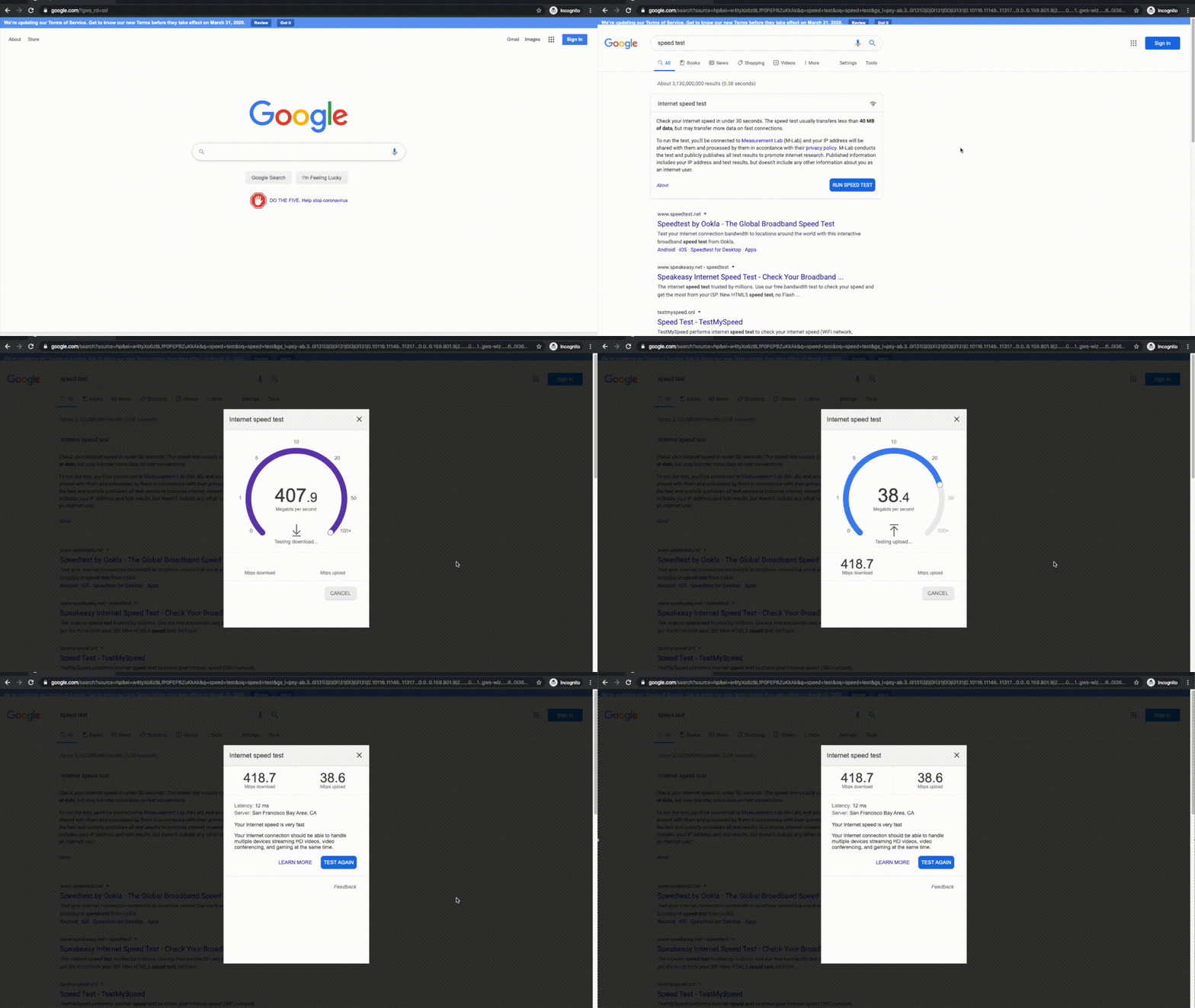
問題の場所を特定するには、カメラの LAN と影響を受けているデバイスの LAN で速度テストを実施する必要があります。これは、コンピューターをカメラまたは影響を受けているデバイスと同じ LAN に接続し、お好みのインターネット速度テストサイトで速度テストを実行することで行えます。
幸い、Google には検索エンジンに組み込まれた速度テストがあります:
---
# Agent Instructions
This documentation is published with GitBook. GitBook is the documentation platform designed so that both humans and AI agents can read, navigate, and reason over technical content effectively. Learn more at gitbook.com.
## Querying This Documentation
If you need additional information that is not directly available in this page, you can query the documentation by asking a question.
Perform an HTTP GET request on the following URL with the `ask` and `goal` query parameters:
```
GET https://help.verkada.com/verkada-cameras/ja/mentenansutotoraburushtingu/troubleshooting/troubleshooting-buffering-and-latency.md?ask=&goal=
```
`ask` is the immediate question: it should be specific, self-contained, and written in natural language.
`goal` is what the user is ultimately trying to achieve, the reason they need the answer. Sharing it helps GitBook give you a better, more relevant answer. A goal is most helpful when it describes the outcome the user wants rather than restating the question. For example, with `ask=how do I create an API token`, a goal like `automate deployments from our CI pipeline` lets GitBook tailor the answer to that use case.
The response will contain a direct answer to the question and relevant excerpts and sources from the documentation.
Use this mechanism when the answer is not explicitly present in the current page, you need clarification or additional context, or you want to retrieve related documentation sections.