> For the complete documentation index, see [llms.txt](https://help.verkada.com/llms.txt). Markdown versions of documentation pages are available by appending `.md` to page URLs; this page is available as [Markdown](https://help.verkada.com/verkada-cameras/ja/mentenansutotoraburushtingu/troubleshooting/loss-of-network-connection-for-cameras.md).
# カメラのネットワーク接続の喪失
インターネット接続がなくてもカメラが録画を継続する仕組みについて学びます
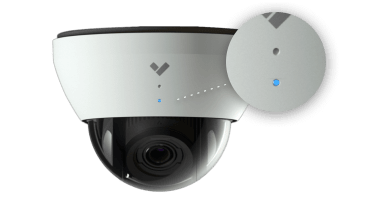
Verkadaカメラは、電源がある限り、ネットワーク接続がなくても録画を続け、映像を保存します。デバイスのLEDが青く点滅している限り、カメラが録画していると安心できます。青のみで点滅している場合でも、青の点滅の間に1回から8回のオレンジの点滅がある場合でも同様です。
オレンジの点滅しか見えず(青が見えない場合)、カメラは録画していない可能性があります。おそらくアップグレード中で、再起動が伴っていると考えられます。その再起動中、カメラは録画できません。
さまざまな [LED のステータス](/verkada-cameras/ja/insutru/camera-led-status-indicators.md) 色について詳しく知る。
***
## ネットワーク構成を確認してください
カメラが引き続き **青く点滅している** 場合は、現地のインターネット接続があることを確認し、ネットワークが当社の必要な [構成](/verkada-cameras/ja/she-ding/camera-network-settings.md).
に準拠しているか確認してください。カメラが再接続されると、障害発生中の映像の同期が開始され、動画が利用可能になるまで少し時間がかかる場合があります。
---
# Agent Instructions
This documentation is published with GitBook. GitBook is the documentation platform designed so that both humans and AI agents can read, navigate, and reason over technical content effectively. Learn more at gitbook.com.
## Querying This Documentation
If you need additional information that is not directly available in this page, you can query the documentation by asking a question.
Perform an HTTP GET request on the following URL with the `ask` and `goal` query parameters:
```
GET https://help.verkada.com/verkada-cameras/ja/mentenansutotoraburushtingu/troubleshooting/loss-of-network-connection-for-cameras.md?ask=&goal=
```
`ask` is the immediate question: it should be specific, self-contained, and written in natural language.
`goal` is what the user is ultimately trying to achieve, the reason they need the answer. Sharing it helps GitBook give you a better, more relevant answer. A goal is most helpful when it describes the outcome the user wants rather than restating the question. For example, with `ask=how do I create an API token`, a goal like `automate deployments from our CI pipeline` lets GitBook tailor the answer to that use case.
The response will contain a direct answer to the question and relevant excerpts and sources from the documentation.
Use this mechanism when the answer is not explicitly present in the current page, you need clarification or additional context, or you want to retrieve related documentation sections.