> For the complete documentation index, see [llms.txt](https://help.verkada.com/llms.txt). Markdown versions of documentation pages are available by appending `.md` to page URLs; this page is available as [Markdown](https://help.verkada.com/access-control/ja/she-zhi/wire-a-door-to-a-verkada-access-controller/supervised-wiring-for-access-control.md).
# アクセスコントロールの監視配線
監視機能によりVerkada アクセスコントローラが断線および短絡した配線を検出する仕組みを学ぶ
監視により、第二世代以降のすべてのアクセスコントロール製品は、REX または DPI の有線通常開(NO)が切断された場合、または通常閉(NC)に設定された配線が短絡した場合を検出し、通知、補助出力イベント、または Verkada アラームのトリガーとして設定されている場合はアラームを作動できます。さらに、 [アラーム用の監視配線](/classic-alarms/ja/she-zhi/alarm-setup-and-install-best-practices/supervised-wiring-with-classic-alarms.md) があり、これは個別に設定して使用します。
## 監視の種類
ほとんどのアクセスコントローラは、単一 EOL と二重 EOL の監視をサポートしています。この 2 種類の監視は、有線通常開(NO)または通常閉(NC)の REX および DPI センサーに適用できます。抵抗器は、配線の終端での短絡や切断を防ぐため、デバイスのできるだけ近くに配置してください。
{% hint style="warning" %}
監視配線は現在、AC41 では利用できません。
{% endhint %}
### 単一 EOLR 監視
| | | |
| ------- | ------------------------ | --------------------- |
| **抵抗値** | **通常閉(NC)** | **常開(NO)** |
| 0 Ω | 短絡回路; 障害状態 | 短絡回路または閉イベント; アラームが作動 |
| 1000Ω | 正常状態 | 正常状態 |
| 無限大 Ω | 切断された配線または開イベント; アラームが作動 | 切断された配線; 障害状態 |
### 二重 EOLR 監視
| | | |
| ------- | -------------- | -------------- |
| **抵抗値** | **通常閉(NC)** | **常開(NO)** |
| 0 Ω | 短絡回路; 障害状態 | 短絡回路; 障害状態 |
| 1000Ω | 正常状態 | 閉イベント; アラームが作動 |
| 2000Ω | 開イベント; アラームが作動 | 正常状態 |
| 無限大 Ω | 切断された配線; 障害状態 | 切断された配線; 障害状態 |
{% hint style="danger" %}
EOL 抵抗は 1000Ω である必要があります。
{% endhint %}
## EOL 抵抗をアクセスコントローラに配線します
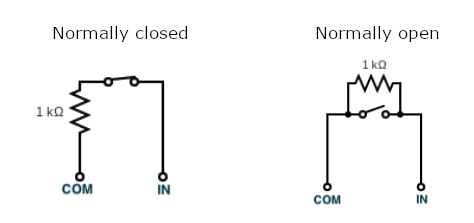
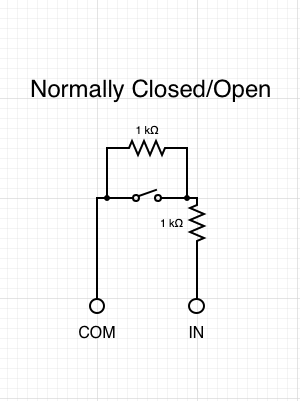
抵抗器は、常に回路の終端、センサーのできるだけ近くに設置する必要があります。パネルに EOL 抵抗器を設置すると、監視の目的が損なわれる可能性があります。
**単一 EOLR 二重 EOL**
## Command で EOL 抵抗を設定する
{% stepper %}
{% step %}
**Verkada Command で、All Products > Access に移動します。**
{% endstep %}
{% step %}
**[すべてのサイト]ドロップダウンからサイトを選択します。**
{% endstep %}
{% step %}
**ドアを選択し、[設定]をクリックします。**
{% endstep %}
{% step %}
**[ハードウェア]で、EOL 抵抗が配置されている場所を選択します。監視配線は、以下のセクションで設定できます:**
a. **DPI**\
b. **REX1**\
c. **REX2**
{% endstep %}
{% step %}
**[監視配線]ドロップダウンの横で、そのドアに正しい EOL 抵抗を選択します。**
{% endstep %}
{% step %}
**有効にすると、監視イベントのイベントタイルが自動的に表示されます。**
{% endstep %}
{% endstepper %}
{% hint style="warning" %}
監視配線を有効にするときは、抵抗器が存在することを確認してください。存在しない場合、誤ったアラートにつながります。
{% endhint %}
***
## アラート
監視アラートは、ドア強制開放などのドアイベントと同様に扱われます。検出されたタンパーイベントをストロボまたはアラームに知らせるよう AUX 出力を設定し、不正者を抑止できます。参照: [アクセスコントロールイベントのアラートを設定](/access-control/ja/toarto/configure-access-control-event-alerts.md) EOL 抵抗アラートを設定します。
{% hint style="warning" %}
REX が、退出検出ではなくトリガー時にドアのロック解除を行うよう設定されている場合でも、監視配線の設定が失敗しており、NO および NC 構成で完全な短絡または開回路が検出されたときは、ドアは引き続きロック解除されます。
{% endhint %}
---
# Agent Instructions
This documentation is published with GitBook. GitBook is the documentation platform designed so that both humans and AI agents can read, navigate, and reason over technical content effectively. Learn more at gitbook.com.
## Querying This Documentation
If you need additional information that is not directly available in this page, you can query the documentation dynamically by asking a question.
Perform an HTTP GET request on the current page URL with the `ask` query parameter, and the optional `goal` query parameter:
```
GET https://help.verkada.com/access-control/ja/she-zhi/wire-a-door-to-a-verkada-access-controller/supervised-wiring-for-access-control.md?ask=&goal=
```
`ask` is the immediate question: it should be specific, self-contained, and written in natural language.
`goal` is optional and describes the broader end goal you are ultimately trying to accomplish on behalf of the user. GitBook uses it to tailor the answer towards what is most useful for that goal.
The response will contain a direct answer to the question and relevant excerpts and sources from the documentation.
Use this mechanism when the answer is not explicitly present in the current page, you need clarification or additional context, or you want to retrieve related documentation sections.