> For the complete documentation index, see [llms.txt](https://help.verkada.com/llms.txt). Markdown versions of documentation pages are available by appending `.md` to page URLs; this page is available as [Markdown](https://help.verkada.com/access-control/ja/toarto/manage-doors-via-api.md).
# API でドアを管理する
サードパーティプラットフォームで Verkada のアクセスコントロール対象ドアを管理する
サードパーティのプラットフォームは、Verkada が管理するドアをプログラム的に制御できます。 **API 経由でドア管理を有効にする** 設定を、Verkada のアクセスコントロール API を使用して有効にします。
### 該当するドア管理 API
以下のアクセスコントロール API カテゴリには、API で制御されるすべてのドアに必要な API が含まれます **API 経由でドア管理を有効にする** が有効になっていること。
* [アクセスドア解錠 API](https://apidocs.verkada.com/reference/postaccessadminapiunlockviewv1)
* [ドア例外カレンダー API](https://apidocs.verkada.com/reference/getaccessdoorexceptioncalendarsviewv1)
* [アクセスレベル API](https://apidocs.verkada.com/reference/getaccesslevelview)
{% hint style="warning" %}
参照 [Verkada API ドキュメント](https://apidocs.verkada.com/) この設定が必要な特定の API エンドポイントの詳細については、
{% endhint %}
***
## Command の設定
ドアを API 経由で制御する前に、ドアを API 経由で制御する権限を以下のレベルで有効にする必要があります:
* [オーガナイゼーション'レベル](/access-control/ja/toarto/manage-doors-via-api.md)
* [サイトレベル](/access-control/ja/toarto/manage-doors-via-api.md)
* [ドアレベル](/access-control/ja/toarto/manage-doors-via-api.md)
### オーガナイゼーション' レベルの設定
{% stepper %}
{% step %}
**Verkada Command で、All Products > Access に移動します。**
{% endstep %}
{% step %}
**左側のナビゲーションで、Access Settingsをクリックします。**
{% endstep %}
{% step %}
**[API 経由でドア管理を有効にする]をオンに切り替えます。**
{% endstep %}
{% endstepper %}
### サイトレベルの設定
{% stepper %}
{% step %}
**Verkada Command で、All Products > Access に移動します。**
{% endstep %}
{% step %}
**\[All Sites] ドロップダウンからサイトを選択します。**
{% endstep %}
{% step %}
**上部で、[アクセス設定]をクリックします。**
{% endstep %}
{% step %}
**[API 経由でドア管理を有効にする]をオンに切り替えます。**
{% endstep %}
{% endstepper %}
### ドアレベルの設定
{% stepper %}
{% step %}
**Verkada Command で、All Products > Access に移動します。**
{% endstep %}
{% step %}
**\[All Sites] ドロップダウンからサイトを選択します。**
{% endstep %}
{% step %}
**ドアを選択し、[設定]をクリックします。**
{% endstep %}
{% step %}
**[インストーラー設定]で、[API 経由でドア管理を有効にする]をオンに切り替えます。**
{% endstep %}
{% endstepper %}
***
## API 解錠イベントの確認
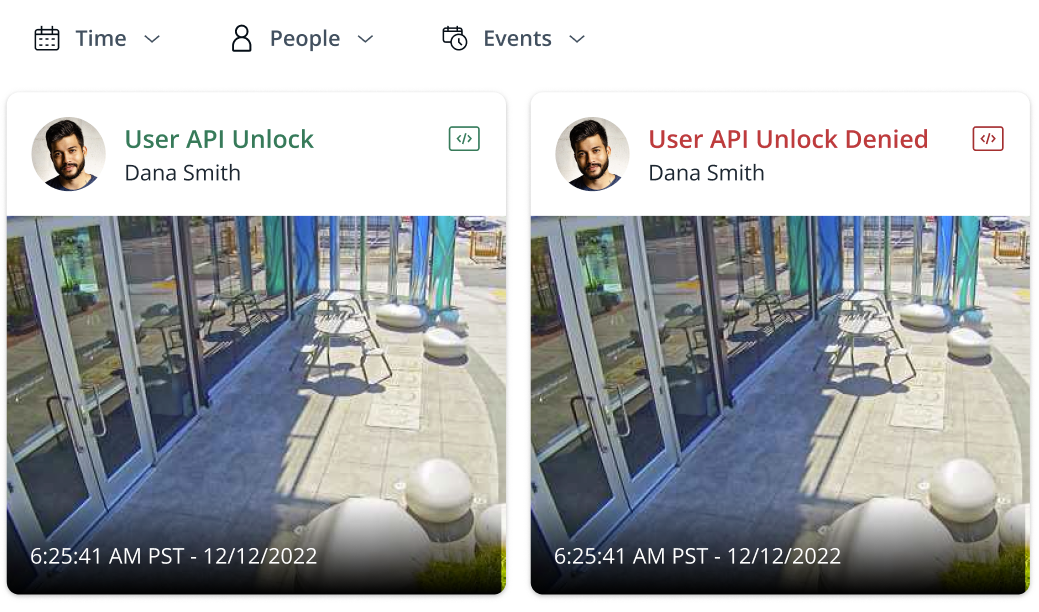
ドア解錠 API 呼び出しが使用されると、Command に、API 経由でドアの解錠要求が行われたことを示すイベントが記録されます。このイベントには、アクセスが許可されたかどうか、使用された API、(該当する場合)要求に関連付けられたアクセスユーザーが示されます。
ドア解錠 API リクエストに関連するイベントは、アクセスコントロールの [レポート](/access-control/ja/toarto/access-control-reports.md) ページまたは [ドアページ](/access-control/ja/she-ding/configure-a-door-in-command/view-access-control-doors.md) で、該当するドアについて確認できます。
ドア解錠 API リクエストに関連するイベントには、次の情報が含まれます:
* **イベント名:** アクセス許可またはアクセス拒否
* **方法:** ユーザー解錠 API または管理者解錠 API
* **ユーザー** (方法がユーザー解錠 API の場合):解錠リクエストに関連付けられたアクセスユーザー。
* **認証情報:** 〜の名前 [Verkada API キー](https://apidocs.verkada.com/reference/quick-start-guide) API 解錠リクエストの送信に使用されたもの。
***
{% hint style="info" %}
**実際の動作をご覧になりますか?** こちらをご覧ください。 [動画チュートリアル](https://www.youtube.com/watch?v=nvJkh2jyOjU).
{% endhint %}
---
# Agent Instructions
This documentation is published with GitBook. GitBook is the documentation platform designed so that both humans and AI agents can read, navigate, and reason over technical content effectively. Learn more at gitbook.com.
## Querying This Documentation
If you need additional information that is not directly available in this page, you can query the documentation by asking a question.
Perform an HTTP GET request on the following URL with the `ask` and `goal` query parameters:
```
GET https://help.verkada.com/access-control/ja/toarto/manage-doors-via-api.md?ask=&goal=
```
`ask` is the immediate question: it should be specific, self-contained, and written in natural language.
`goal` is what the user is ultimately trying to achieve, the reason they need the answer. Sharing it helps GitBook give you a better, more relevant answer. A goal is most helpful when it describes the outcome the user wants rather than restating the question. For example, with `ask=how do I create an API token`, a goal like `automate deployments from our CI pipeline` lets GitBook tailor the answer to that use case.
The response will contain a direct answer to the question and relevant excerpts and sources from the documentation.
Use this mechanism when the answer is not explicitly present in the current page, you need clarification or additional context, or you want to retrieve related documentation sections.