> For the complete documentation index, see [llms.txt](https://help.verkada.com/llms.txt). Markdown versions of documentation pages are available by appending `.md` to page URLs; this page is available as [Markdown](https://help.verkada.com/access-control/ja/she-zhi/wire-a-door-to-a-verkada-access-controller/recommended-wires-for-access-controllers.md).
# アクセスコントローラに推奨される配線
Verkada アクセス用ドアコントローラ向けの配線選定に関する推奨事項を学ぶ
Verkadaアクセスコントロールユニット(ACU)は、RS-485経由のVerkadaリーダーおよび標準のWiegandリーダーをサポートできます。
この一覧は、Verkadaアクセスコントローラ(AC)での使用に推奨される配線の種類と最大長を示しています。すべての配線は、より線の純銅導体を使用する必要があります。Copper-clad aluminum wire(CCAW)のような材料は推奨されません。
{% hint style="warning" %}
配線方法は、National Electrical Code、ANSI/NFPA 70、地方自治体の規定、および管轄当局に準拠するものとします。
{% endhint %}
| | | | | | |
| ----------- | ------- | ---------- | ------ | ---------- | ----------------- |
| **信号** | **AWG** | **ツイストペア** | **導体** | **シールド付き** | **最大長** |
| リーダーオプション 1 | 22 | はい | | はい | 250フィート(76m) |
| リーダーオプション 2 | 20 | はい | | はい | 300フィート(91m) |
| リーダーオプション 3 | 18 | はい | | はい | 500フィート(152.4m) |
| 電源(22ゲージ) | 22 | | はい | はい | 600フィート(182.8m) |
| 電源(18ゲージ) | 18 | | はい | はい | 1,500フィート(457.2m) |
| 退出要求 | 22/18 | | はい | はい | 1,500フィート(457.2m) |
| ドアコンタクト | 22 | | はい | はい | 1,500フィート(457.2m) |
{% hint style="info" %}
1組のツイストペアを使用して **–** (接地)と **+** (電源)、およびデータ用に1組のツイストペア(Wiegandリーダーの場合はD0/D1、Verkadaリーダーの場合はA/B)。
{% endhint %}
各個別ケーブルがシールドされ、適切なゲージであれば、ACコンボ/幹線ケーブルを使用できます。
{% hint style="danger" %}
〜です **必要** として **のみ** ACUのすべての入力にシールド付き配線を使用することが必要です。錠前を含め、アクセスコントローラに接続されるすべてのコンポーネントは、シールド付き配線で接続する必要があります。シールド付き配線を使用せず、適切に接地しないと、リーダーの性能低下やアクセスコントローラの損傷につながる可能性があります。
{% endhint %}
{% hint style="info" %}
**ヒント**:ケーブルがシールド付きかどうかを確認するには、配線の周囲に金属箔があり、むき出しの金属ドレイン線があるかを確認してください。
{% endhint %}
## 設置を接地する
{% stepper %}
{% step %}
**リーダーのドレイン(むき出しの金属)線を、シールド付き配線のドレイン(むき出しの金属)線に接続します。**
{% endstep %}
{% step %}
**配線内のドレイン線をアースに接続します。理想的には、接地はリーダーの近くで行うべきです。たとえば、接地されたジャンクションボックスやドア枠を含む接地点です。**
{% endstep %}
{% step %}
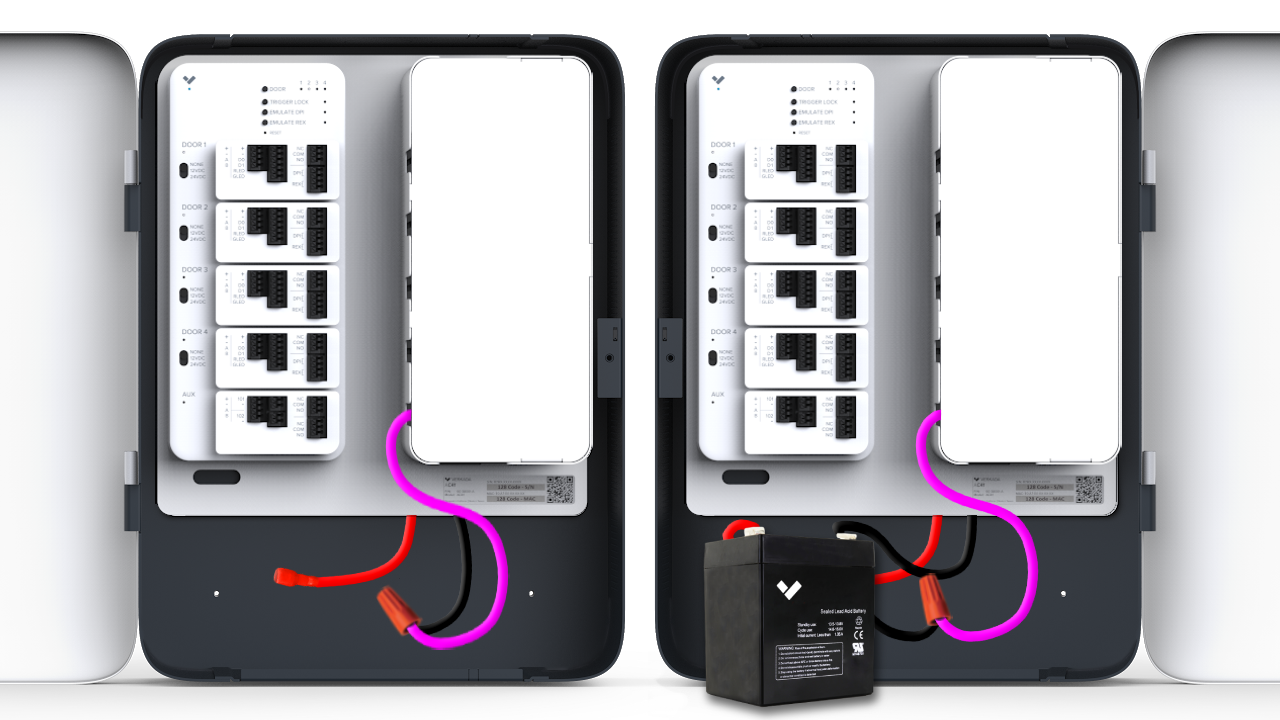
**別の方法として、リーダーでドレイン線を接地する手段がない場合は、接地されたジャンクションボックス、接地バスバー、またはアクセスコントローラのバッテリーの負極端子を使用してAC側で接地できます。バッテリーを使用している場合は、接続を分岐しても構いません(1つはバッテリーへ、もう1つはドレイン線へ)。**
画像は、ドレイン線がACの負極(黒)バッテリー端子にどのように接続されるかを示しています:
* 赤い線は正極バッテリー端子を表し、ピンクの線はむき出しの金属ドレイン線を表しています。
* 左側のACでは、ドレイン線が黒いバッテリー線に直接接続されています。
* 右側のACでは、ドレイン線が負極バッテリー端子に接続されています。
* その他すべてのアクセスコントロールモデルでは、デバイスのシャーシ上に専用のアース接続ピンがあります。
{% endstep %}
{% endstepper %}
{% hint style="danger" %}
COM と **–** アクセスコントローラの(負極)ポートは **接地として** 使用できません。そうすると機器が損傷する可能性があります。ドレイン線は片端のみを接地に接続してください。もう一方の端は何にも接続しないでください。
{% endhint %}
---
# Agent Instructions
This documentation is published with GitBook. GitBook is the documentation platform designed so that both humans and AI agents can read, navigate, and reason over technical content effectively. Learn more at gitbook.com.
## Querying This Documentation
If you need additional information that is not directly available in this page, you can query the documentation dynamically by asking a question.
Perform an HTTP GET request on the current page URL with the `ask` query parameter, and the optional `goal` query parameter:
```
GET https://help.verkada.com/access-control/ja/she-zhi/wire-a-door-to-a-verkada-access-controller/recommended-wires-for-access-controllers.md?ask=&goal=
```
`ask` is the immediate question: it should be specific, self-contained, and written in natural language.
`goal` is optional and describes the broader end goal you are ultimately trying to accomplish on behalf of the user. GitBook uses it to tailor the answer towards what is most useful for that goal.
The response will contain a direct answer to the question and relevant excerpts and sources from the documentation.
Use this mechanism when the answer is not explicitly present in the current page, you need clarification or additional context, or you want to retrieve related documentation sections.