> For the complete documentation index, see [llms.txt](https://help.verkada.com/llms.txt). Markdown versions of documentation pages are available by appending `.md` to page URLs; this page is available as [Markdown](https://help.verkada.com/access-control/configuration/enable-and-configure-rex-inputs.md).
# Enable and Configure REX Inputs
Learn how to enable and configure REX inputs for access control
Request to Exit, or REX, is a type of sensor commonly used alongside access control systems to automate the opening of doors and expand event sensing capabilities. The REX functions by detecting when there’s continuity across the 2 wires in the REX section of the door cassette. This means that you can use any **Normally Open (NO)** button, sensor, and so on as a REX.
Most commonly, motion detectors are used on the egress (exiting) side of a door to automatically disengage a lock as someone approaches the door.
***
## Verkada access integration
REX options are available under the door’s settings page. To make use of REX settings, you must first enable **REX** under the hardware section:
### Unlock the door
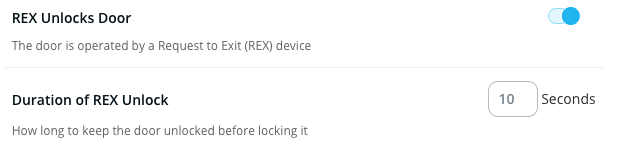
As noted earlier, you can use REX to disengage the lock. To enable this behavior, toggle on the **REX Unlocks Door** option. The duration option refers to how long the door will stay unlocked when the REX is engaged.
### Release the lock in Command
You can configure the REX to release the lock in Command (most commonly seen in maglocks) or simply show DFO events. You can also configure the REX unlock time.\
\
REX motion sensors and REX buttons are often required by regulation to meet building codes for access-controlled entrance doors.
{% hint style="info" %}
The REX motion sensor should be wired into the REX terminals on the AC41 while the emergency REX button should be wired directly in line with the lock to provide direct interruption of power in an emergency situation.
{% endhint %}
{% hint style="warning" %}
The Verkada AC41 expects the REX to be NO.
{% endhint %}
### DFO event detection
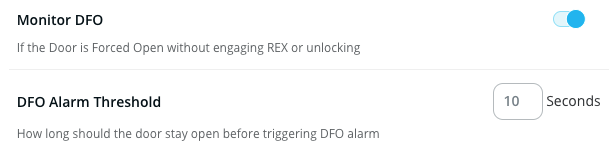
A REX and DPI are required to detect door forced open (DFO) events, such as a break-in. This is because a REX allows the system to be aware of valid egress and a card reader allows the system to be aware of valid ingress. If the system detects that the door has opened without a valid card read or REX event, a DFO event is thrown.
To detect DFO events, you must enable the **Monitor DFO** option:
### Power the REX device
If necessary, you can utilize the 12V port for the unused reader to power the REX device.
#### Wet configuration with emergency REX button release
#### Dry configuration with emergency REX button release
---
# Agent Instructions
This documentation is published with GitBook. GitBook is the documentation platform designed so that both humans and AI agents can read, navigate, and reason over technical content effectively. Learn more at gitbook.com.
## Querying This Documentation
If you need additional information that is not directly available in this page, you can query the documentation by asking a question.
Perform an HTTP GET request on the following URL with the `ask` and `goal` query parameters:
```
GET https://help.verkada.com/access-control/configuration/enable-and-configure-rex-inputs.md?ask=&goal=
```
`ask` is the immediate question: it should be specific, self-contained, and written in natural language.
`goal` is what the user is ultimately trying to achieve, the reason they need the answer. Sharing it helps GitBook give you a better, more relevant answer. A goal is most helpful when it describes the outcome the user wants rather than restating the question. For example, with `ask=how do I create an API token`, a goal like `automate deployments from our CI pipeline` lets GitBook tailor the answer to that use case.
The response will contain a direct answer to the question and relevant excerpts and sources from the documentation.
Use this mechanism when the answer is not explicitly present in the current page, you need clarification or additional context, or you want to retrieve related documentation sections.