> For the complete documentation index, see [llms.txt](https://help.verkada.com/llms.txt). Markdown versions of documentation pages are available by appending `.md` to page URLs; this page is available as [Markdown](https://help.verkada.com/air-quality/events-and-alerts/configure-air-quality-event-alerts.md).
# Configure Air Quality Event Alerts
Learn how to configure and enable alerts for air quality sensors
You can enable alerts for a variety of air quality events, depending on your configuration needs. For more information about the air quality events types see [below](#h_71912ba2a2).
{% hint style="danger" %}
You must be a Site Admin (for all selected devices) to use the **Readings & Thresholds** feature. Learn more about [Roles and Permissions for Air Quality Sensors](/air-quality/getting-started/roles-and-permissions-for-air-quality-sensors.md).
{% endhint %}
***
## Configure air quality event alerts
### Create Alert > Events
{% stepper %}
{% step %}
**Log in to Verkada Command.**
{% endstep %}
{% step %}
**On the Command homepage, left navigation, click Alerts.**
{% endstep %}
{% step %}
**On the Alerts page, next to My Alerts, click.**
{% endstep %}
{% step %}
**On Select Event, select the Air Quality product type.**
{% endstep %}
{% step %}
**Search for or select an event to configure.**
{% endstep %}
{% step %}
**(Optional) Some event types are general and have more specific options once you select them. If prompted, complete any additional configuration steps then click Next.**
{% endstep %}
{% step %}
**Select your devices/sites, based on the alert type you can configure events to be device-specific, site-specific, or all devices.**
* When you select **Sites** or **All Devices**, new devices added after alert creation will automatically generate alerts.
Click **Done** to continue.
{% endstep %}
{% step %}
**(Optional) Some event types have additional setup steps. If that is the case, click the additional steps and follow the prompts in the configuration window.**
{% endstep %}
{% step %}
**Click Done and continue with the alert** [**notification schedule**](#h_0580f3aa78)**.**
{% endstep %}
{% endstepper %}
### Create Alert > Notification Schedule
{% stepper %}
{% step %}
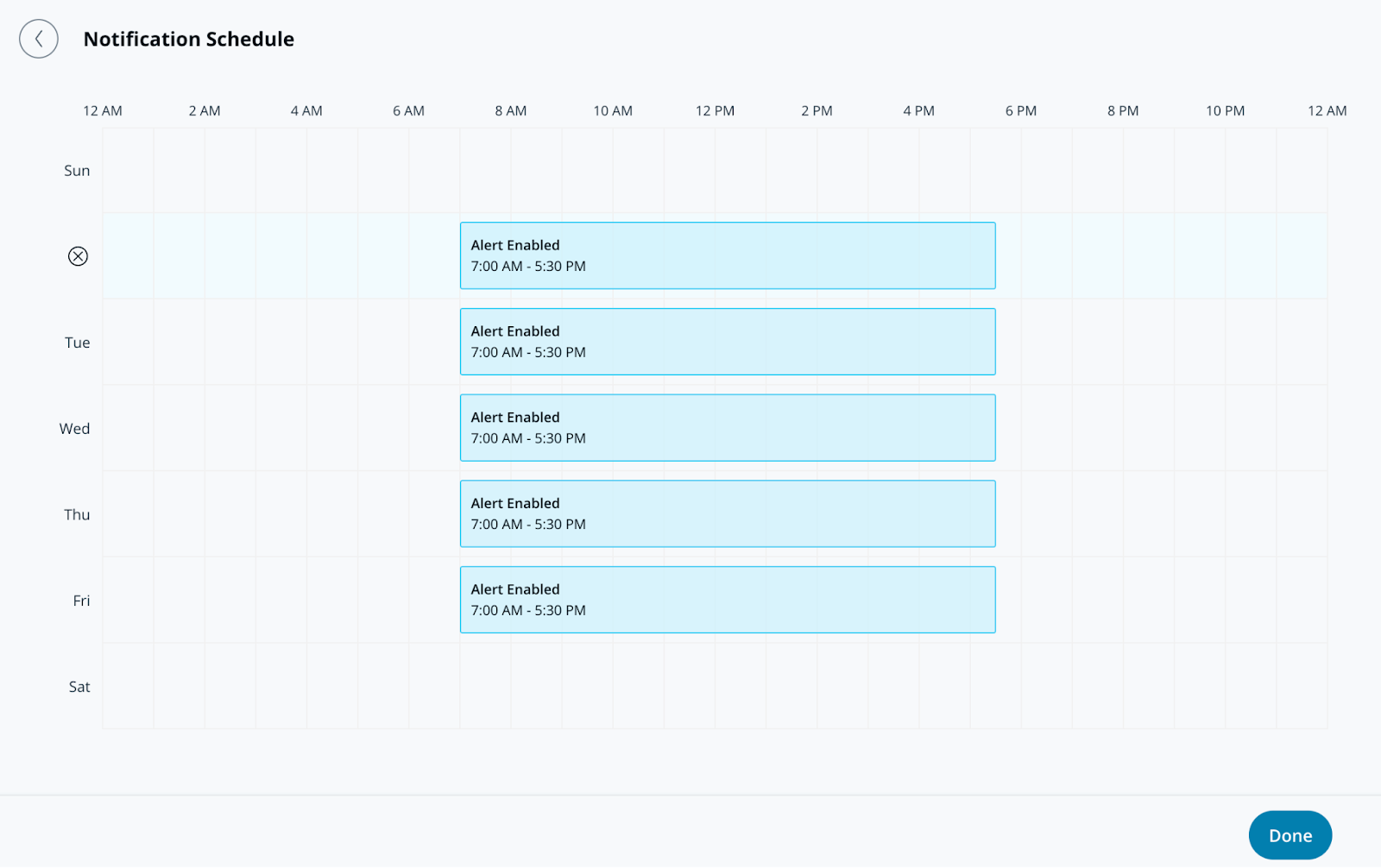
**On Notification Schedule, specify the days and times for the alerts to send notifications. Alerts generate 24/7 by default.**
{% endstep %}
{% step %}
**Click Done and continue with the alert** [**notification**](#create-alert-greater-than-notification)**.**
{% endstep %}
{% endstepper %}
### Create Alert > Notification
{% stepper %}
{% step %}
**On Notification, add users individually or assign the alert to a group.**
{% endstep %}
{% step %}
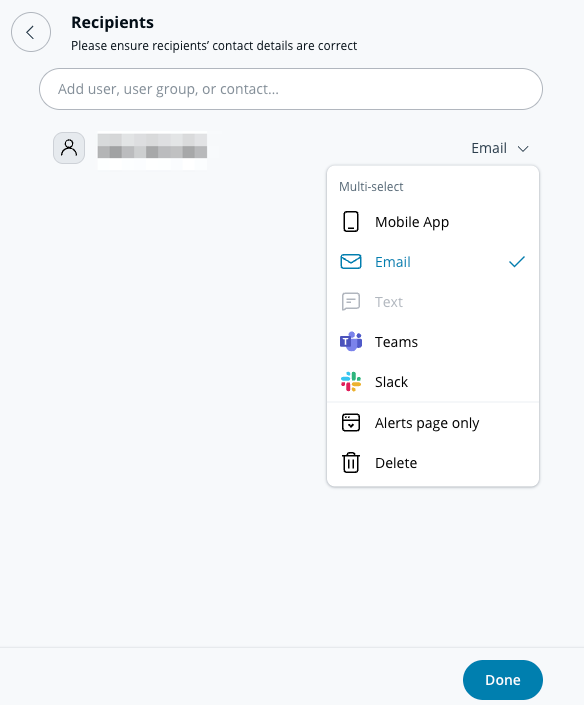
**Select the dropdown menu next to a user or group to choose their notification method(s). Recipients can be notified via push, SMS, messaging platform alerts, or email notifications.**
{% hint style="info" %}
Any recipient added to this alert will see it appear under the **Shared Alerts** section of their **Alerts** page.
{% endhint %}
{% endstep %}
{% step %}
**(Optional) By default, you will be an alert recipient. Select the dropdown menu and click Delete to remove yourself.**
{% endstep %}
{% step %}
**Click Done and continue with the alert's** [**optional settings**](#optional-settings)**, or** [**finish the alert**](#finish-the-alert)**.**
{% endstep %}
{% endstepper %}
### Optional settings
#### Create Alert > Operations
{% stepper %}
{% step %}
**Toggle on Route to Operations to create a ticket from the alert.**
{% endstep %}
{% step %}
**(Optional) Select Ticket Instructions to add information to the ticket and click Done.**
{% endstep %}
{% step %}
**Click Done and continue to** [**finish the alert**](#finish-the-alert)**.**
{% endstep %}
{% endstepper %}
#### Create Alert > Device Action
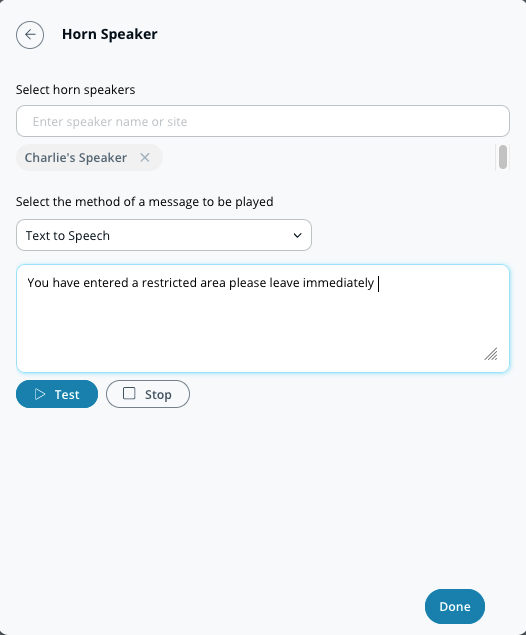
In addition to notifying individuals, you can configure your horn speaker to play when an alert is triggered. These alerts can be text-to-speech or an uploaded MP3 file.
{% stepper %}
{% step %}
**On Device Action, select the horn speaker(s) you want to play your message.**
{% endstep %}
{% step %}
**Select your notification preference (Text to Speech or Audio File).**
a. For **Text to Speech,** enter a message up to 200 characters.\
b. For **Audio File,** drag and drop the file or click **choose a file** to upload your audio clip.
{% endstep %}
{% step %}
**Click Done and continue to** [**finish the alert**](#finish-the-alert)**.**
{% endstep %}
{% endstepper %}
### Finish the alert
{% stepper %}
{% step %}
**In the bottom right of the configuration window, click Next.**
{% endstep %}
{% step %}
**Enter a descriptive name for the alert.**
{% endstep %}
{% step %}
**Click Done to complete the setup.**
{% endstep %}
{% endstepper %}
### Understand the various air quality event types
| Alert Type | Description |
| ------------------------------------------------ | -------------------------------------------------------------------------------------------------------------------------- |
| **Schools** | Receive vape alerts for a school. |
| **Schools and Hospitality** | Receive vape, noise, and tamper alerts. |
| **Server Rooms, Data Centers, or Refrigeration** | Receive temperature and humidity alerts. |
| **Employee Health and Safety** | Receive noise, CO2, carbon monoxide, TVOC, Formaldehyde, and PM 2.5 alerts. |
| **Online/Offline** | Air quality device changed state to online or offline. |
| **Custom Air Quality Readings** | Configure alerts for the different [Air Quality Sensor Readings](/air-quality/sensor-data/air-quality-sensor-readings.md). |
---
# Agent Instructions
This documentation is published with GitBook. GitBook is the documentation platform designed so that both humans and AI agents can read, navigate, and reason over technical content effectively. Learn more at gitbook.com.
## Querying This Documentation
If you need additional information that is not directly available in this page, you can query the documentation by asking a question.
Perform an HTTP GET request on the following URL with the `ask` and `goal` query parameters:
```
GET https://help.verkada.com/air-quality/events-and-alerts/configure-air-quality-event-alerts.md?ask=&goal=
```
`ask` is the immediate question: it should be specific, self-contained, and written in natural language.
`goal` is what the user is ultimately trying to achieve, the reason they need the answer. Sharing it helps GitBook give you a better, more relevant answer. A goal is most helpful when it describes the outcome the user wants rather than restating the question. For example, with `ask=how do I create an API token`, a goal like `automate deployments from our CI pipeline` lets GitBook tailor the answer to that use case.
The response will contain a direct answer to the question and relevant excerpts and sources from the documentation.
Use this mechanism when the answer is not explicitly present in the current page, you need clarification or additional context, or you want to retrieve related documentation sections.