> For the complete documentation index, see [llms.txt](https://help.verkada.com/llms.txt). Markdown versions of documentation pages are available by appending `.md` to page URLs; this page is available as [Markdown](https://help.verkada.com/air-quality/sensor-data/view-air-quality-sensor-data.md).
# View Air Quality Sensor Data
Learn more about your Verkada Air Quality Sensor data readings
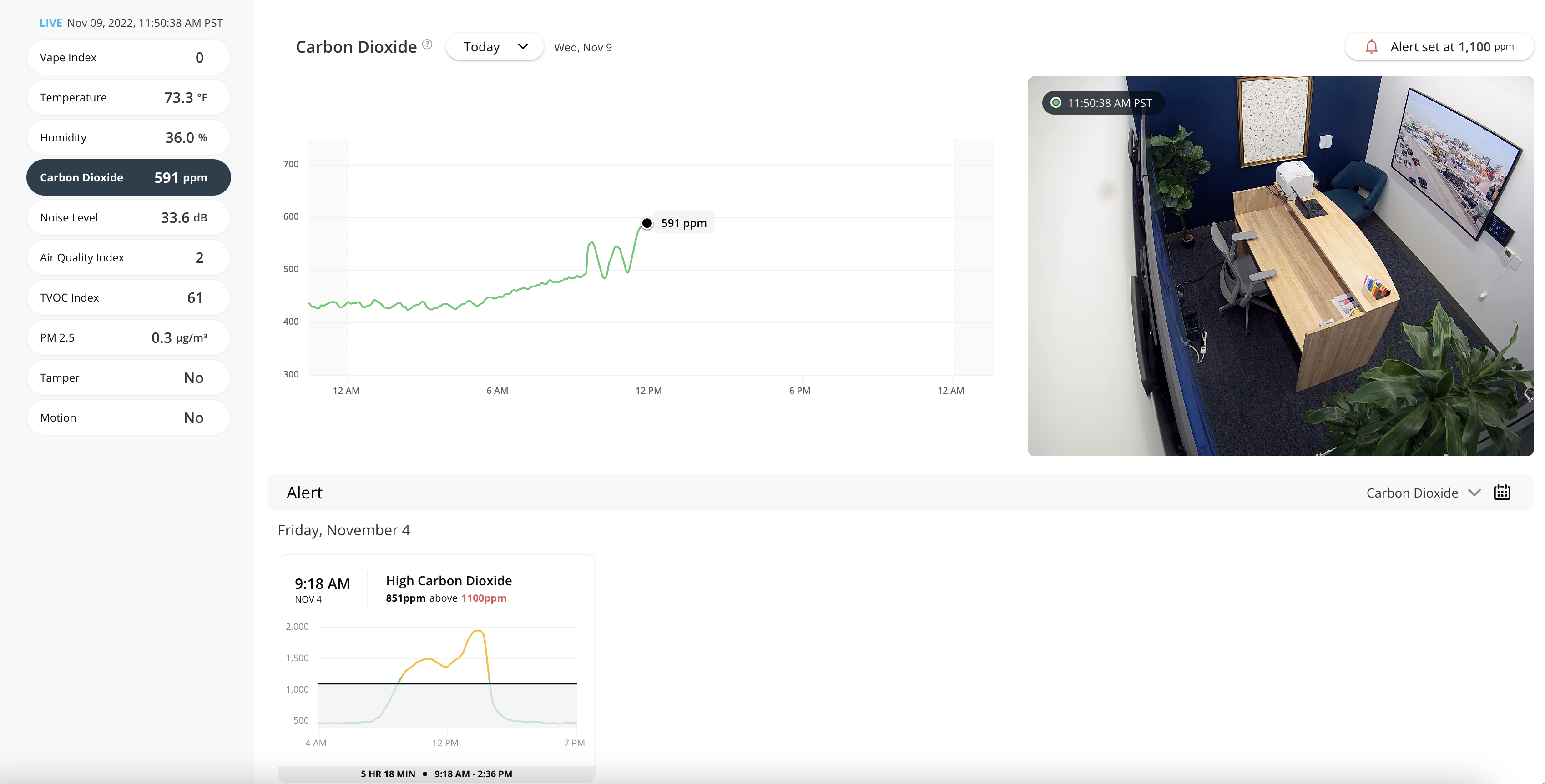
Verkada [Air Quality Sensors](https://docs.verkada.com/docs/air-quality-sensors-overview.pdf) have varied readings that allow you to gain more insight into your building or monitor areas where video monitoring is not allowed.
***
## Sensor data by model
The data available depends on your sensor model. See [Sensor Readings](/air-quality/sensor-data/air-quality-sensor-readings.md) for more information about the breakdown of the different sensor readings per model.
### [SV21](https://docs.verkada.com/docs/air-quality-sensors-overview.pdf)
| Sensor Reading | Data Output |
| ------------------- | ------------------------------------------------------------------------------------------------------------------------------------------------------------------------------------ |
| **Temperature** | Room temperature |
| **Humidity** | Room humidity |
| **Heat Index** | A combined index that represents what the temperature feels like to the human body when relative humidity is combined with the temperature |
| **Humidex** | Humidex measures how hot we feel in hot, humid weather. |
| **Mold Risk Index** | The Mold Risk Index assesses the likelihood of mold growth in confined, unventilated spaces, based on temperature and humidity levels. |
| **Dew Point** | The dew point is the temperature to which air must be cooled, at constant pressure, for the air to reach 100% relative humidity, meaning the air becomes saturated with water vapor. |
| **Carbon Dioxide** | Concentration of CO2 gas, measured in ppm |
| **Tamper** | Indicates if the sensor is being tampered with |
### [SV23](https://docs.verkada.com/docs/air-quality-sensors-overview.pdf)
Includes all data output of the [SV21](https://docs.verkada.com/docs/air-quality-sensors-overview.pdf), plus the following.
| Sensor Reading | Data Output |
| ---------------------------------------------------------------------------------------- | --------------------------------------------------------------------------------------------------------------------- |
| **Vape Index** | A combined index that represents the likelihood that someone is vaping in the vicinity of the sensor |
| **Noise Level** | Noise level in the room, measured in dB |
| **Air Quality Index** | U.S. Air Quality Index, derived from multiple sensors |
| **TVOC** | Volatile organic compound level in the air measured in an index |
| PM 2.5
PM 4.0
PM 10.0
| Fine particulate level measured in microgrammes per cubic meter |
| **Motion** | Motion detected by the Passive Infrared (PIR) sensor |
| **RESET® Viral Index** | The RESET® Viral Index is an index designed to assess the likelihood of airborne virus transmission in indoor spaces. |
### [SV25](https://docs.verkada.com/docs/air-quality-sensors-overview.pdf)
Includes all data output of the [SV23](https://docs.verkada.com/docs/air-quality-sensors-overview.pdf), plus the following.
| Sensor Reading | Data Output |
| ----------------------- | --------------------------------------------------------- |
| **Carbon Monoxide** | Concentration of Carbon Monoxide gas, measured in ppm |
| **Formaldehyde (CH2O)** | Concentration of Formaldehyde (CH2O) gas, measured in ppb |
| **Barometric Pressure** | Measurement of air pressure in the atmosphere |
### [SV11](https://www.verkada.com/sensors/sv11/)
Verkada’s first-generation sensor outputs data on the following readings.
| Sensor Reading | Data Output |
| ---------------------------------------------------------------------------------------- | ------------------------------------------------------------------------------------------------------------------------------------------------------------------------------------ |
| **Vape Index** | A combined index that represents the likelihood that someone is vaping in the vicinity of the sensor |
| **Temperature** | Room temperature |
| **Humidity** | Room humidity |
| **Heat Index** | A combined index that represents what the temperature feels like to the human body when relative humidity is combined with the temperature |
| **Humidex** | Humidex measures how hot we feel in hot, humid weather. |
| **Mold Risk Index** | The Mold Risk Index assesses the likelihood of mold growth in confined, unventilated spaces, based on temperature and humidity levels. |
| **Dew Point** | The dew point is the temperature to which air must be cooled, at constant pressure, for the air to reach 100% relative humidity, meaning the air becomes saturated with water vapor. |
| **Noise Level** | Noise level in the room, measured in dB |
| **Air Quality Index** | U.S. Air Quality Index, derived from multiple sensors |
| **TVOC** | Volatile organic compound level in the air, measured in parts per million |
| PM 2.5
PM 4.0
PM 10.0
| Fine particulate level measured in micrograms per cubic meter |
| **Tamper** | Indicates if the sensor is being tampered with |
| **Motion** | Motion detected by the PIR sensor |
***
## View sensor data
{% stepper %}
{% step %}
**In Verkada Command, go to All Products > Air Quality.**
{% endstep %}
{% step %}
**Select a sensor.**
{% endstep %}
{% step %}
**Select the sensor reading you want to see. By default, you should see Today's output for the selected reading.**
{% endstep %}
{% step %}
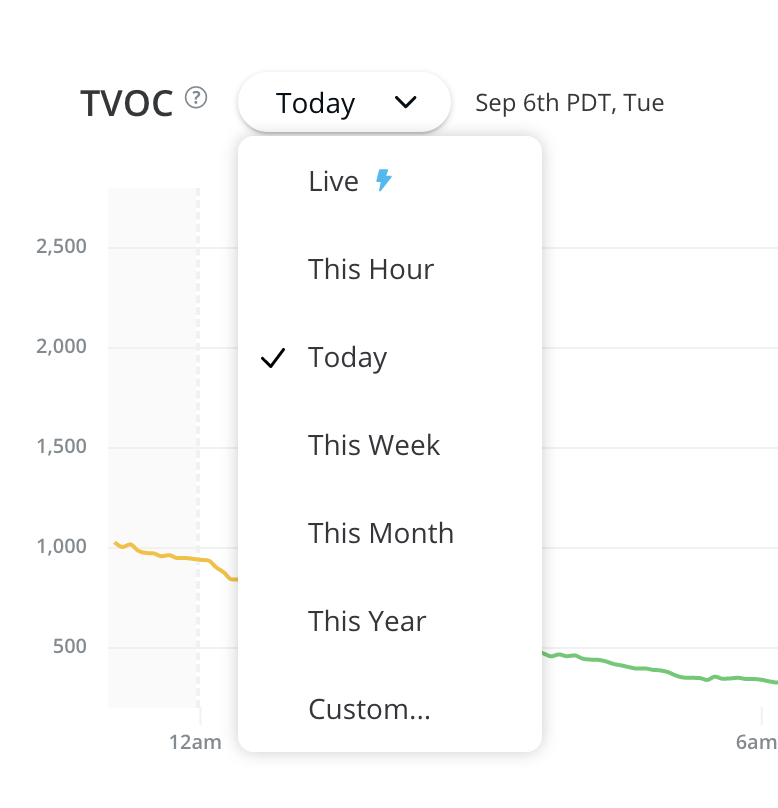
**Above the graph, select the dropdown menu and choose a time frame to filter the data. To return to the live sensor readings, at the top of the list, select Live.**
{% hint style="info" %}
As your date range increases, the resolution of your chart decreases.
{% endhint %}
{% endstep %}
{% step %}
**(Optional) Click and drag the cursor over a time range to zoom into the data. Click Reset to return to the full time range.**
This helps you analyze long-term and macro trends, such as seasonal changes that may impact air quality or cleaning habits.
{% hint style="info" %}
As you scrub through the graph, the side readings update to match the selected time range and hover position.
{% endhint %}
{% endstep %}
{% endstepper %}
***
## Data retention and resolution
The Verkada sensors store sensor data for 365 days. After the 365th day, the oldest sensor data is overwritten with the newest data.
* For the SV11, data is stored at a **1-second** resolution for **30 days**. For **days 31–365**, data is stored at a **5-minute** resolution.
* For the SV20 series, data is stored at a **5-second** resolution for **30 days**. For days **31–365**, data is stored at a **5-minute** resolution.
### Export sensor data and alerts
{% stepper %}
{% step %}
**In Verkada Command, go to All Products > Air Quality.**
{% endstep %}
{% step %}
**Select a sensor.**
{% endstep %}
{% step %}
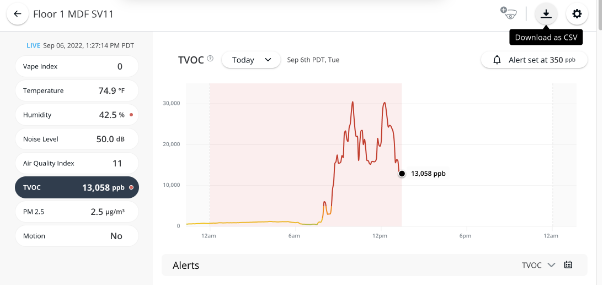
**In the top right, click** :download: **to export sensor data via a comma-separated value (CSV) file.**
{% endstep %}
{% step %}
**On Download CSV:**
1. Select **Sensor Data** or **Alerts**, depending on what type of data you want to download.
2. Check the box next to the sensor readings you want to download.
3. Set the date range for the report.
4. Set the resolution.
5. Click **Export**.
{% endstep %}
{% endstepper %}
For sensor data, you can export data at various predefined resolutions (5s, 1min, 5min, 30min, 1hr, 1day). The table shows the maximum resolution that can be exported for a given time range.
| | |
| ---------------- | ---------------------- |
| **Time Range** | **Maximum Resolution** |
| 1 hour | 5 seconds |
| 1–24 hours | 1 minute |
| 24 hours–30 days | 5 minutes |
| 30–180 days | 30 minutes |
| 180–365 days | 1 hour |
Once you click **Export**, Command sends an email with the CSV attached. This process can take up to 10 minutes, depending on the amount of data being requested.
---
# Agent Instructions
This documentation is published with GitBook. GitBook is the documentation platform designed so that both humans and AI agents can read, navigate, and reason over technical content effectively. Learn more at gitbook.com.
## Querying This Documentation
If you need additional information that is not directly available in this page, you can query the documentation by asking a question.
Perform an HTTP GET request on the following URL with the `ask` and `goal` query parameters:
```
GET https://help.verkada.com/air-quality/sensor-data/view-air-quality-sensor-data.md?ask=&goal=
```
`ask` is the immediate question: it should be specific, self-contained, and written in natural language.
`goal` is what the user is ultimately trying to achieve, the reason they need the answer. Sharing it helps GitBook give you a better, more relevant answer. A goal is most helpful when it describes the outcome the user wants rather than restating the question. For example, with `ask=how do I create an API token`, a goal like `automate deployments from our CI pipeline` lets GitBook tailor the answer to that use case.
The response will contain a direct answer to the question and relevant excerpts and sources from the documentation.
Use this mechanism when the answer is not explicitly present in the current page, you need clarification or additional context, or you want to retrieve related documentation sections.