> For the complete documentation index, see [llms.txt](https://help.verkada.com/llms.txt). Markdown versions of documentation pages are available by appending `.md` to page URLs; this page is available as [Markdown](https://help.verkada.com/air-quality/configuration/bacnet-for-verkada-air-quality-sensors.md).
# BACnet for Verkada Air Quality Sensors
Learn how to integrate your Verkada Air Quality Sensors with BACnet
Verkada [Air Quality Sensors](https://docs.verkada.com/docs/air-quality-sensors-overview.pdf) enable your organization to monitor essential indoor air quality factors, including [CO2](/air-quality/sensor-data/air-quality-sensor-readings.md), [CO](/air-quality/sensor-data/air-quality-sensor-readings.md), [PM 2.5](/air-quality/sensor-data/air-quality-sensor-readings.md), [PM 4.0](/air-quality/sensor-data/air-quality-sensor-readings.md), [PM 10.0](/air-quality/sensor-data/air-quality-sensor-readings.md), [AQI](/air-quality/sensor-data/air-quality-sensor-readings.md), [TVOC](/air-quality/sensor-data/air-quality-sensor-readings.md), and [formaldehyde](/air-quality/sensor-data/air-quality-sensor-readings.md).
The [Building Automation and Control Networks (BACnet)](https://www.ashrae.org/technical-resources/technical-faqs/question-51-what-is-bacnet) integration allows Verkada sensors to inform a building’s Heating, Ventilation, and Air Conditioning (HVAC) system about air quality metrics or any sensor readings, enabling the building's HVAC to respond to these indoor air quality conditions.
Verkada sensors can integrate with the Building Management System (BMS) protocol, BACnet. By integrating Verkada’s sensors with this protocol, your organization’s HVAC systems can now automatically respond to suboptimal air conditions. Learn how to [configure BACnet for your Verkada Air Quality Sensors](/air-quality/configuration/bacnet-for-verkada-air-quality-sensors/configure-bacnet-on-air-quality-sensors.md).
***
## About BACnet
BACnet is a communication protocol specifically designed for building automation and control systems. It is an industry-standard protocol used to exchange data among devices and systems within a building, such as HVAC, lighting, security, and other building automation systems.
BACnet provides a standardized way for different devices and systems from different manufacturers to communicate with each other, regardless of the underlying hardware or software implementation.
The goal of BACnet is to enable efficient, standardized communication among building automation devices, promoting interoperability, scalability, and flexibility in the design and operation of building control systems.
***
## Benefits of BACnet
Here are some instances where the intuitiveness of BACnet can be beneficial to your organization:
* Adjusts the temperature in a room or building to save costs
* Adjusts the output of dampers to increase fresh air circulation in a room
* Turns on supply fans
* Automatically closes windows when poor air quality is detected
* Automatically turns on air filtration systems and increases outdoor airflow when the CO2 levels are high
* Only runs air through filtration systems when pollution thresholds are met, to avoid unnecessary filtration when the air is clean
* Automatically increases the ventilation rate in a lab when there are high levels of VOCs
* Uses the [SV23](https://docs.verkada.com/docs/air-quality-sensors-overview.pdf) and [SV25](https://docs.verkada.com/docs/air-quality-sensors-overview.pdf) as occupancy sensors to save on HVAC energy costs, if programmed to allow the HVAC system to reduce its operation when the room is unoccupied
* Uses the [SV25](https://docs.verkada.com/docs/air-quality-sensors-overview.pdf) light sensor to turn off the lights in a room when it is unoccupied, but light is detected
* Triggers a strobe or alarm if vaping is detected
***
## Use cases for BACnet
If your BMS, also known as a Building Automation System (BAS), supports BACnet, you can use Verkada sensors as inputs to control HVAC equipment or other equipment within your BMS.
BACnet enables centralized control and monitoring, and by accepting input readings from Verkada sensors, such as temperature, humidity, PM 2.5, TVOC, and CO2, among others, it can be used to control outputs to mitigate the effects. For example, a sensor installed in a meeting room could trigger a high CO2 alert, which would then feed this information to the BAS/BMS, which in turn controls a specific action, such as powering on a ventilation fan or damper in the meeting room.
***
## Example implementation
**Scenario**: You want your Verkada Air Quality sensor to monitor CO2 in a conference room and increase airflow when CO2 reaches 700 ppm.
{% stepper %}
{% step %}
**Install the Verkada Air Quality Sensor and put it on your BACnet network.**
{% endstep %}
{% step %}
**Enable BACnet on the device and give it a unique device ID. See** [**how to enable BACnet on a device**](#h_2d2ca08f93)**.**
{% endstep %}
{% step %}
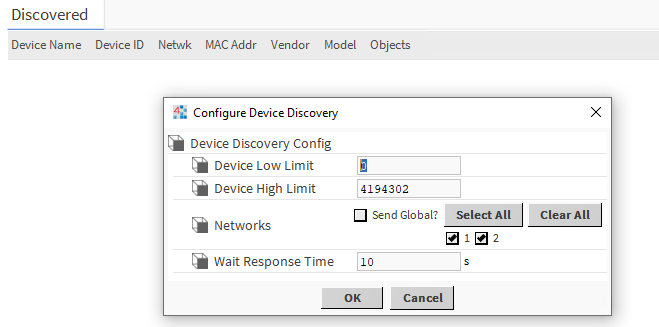
**Go to your BACnet-over-IP-compatible BMS and use the "discover" feature to find your Verkada sensor. In this example, use Vykon WorkPlace N4.**
This returns the BACnet devices found on the network.
{% endstep %}
{% step %}
**Rename the device and add it to your BMS.**
{% endstep %}
{% step %}
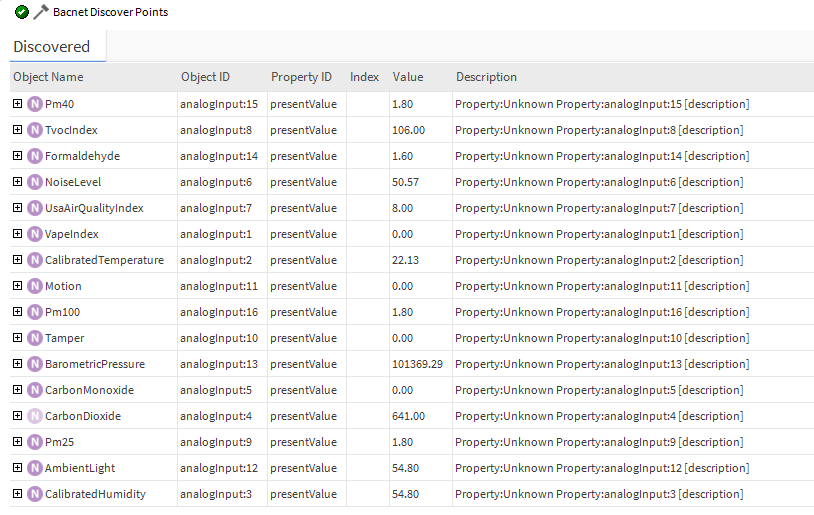
**Run a BACnet Who-Has discover to find all the available points.**
{% endstep %}
{% step %}
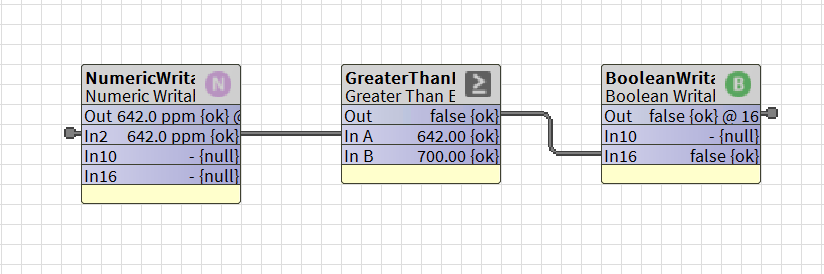
**Add the points to your BMS and use them to make HVAC decisions.**
1. In this case, **In2** is linked to the SV25 CO2 reading, which goes to **In A,** which is a **GreaterThanEqual** function.
2. If the **SV25 CO2** reading is above **700 ppm**, send **True**; otherwise, send **False**.
3. Link the **Out** (the output) of that function to the input of a BooleanWritable variable; in this case, **In16**. **In16** determines the **Out** boolean.
4. Link the **Out** boolean to your damper control.
1. If **Out** is True, the damper is **open**.
2. If **Out** is **False**, the damper is **closed**.
{% endstep %}
{% endstepper %}
***
## FAQ
Do all BMSs/BASs use BACnet?
No, not all Building Management Systems (BMSs)/Building Automation Systems (BASs) support BACnet. Most major HVAC providers have products and controllers that support this feature. However, you should talk with your HVAC specialist to understand if your system is supported.
{% hint style="danger" %}
Your building must have a BAS that is compatible with BACnet IP to use this integration. We recommend that you contact your HVAC specialist to understand if your system is supported. If you are unsure whether your BAS supports BACnet, contact [Verkada Support](https://www.verkada.com/contact/) for additional assistance.
{% endhint %}
Which sensor readings are supported by BACnet?
You can use all Verkada [sensor readings](/air-quality/sensor-data/air-quality-sensor-readings.md) as inputs for your BMSs, such as [temperature](/air-quality/sensor-data/air-quality-sensor-readings.md), [humidity](/air-quality/sensor-data/air-quality-sensor-readings.md), [CO2](/air-quality/sensor-data/air-quality-sensor-readings.md) values, [Vape Index](/air-quality/readme.md), and so on, to control dampers, ventilation fans, or other HVAC equipment.
Do Verkada sensors control the HVAC directly?
No, the Verkada sensors do not control the building’s HVAC system directly. Instead, the sensors relay their readings to your BMS, which in turn uses these as inputs in a function that controls the building’s HVAC, such as adjusting the temperature in a room or increasing the airflow in a closed space.
Do Verkada Air Quality monitors support BACnet MS/TP?
No, BACnet Master Slave (MS)/Token Passing (TP), the hard-wired version of BACnet that requires an [RS-485](https://en.wikipedia.org/wiki/RS-485) connection, similar to our access control readers, is currently not supported by Verkada Air Quality Sensors. Contact your SE should you require additional information or support.
What does BACnet do when enabled?
Once BACnet is enabled on a device, the BMS controller is now able to "discover" the device on the BACnet network. This is why the BACnet device needs a device ID, which is used to identify the device on the network, as well as a port, also used for communication.The server will initiate a handshake with the device via the "Who-Is/I-Am" flow. It will then figure out what properties the device has with the "Who-Has/I-Have" flow.
{% hint style="warning" %}
The Verkada [SV21](https://docs.verkada.com/docs/air-quality-sensors-overview.pdf), [SV23](https://docs.verkada.com/docs/air-quality-sensors-overview.pdf), and [SV25](https://docs.verkada.com/docs/air-quality-sensors-overview.pdf) all support the BACnet/IP protocol and support IPv4. The UDP port defaults to 47808 (0xBAC0).
{% endhint %}
---
# Agent Instructions
This documentation is published with GitBook. GitBook is the documentation platform designed so that both humans and AI agents can read, navigate, and reason over technical content effectively. Learn more at gitbook.com.
## Querying This Documentation
If you need additional information that is not directly available in this page, you can query the documentation by asking a question.
Perform an HTTP GET request on the following URL with the `ask` and `goal` query parameters:
```
GET https://help.verkada.com/air-quality/configuration/bacnet-for-verkada-air-quality-sensors.md?ask=&goal=
```
`ask` is the immediate question: it should be specific, self-contained, and written in natural language.
`goal` is what the user is ultimately trying to achieve, the reason they need the answer. Sharing it helps GitBook give you a better, more relevant answer. A goal is most helpful when it describes the outcome the user wants rather than restating the question. For example, with `ask=how do I create an API token`, a goal like `automate deployments from our CI pipeline` lets GitBook tailor the answer to that use case.
The response will contain a direct answer to the question and relevant excerpts and sources from the documentation.
Use this mechanism when the answer is not explicitly present in the current page, you need clarification or additional context, or you want to retrieve related documentation sections.