> For the complete documentation index, see [llms.txt](https://help.verkada.com/llms.txt). Markdown versions of documentation pages are available by appending `.md` to page URLs; this page is available as [Markdown](https://help.verkada.com/new-alarms/ja/insutru/set-up-universal-transmitter-mode-on-a-br31.md).
# BR31 でユニバーサルトランスミッターモードを設定する
BR31 無線ドアセンサーでユニバーサルトランスミッターモードを設定します
{% hint style="success" %}
この記事は新しいアラーム向けのガイドです。こちらを参照してください [記事](/classic-alarms/ja/she-zhi/set-up-universal-transmitter-mode-on-a-br31-with-classic-alarms.md) クラシック アラームをお使いの場合は、こちらを参照してください。詳細は [New アラームと Classic アラームの違い](/new-alarms/ja/hajimeni/new-alarms-vs-classic-alarms.md) どのバージョンのアラームをお使いか不明な場合は、こちらをご覧ください。
{% endhint %}
***
この [Verkada BR31 無線ドアセンサー](https://docs.verkada.com/docs/br31-quick-start-guide.pdf) 有線アラームデバイスが無線で Verkada ハブに接続できるようにする汎用トランスミッターとして機能します。これは、ドア枠のためにセンサーを縦向きに設置できない場合に有効です。
{% stepper %}
{% step %}
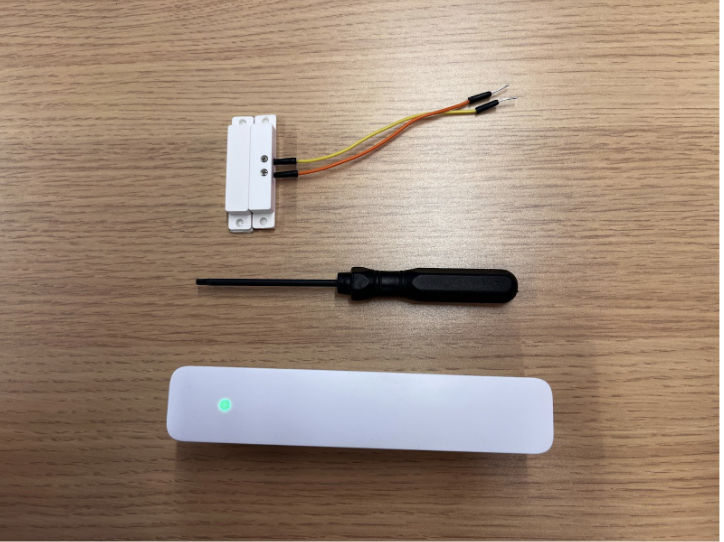
**BR31 本体、T10 トルクスドライバー、有線センサーなど、必要な部品を用意します。**
{% endstep %}
{% step %}
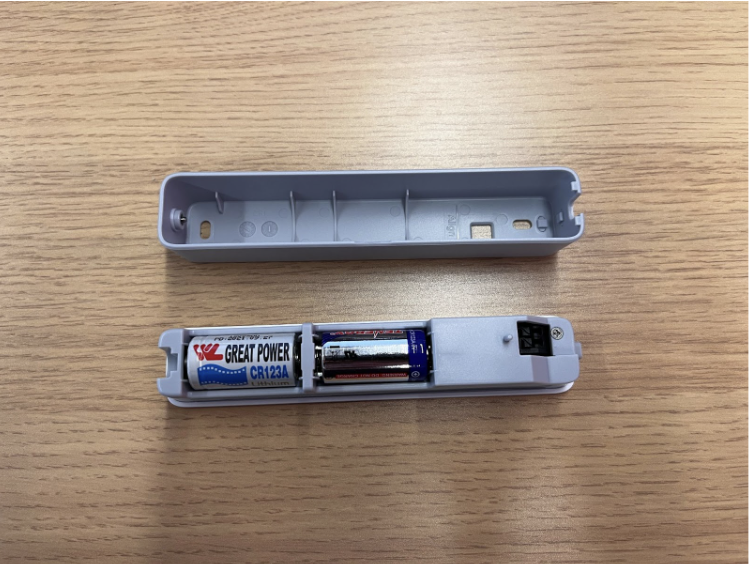
**T10 トルクスドライバーを使って、BR31 の底面にあるトルクスねじを外します。本体の背面プレートを取り外します。**
{% endstep %}
{% step %}
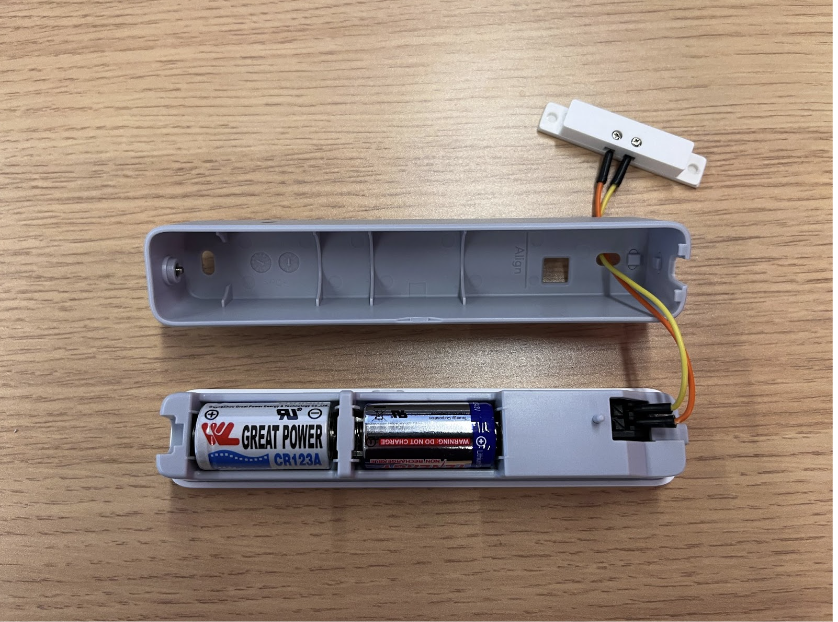
**有線アラームセンサーのリード線を、BR31 本体上部の 2 つの入力端子に差し込みます。この場合、極性は関係ありません。**
{% endstep %}
{% endstepper %}
***
## Command の設定
{% hint style="danger" %}
[デバイスを追加する](/command/ja/ganaizshon/add-a-device-to-your-command-organization.md) 続行する前に Command に追加します。
{% endhint %}
{% stepper %}
{% step %}
**Verkada Command で、すべての製品 > アラーム に移動します。**
{% endstep %}
{% step %}
**アラームサイトを選択します。**
{% endstep %}
{% step %}
**左側のナビゲーションで[デバイス]をクリックします。**
{% endstep %}
{% step %}
**センサーをクリックし、[デバイス設定]>[トランスミッターモードを有効にする]を選択します。**
{% endstep %}
{% endstepper %}
{% hint style="warning" %}
センサーが設定を更新する前に、イベントを発生させる必要があります(タンパー、ドアの開閉など)。背面のボタンを押すか、センサーの近くに磁石を動かしてください。これにより、最新の設定をすぐに取得します。
{% endhint %}
---
# Agent Instructions
This documentation is published with GitBook. GitBook is the documentation platform designed so that both humans and AI agents can read, navigate, and reason over technical content effectively. Learn more at gitbook.com.
## Querying This Documentation
If you need additional information that is not directly available in this page, you can query the documentation by asking a question.
Perform an HTTP GET request on the following URL with the `ask` and `goal` query parameters:
```
GET https://help.verkada.com/new-alarms/ja/insutru/set-up-universal-transmitter-mode-on-a-br31.md?ask=&goal=
```
`ask` is the immediate question: it should be specific, self-contained, and written in natural language.
`goal` is what the user is ultimately trying to achieve, the reason they need the answer. Sharing it helps GitBook give you a better, more relevant answer. A goal is most helpful when it describes the outcome the user wants rather than restating the question. For example, with `ask=how do I create an API token`, a goal like `automate deployments from our CI pipeline` lets GitBook tailor the answer to that use case.
The response will contain a direct answer to the question and relevant excerpts and sources from the documentation.
Use this mechanism when the answer is not explicitly present in the current page, you need clarification or additional context, or you want to retrieve related documentation sections.