> For the complete documentation index, see [llms.txt](https://help.verkada.com/llms.txt). Markdown versions of documentation pages are available by appending `.md` to page URLs; this page is available as [Markdown](https://help.verkada.com/new-alarms/ja/ibentotoarto/configure-new-alarms-event-alerts.md).
# 新しいアラームのイベントアラートを構成する
新しいアラームのイベントに対するアラートを構成して有効にする方法を学ぶ
設定のニーズに応じて、さまざまな New Alarms イベントのアラートを有効にできます。詳細は [以下](/classic-alarms/ja/ibentotoarto/configure-alarms-event-alerts.md) New Alarms イベントの種類の詳細については。
***
## New Alarms イベントのアラートを設定する
### アラートを作成 > イベント
{% stepper %}
{% step %}
**Verkada Command にログインします。**
{% endstep %}
{% step %}
**Command のホームページの左側ナビゲーションで、\[アラート] をクリックします。**
{% endstep %}
{% step %}
**上部の \[新しいアラート] をクリックします。**
{% endstep %}
{% step %}
**\[イベントを選択] で、New Alarms と設定するイベントを選択します。**
{% endstep %}
{% step %}
**(オプション)一部のイベントタイプは一般的なもので、選択するとより具体的なオプションが表示されます。求められたら、追加の設定手順を完了してから、\[次へ] をクリックします。**
{% endstep %}
{% step %}
**デバイス/サイトを選択します。アラートの種類に応じて、イベントをデバイス固有、サイト固有、または全デバイス向けに設定できます。**
{% hint style="info" %}
選択したとき **サイト** または **すべてのデバイス**、アラート作成後に追加された新しいデバイスでは、自動的にアラートが生成されます。
{% endhint %}
クリックします **完了** して続行します。
{% endstep %}
{% step %}
**(オプション)一部のイベントタイプには追加の設定手順があります。その場合は、追加の手順をクリックし、設定ウィンドウの指示に従ってください。**
{% endstep %}
{% step %}
**\[完了] をクリックして、アラートの設定を続行します** [**通知スケジュール**](#create-alert-greater-than-events)**.**
{% endstep %}
{% endstepper %}
### アラートを作成 > 通知スケジュール
{% stepper %}
{% step %}
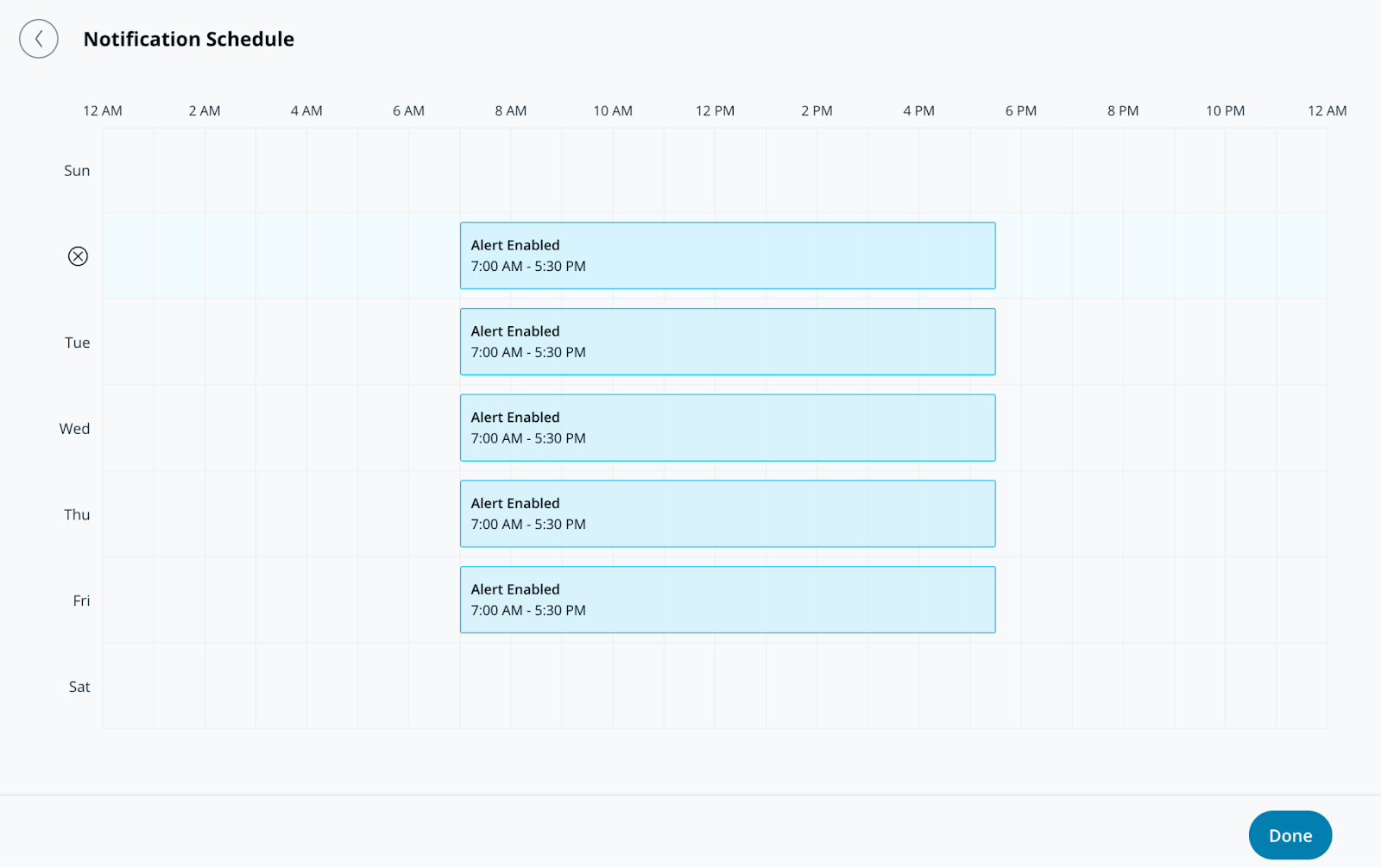
**通知スケジュールで、アラートを送信する曜日と時刻を指定します。アラートはデフォルトで24時間365日送信されます。**
{% endstep %}
{% step %}
**\[完了] をクリックして、アラートの設定を続行します** [**通知**](#create-alert-greater-than-notification)**.**
{% endstep %}
{% endstepper %}
### アラートを作成 > 通知
{% stepper %}
{% step %}
**通知で、ユーザーを個別に追加するか、アラートをグループに割り当てます。**
{% endstep %}
{% step %}
**ユーザーまたはグループの横にあるドロップダウンメニューを選択して、通知方法を選びます。受信者には、プッシュ、SMS、メッセージングプラットフォームのアラート、またはメール通知で通知できます。**
{% hint style="info" %}
このアラートに追加された受信者には、 **共有アラート** のセクションにある **アラート** ページ。
{% endhint %}
{% endstep %}
{% step %}
**(オプション) デフォルトでは、あなたはアラートの受信者になります。ドロップダウンメニューを選択し、[削除]をクリックして自分を削除します。**
{% endstep %}
{% step %}
**[完了]をクリックし、アラートの** [**オプション設定**](#optional-settings)**、または** [**アラートを完了する**](#finish-the-alert)**.**
{% endstep %}
{% endstepper %}
### オプション設定
#### アラートを作成 > オペレーション
{% stepper %}
{% step %}
**Route to Operationsをオンにして、アラートからチケットを作成します。**
{% endstep %}
{% step %}
**(オプション) [チケット指示]を選択してチケットに情報を追加し、[完了]をクリックします。**
{% endstep %}
{% step %}
**[完了]をクリックして次へ進みます** [**アラートを完了する**](#finish-the-alert)**.**
{% endstep %}
{% endstepper %}
#### アラートを作成 > デバイスアクション
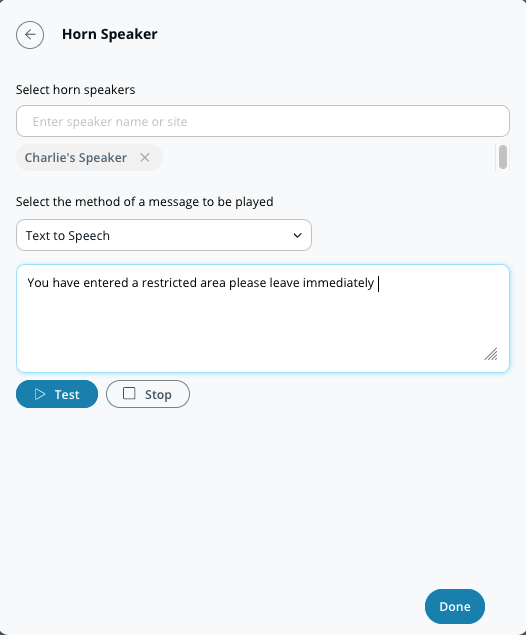
個人への通知に加えて、アラートがトリガーされたときにホーンスピーカーが再生されるように設定できます。これらのアラートは、テキスト読み上げまたはアップロードしたMP3ファイルにできます。
{% stepper %}
{% step %}
**デバイスアクションで、メッセージを再生するホーンスピーカーを選択します。**
{% endstep %}
{% step %}
**通知方法(テキスト読み上げまたは音声ファイル)を選択します。**
a. の場合 **テキスト読み上げ、** 200文字までのメッセージを入力します。\nb. の場合 **音声ファイル、** ファイルをドラッグ&ドロップするか、 **ファイルを選択** して音声クリップをアップロードします。
{% endstep %}
{% step %}
**[完了]をクリックして次へ進みます** [**アラートを完了する**](#finish-the-alert)**.**
{% endstep %}
{% endstepper %}
### アラートを完了する
{% stepper %}
{% step %}
**設定ウィンドウの右下で、[次へ]をクリックします。**
{% endstep %}
{% step %}
**アラートの説明的な名前を入力します。**
{% endstep %}
{% step %}
**設定を完了するには、[完了]をクリックします。**
{% endstep %}
{% endstepper %}
***
## さまざまな Alarms イベントタイプを理解する
| | |
| ------------------------ | --------------------------------------------------------------------------------------------------------------------------------------------------------------------------- |
| **アラートの種類** | **説明** |
| **パネルのオンライン/オフライン** | New Alarms パネルの状態がオンラインまたはオフラインに変わりました。 |
| **パネルの電源状態** | New Alarms パネルがバッテリーバックアップに切り替わったか、AC 電源に戻りました。 |
| **セルラーモジュールの状態** | New Alarms パネルが LTE バックアップに切り替わったか、Ethernet に戻りました |
| **デバイスのオンライン/オフライン** | New Alarms デバイスの状態がオンラインまたはオフラインに変わりました。 |
| **無線センサーのバッテリー残量低下** | 無線センサーのバッテリー残量が少なくなっています。 |
| **有線センサーの問題** | 終端監視付きの有線センサーで断線または短絡が検知されました。 |
| **パーティションの状態** | パーティションが手動で警戒設定または警戒解除されたときにアラートを受信します(例:遅延オープンや早期クローズがある場合)。 |
| **警戒設定/警戒解除の遅延** | パーティションが期待時刻までに警戒設定または警戒解除されなかった場合にアラートを受信します。
注: 期待時刻はサイトのタイムゾーンに基づきます。
|
| **アラーム** **センサーイベント** | 次のいずれかのイベントが検知されたときにアラートを受信します:
- ドアが開いた
- ドア開放保持
- 動体を検知
- 水を検知
- ガラス破損を検知
- パニックボタンが押されました
- 汎用有線センサーが作動
|
| **タンパー** | Alarms デバイスで干渉または改ざんが検知されました。 |
| **vLink 干渉** | vLink の無線干渉が検知されました |
| **誤設定された応答** | 接点の欠落または誤設定されたアラーム応答を検出します |
| **ホーンスピーカーのオンライン/オフライン** | ホーンスピーカーがオフラインになったか、オンラインに戻りました。 |
---
# Agent Instructions
This documentation is published with GitBook. GitBook is the documentation platform designed so that both humans and AI agents can read, navigate, and reason over technical content effectively. Learn more at gitbook.com.
## Querying This Documentation
If you need additional information that is not directly available in this page, you can query the documentation by asking a question.
Perform an HTTP GET request on the following URL with the `ask` and `goal` query parameters:
```
GET https://help.verkada.com/new-alarms/ja/ibentotoarto/configure-new-alarms-event-alerts.md?ask=&goal=
```
`ask` is the immediate question: it should be specific, self-contained, and written in natural language.
`goal` is what the user is ultimately trying to achieve, the reason they need the answer. Sharing it helps GitBook give you a better, more relevant answer. A goal is most helpful when it describes the outcome the user wants rather than restating the question. For example, with `ask=how do I create an API token`, a goal like `automate deployments from our CI pipeline` lets GitBook tailor the answer to that use case.
The response will contain a direct answer to the question and relevant excerpts and sources from the documentation.
Use this mechanism when the answer is not explicitly present in the current page, you need clarification or additional context, or you want to retrieve related documentation sections.