> For the complete documentation index, see [llms.txt](https://help.verkada.com/llms.txt). Markdown versions of documentation pages are available by appending `.md` to page URLs; this page is available as [Markdown](https://help.verkada.com/new-alarms/ja/insutru/daisy-chain-multiple-be32s.md).
# 複数のBE32をデイジーチェーン接続する
デイジーチェーン接続用にBE32を準備し、設定に必要な正しい距離を指定します
BE32 アラーム拡張器は、Verkada アラームシステムのカバレッジを拡張します。この拡張器を使用すると、複数の有線センサーを 1 本の RS-485 ケーブル配線にまとめて、BP52 アラームパネルへ接続できます。アラームパネルの RS-485 ポートごとに、最大 4 台の BE32 をデイジーチェーン接続できます。
***
## **ファームウェアを更新**
BE32 をデイジーチェーン接続する前に、すべて最新のファームウェアバージョンである必要があります。
{% stepper %}
{% step %}
[**BE32 を Command に追加します。**](/command/ja/ganaizshon/add-a-device-to-your-command-organization.md)
{% endstep %}
{% step %}
[**BE32 をアラームサイトに追加します**](/new-alarms/ja/she-ding/alarm-sites.md)**.**
{% endstep %}
{% step %}
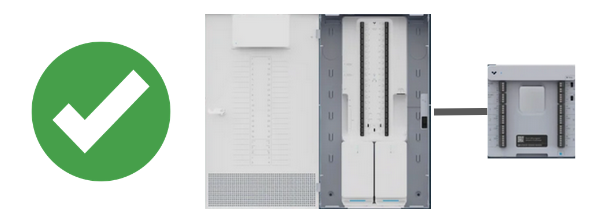
**RS-485 を介して BE32 を BP52 に直接接続します。**
{% endstep %}
{% step %}
**デバイスは自動的に更新を開始するはずです。数分以内にデバイスはオレンジ色に点滅し始めます。LED が点滅を停止し、少なくとも 1 分間青色点灯のままになるまでは、接続を外さないでください。これは更新が完了したことを示します。全体の処理には約 10 分かかります。**
{% endstep %}
{% endstepper %}
{% hint style="danger" %}
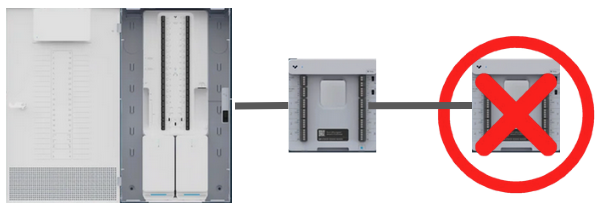
BE32 ユニットが下図のように設置されている場合、2 台目のデバイスは、最初に BP52 アラームパネルに直接接続されていなかった限り、最新のファームウェアに更新されません。
 {% endhint %}
***
## **必要なケーブル長**
BE32 ユニットをデイジーチェーン接続する場合、ケーブル長が制約要因になります。データの整合性と 4 線式センサーへの適切な電力供給を確保するため、デイジーチェーン接続する BE32 の台数に応じて、以下の表の最大距離ガイドラインに従ってください。
{% hint style="danger" %}
表の距離は、BE32 リレーに出力デバイスが接続されていないことを前提としています。リレーを使用する場合は、各 BE32 に外部電源が必要です。
{% endhint %}
| | | |
| -------- | ----------------------------------- | ----------------------------------- |
| **BE32** | **18 AWG の場合、パネルから最後のデバイスまでの最大配線長** | **22 AWG の場合、パネルから最後のデバイスまでの最大配線長** |
| 1 | 2625 フィート / 800 m | 1150 フィート / 350 m |
| 2 | 2130 フィート / 650 m | 820 フィート / 250 m |
| 3 | 1800 フィート / 550 m | 650 フィート / 200 m |
| 4 | 1475 フィート / 450 m | 490 フィート / 150 m |
{% hint style="warning" %}
18 AWG ケーブルは、抵抗が低いため、より長いデイジーチェーンを可能にします。
{% endhint %}
***
## 電源要件
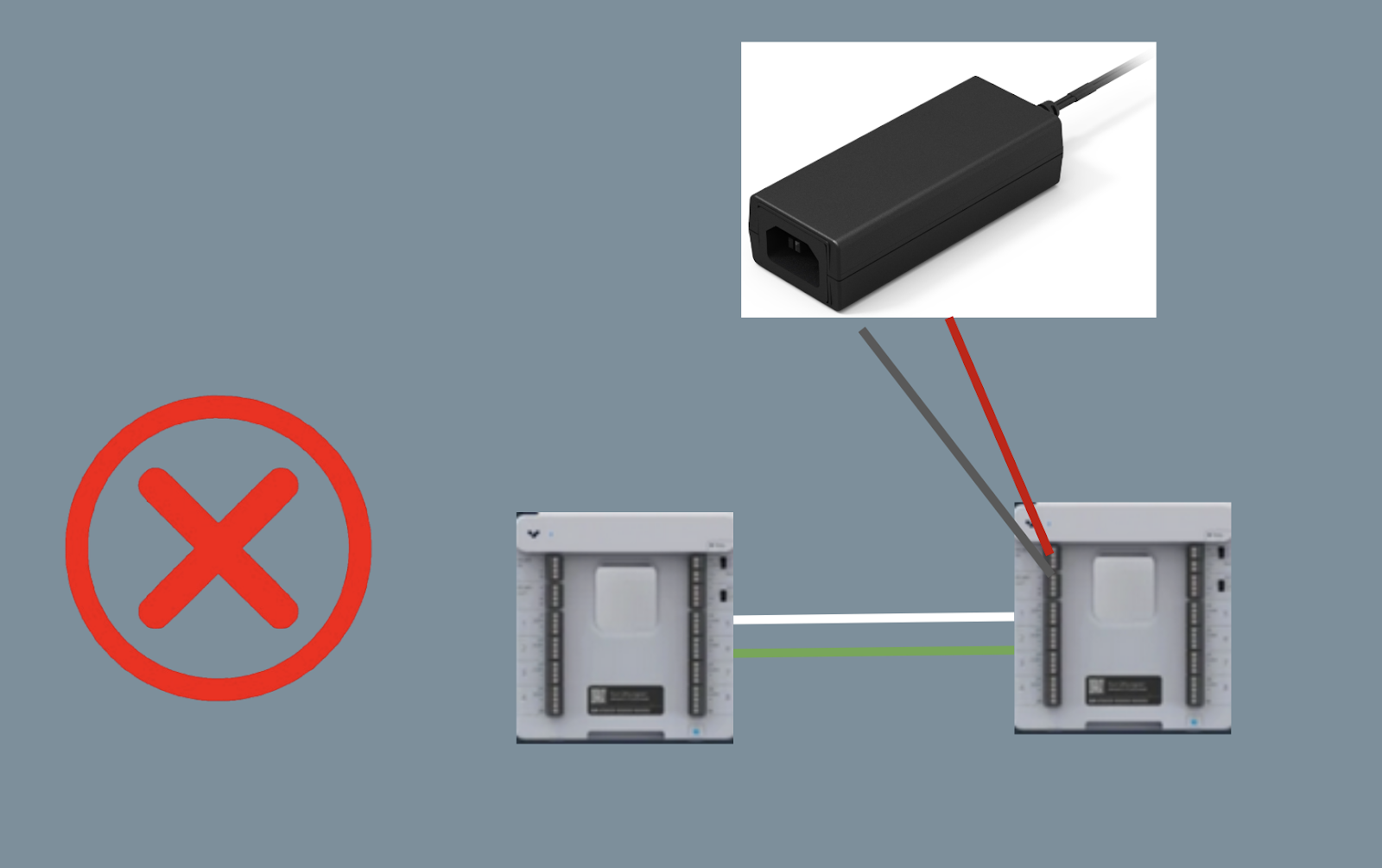
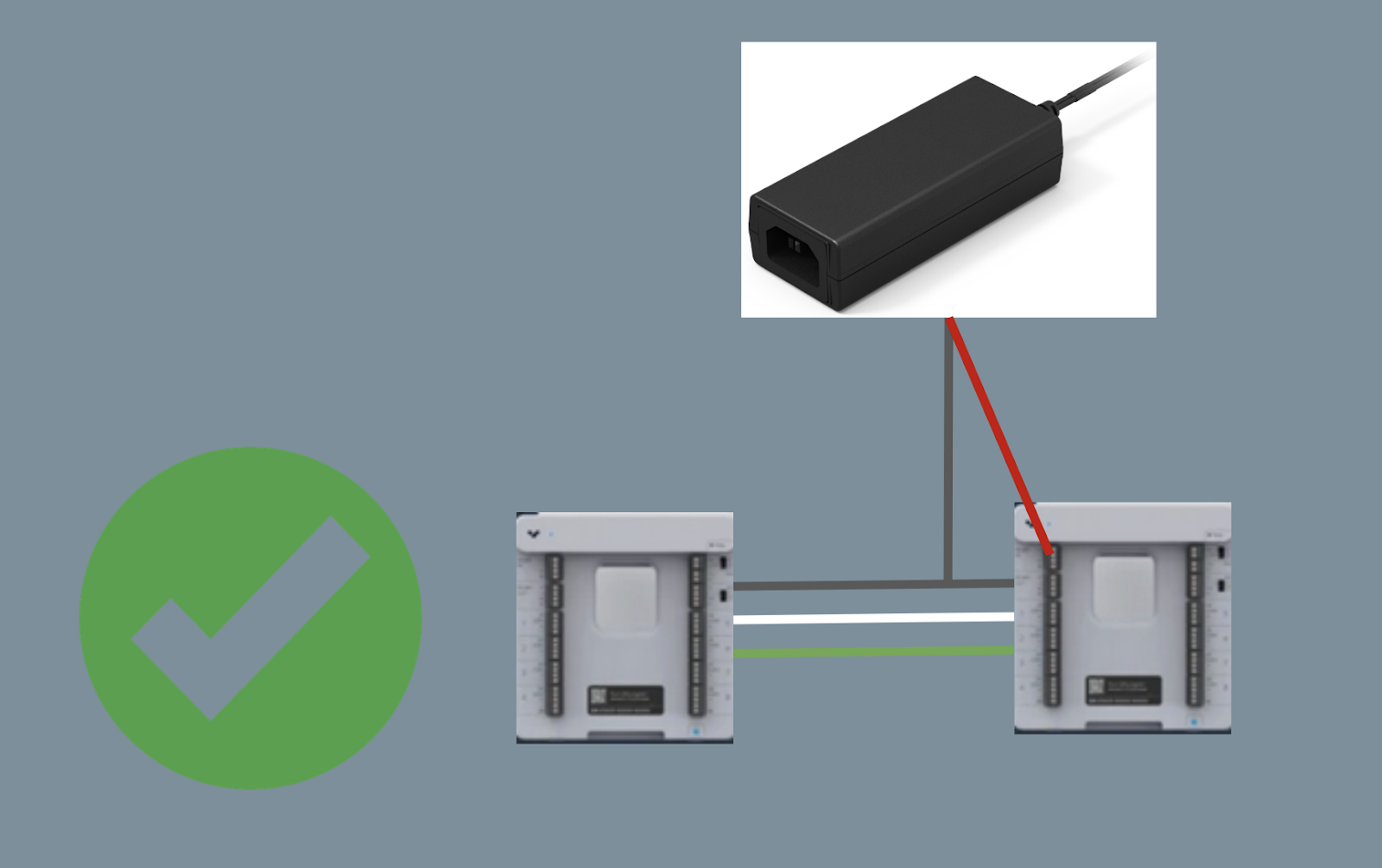
出力デバイス(サイレン、ストロボなど)が接続されている場合、またはケーブル長の上限に達している場合は、補助電源として Verkada ACC–WA–30W/12V スイッチング電源を使用する必要があります。外部電源(10〜36V)を使用する場合は、デバイスの負極を含めることで、RS-485 デバイスが同じ基準グラウンドに接続されるようにしてください。
---
# Agent Instructions
This documentation is published with GitBook. GitBook is the documentation platform designed so that both humans and AI agents can read, navigate, and reason over technical content effectively. Learn more at gitbook.com.
## Querying This Documentation
If you need additional information that is not directly available in this page, you can query the documentation by asking a question.
Perform an HTTP GET request on the following URL with the `ask` and `goal` query parameters:
```
GET https://help.verkada.com/new-alarms/ja/insutru/daisy-chain-multiple-be32s.md?ask=&goal=
```
`ask` is the immediate question: it should be specific, self-contained, and written in natural language.
`goal` is what the user is ultimately trying to achieve, the reason they need the answer. Sharing it helps GitBook give you a better, more relevant answer. A goal is most helpful when it describes the outcome the user wants rather than restating the question. For example, with `ask=how do I create an API token`, a goal like `automate deployments from our CI pipeline` lets GitBook tailor the answer to that use case.
The response will contain a direct answer to the question and relevant excerpts and sources from the documentation.
Use this mechanism when the answer is not explicitly present in the current page, you need clarification or additional context, or you want to retrieve related documentation sections.
{% endhint %}
***
## **必要なケーブル長**
BE32 ユニットをデイジーチェーン接続する場合、ケーブル長が制約要因になります。データの整合性と 4 線式センサーへの適切な電力供給を確保するため、デイジーチェーン接続する BE32 の台数に応じて、以下の表の最大距離ガイドラインに従ってください。
{% hint style="danger" %}
表の距離は、BE32 リレーに出力デバイスが接続されていないことを前提としています。リレーを使用する場合は、各 BE32 に外部電源が必要です。
{% endhint %}
| | | |
| -------- | ----------------------------------- | ----------------------------------- |
| **BE32** | **18 AWG の場合、パネルから最後のデバイスまでの最大配線長** | **22 AWG の場合、パネルから最後のデバイスまでの最大配線長** |
| 1 | 2625 フィート / 800 m | 1150 フィート / 350 m |
| 2 | 2130 フィート / 650 m | 820 フィート / 250 m |
| 3 | 1800 フィート / 550 m | 650 フィート / 200 m |
| 4 | 1475 フィート / 450 m | 490 フィート / 150 m |
{% hint style="warning" %}
18 AWG ケーブルは、抵抗が低いため、より長いデイジーチェーンを可能にします。
{% endhint %}
***
## 電源要件
出力デバイス(サイレン、ストロボなど)が接続されている場合、またはケーブル長の上限に達している場合は、補助電源として Verkada ACC–WA–30W/12V スイッチング電源を使用する必要があります。外部電源(10〜36V)を使用する場合は、デバイスの負極を含めることで、RS-485 デバイスが同じ基準グラウンドに接続されるようにしてください。
---
# Agent Instructions
This documentation is published with GitBook. GitBook is the documentation platform designed so that both humans and AI agents can read, navigate, and reason over technical content effectively. Learn more at gitbook.com.
## Querying This Documentation
If you need additional information that is not directly available in this page, you can query the documentation by asking a question.
Perform an HTTP GET request on the following URL with the `ask` and `goal` query parameters:
```
GET https://help.verkada.com/new-alarms/ja/insutru/daisy-chain-multiple-be32s.md?ask=&goal=
```
`ask` is the immediate question: it should be specific, self-contained, and written in natural language.
`goal` is what the user is ultimately trying to achieve, the reason they need the answer. Sharing it helps GitBook give you a better, more relevant answer. A goal is most helpful when it describes the outcome the user wants rather than restating the question. For example, with `ask=how do I create an API token`, a goal like `automate deployments from our CI pipeline` lets GitBook tailor the answer to that use case.
The response will contain a direct answer to the question and relevant excerpts and sources from the documentation.
Use this mechanism when the answer is not explicitly present in the current page, you need clarification or additional context, or you want to retrieve related documentation sections.