> For the complete documentation index, see [llms.txt](https://help.verkada.com/llms.txt). Markdown versions of documentation pages are available by appending `.md` to page URLs; this page is available as [Markdown](https://help.verkada.com/new-alarms/ja/armuno/verkada-new-alarms-monitoring-certificate.md).
# Verkada 新しいアラームの監視証明書
新しいアラームサイトが監視されていることを証明する証明書を取得します
{% hint style="success" %}
この記事は New アラームのガイドです。こちらを参照してください [記事](broken://pages/bb7eaf2e327eb01509e844651e84a750dc8b10b1) クラシック アラームをお使いの場合は、こちらを参照してください。詳細は [New アラームと Classic アラームの違い](/new-alarms/ja/hajimeni/new-alarms-vs-classic-alarms.md) どのバージョンのアラームをお使いか不明な場合は、こちらをご覧ください。
{% endhint %}
アラーム監視証明書は、Verkada があなたのアラームシステムを専門的に監視していることを証明し、保険会社への証明として役立ちます。
***
## 証明書を取得する
{% stepper %}
{% step %}
**Verkada Command で、\[すべての製品] > \[New アラーム] に移動します。**
{% endstep %}
{% step %}
[**アラームサイトを作成する**](/new-alarms/ja/she-ding/alarm-sites.md) **または、設定するアラームサイトを選択します。**
{% endstep %}
{% step %}
**左側のナビゲーションで、\[設定] を選択します。**
{% endstep %}
{% step %}
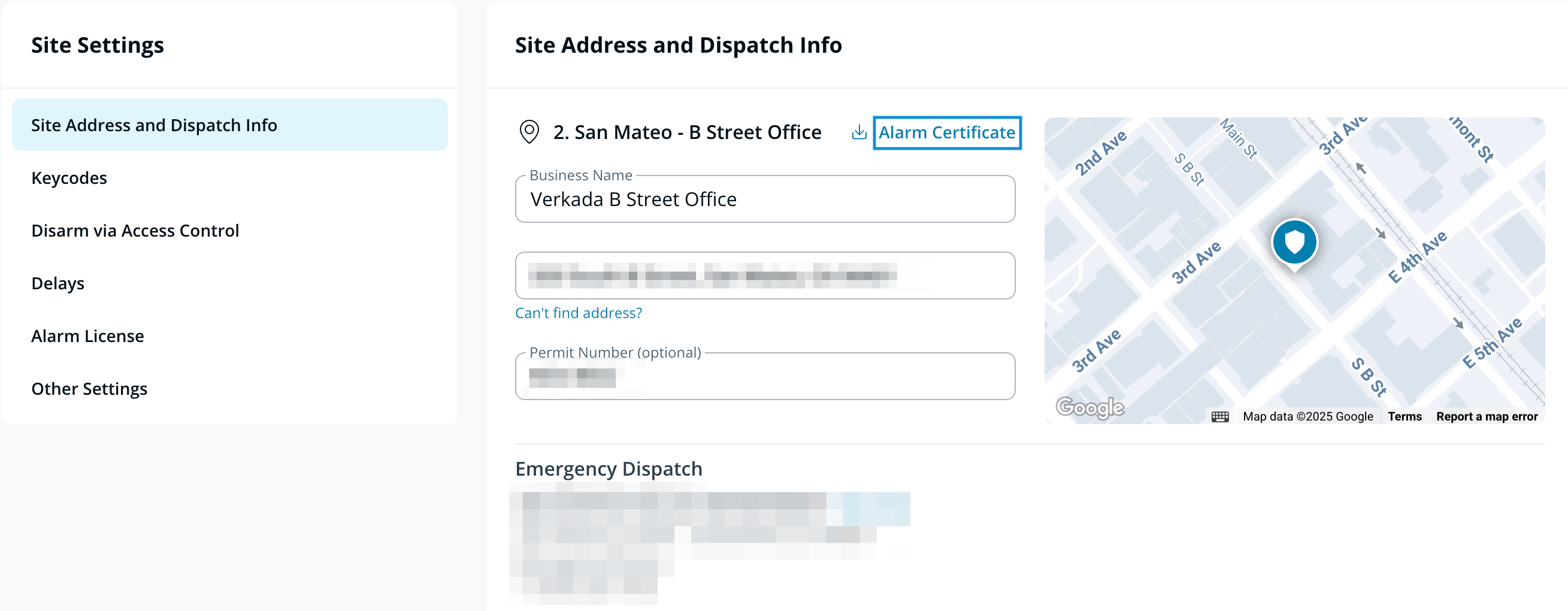
**サイトの住所と出動情報の下で、\[アラーム証明書] をクリックします。**
{% endstep %}
{% endstepper %}
{% hint style="warning" %}
証明書には、事業者名、サイトの住所、ダウンロード日、およびサイトの住所に基づくライセンス番号が含まれます。
{% endhint %}
---
# Agent Instructions
This documentation is published with GitBook. GitBook is the documentation platform designed so that both humans and AI agents can read, navigate, and reason over technical content effectively. Learn more at gitbook.com.
## Querying This Documentation
If you need additional information that is not directly available in this page, you can query the documentation by asking a question.
Perform an HTTP GET request on the following URL with the `ask` and `goal` query parameters:
```
GET https://help.verkada.com/new-alarms/ja/armuno/verkada-new-alarms-monitoring-certificate.md?ask=&goal=
```
`ask` is the immediate question: it should be specific, self-contained, and written in natural language.
`goal` is what the user is ultimately trying to achieve, the reason they need the answer. Sharing it helps GitBook give you a better, more relevant answer. A goal is most helpful when it describes the outcome the user wants rather than restating the question. For example, with `ask=how do I create an API token`, a goal like `automate deployments from our CI pipeline` lets GitBook tailor the answer to that use case.
The response will contain a direct answer to the question and relevant excerpts and sources from the documentation.
Use this mechanism when the answer is not explicitly present in the current page, you need clarification or additional context, or you want to retrieve related documentation sections.