> For the complete documentation index, see [llms.txt](https://help.verkada.com/llms.txt). Markdown versions of documentation pages are available by appending `.md` to page URLs; this page is available as [Markdown](https://help.verkada.com/access-control/ja/she-zhi/wiring-best-practices-for-third-party-wireless-locks/simonsvoss-smartintego-setup-guide.md).
# SimonsVoss SmartIntegoセットアップガイド
VerkadaとSimonsVossのSmartIntego無線ロックの統合をセットアップする
VerkadaはSimonsVoss SmartIntegoロックとの連携をサポートしています。この連携には、SmartIntegoハンドル、シリンダー、南京錠が含まれます。
{% hint style="danger" %}
SimonsVossの無線ロックは、AC12アクセスコントロールパネルでのみサポートされています。AC12は、最大16台のGatewayNodeと最大16個のロックをサポートできます。
{% endhint %}
***
## GatewayNodeとパネルの設置
GatewayNodeは、SmartIntegoロックに接続する無線のSmartIntegoハブです。これはTCP/IP経由でVerkada AC12パネルと通信し、両方のデバイスが同じローカルネットワーク上にある必要があります。この構成では、AC12パネルがクライアントとして機能し、GatewayNodeがサーバーとして機能します。AC12はTCPポート2101経由で接続します。
***
## ロックの設置とSmartIntegoの設定
{% hint style="warning" %}
SimonsVossの [ハードウェアの設置手順に従って](https://help.simons-voss.com/smartintego/wosystemdescription/en-GB/index.html#426501515) 適切なSmartIntegoロックセットを設置してください。その後、SimonsVossの [ソフトウェアの手順に従って](https://help.simons-voss.com/smartintego/wostepbystep/en-GB/index.html#387419659) SmartIntegoロックセットを接続してから、Verkada Commandに追加してください。
{% endhint %}
Commandでドアの状態イベントを受信するには、 **Door Monitoring付きDigital Smart Handle**を使用する場合、ロックを構成してドアの状態データをVerkadaに送信するようにします。SmartIntego Toolで **Door Monitoring** 設定を開き、Smart Handleの以下を有効にしてください。
* **ドアセンサーの読取間隔(秒)がOff以外の値に設定されていること。**
* 次の項目の **イベントの送信** 以下の項目がチェックされていることを確認してください。
* ドア開放イベント
* ロックボルトイベント
* ドアハンドルイベント
{% hint style="warning" %}
SimonsVossの [ステップバイステップWO](https://help.simons-voss.com/smartintego/wostepbystep/en-GB/index.html#index_content) を参照して、一般的なサイト巡回と設置管理のベストプラクティスを確認してください。
{% endhint %}
***
## Commandの設定
AC12がロックに接続されたハブに接続され、さらにSmartIntegoツールを使用してハブとロックが起動されると、これらのデバイスをVerkada Commandに取り込み始める準備が整います。
{% stepper %}
{% step %}
**新しいAC12をCommandに追加します。**
{% endstep %}
{% step %}
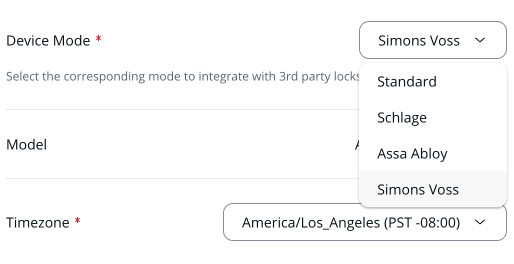
**AC12の設定中に、デバイスモードをSimons Vossに設定します。**
{% endstep %}
{% step %}
**AC12のコントローラーページに移動し、追加をクリックします。**
{% endstep %}
{% step %}
**ロック設定の下で:**
a. **ロック アドレス** を入力します。\
b. **ロックタイプ**.
{% endstep %}
{% step %}
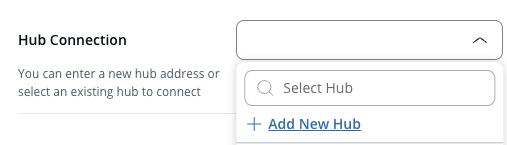
**(オプション)この手順は、初回のハブ設定でのみ必要です。ハブ接続の下で、[新しいハブを追加]をクリックし、以下を入力します。**
a. **ハブアドレス** (デバイスアドレス)\
b. **ハブチップID**\
c. **ハブIPアドレス**\
d. **ハブのパスワード**.
{% endstep %}
{% endstepper %}
***
### CSV経由でハブとロックを一括インポート
{% stepper %}
{% step %}
**SmartIntegoツールでプロジェクトを開きます。**
{% endstep %}
{% step %}
**[File]>[Export]>[WO Configuration]をクリックします。**
{% endstep %}
{% step %}
**WO設定を、アクセスしやすい場所にCSVとして保存します。**
{% endstep %}
{% step %}
**Commandで、SimonsVossモードのAC12のコントローラーページに移動します。**
{% endstep %}
{% step %}
**[Import]をクリックします。**
{% endstep %}
{% step %}
**WO設定のCSVファイルをアップロードします。**
{% endstep %}
{% step %}
**このAC12に関連付けるハブとロックを選択します。**
{% endstep %}
{% step %}
**[Submit]をクリックします。**
{% endstep %}
{% endstepper %}
{% hint style="warning" %}
* ドア長時間開放イベントとドア強制開放イベントはVerkadaによって監視されます。これらのイベントは、SmartIntegoツール内で構成した場合は動作しません。
* ロックの接続ステータスは4時間ごとに更新されます。
{% endhint %}
***
## オフラインユーザー
オフラインユーザー機能を使用すると、認証情報をロックに直接キャッシュできるため、アクセスコントロールシステムが利用できない場合でも、アクセスグループの入室権限を維持できます。
### オフラインユーザーを有効にする
この設定は、ドアの設定中またはドアの設定メニュー内で構成できます。
{% stepper %}
{% step %}
**Commandで、SimonsVoss SmartIntegoのドアに移動します。**
{% endstep %}
{% step %}
**[Settings]>[Installer Settings]を選択するか、Installer Setupページでロック設定中にこのオプションを有効にします。**
{% endstep %}
{% step %}
**オフラインユーザーをオンにします。**
{% endstep %}
{% step %}
**カード設定を構成します。**
a. **カードスロット** を、SmartIntegoツールで以前に構成したスロットに対応するものに選択します。\
b. **カード形式** を、選択したスロットに関連付けます。
{% endstep %}
{% step %}
**ロックにキャッシュしたいアクセスグループを選択します。**
{% endstep %}
{% endstepper %}
{% hint style="warning" %}
* SimonsVoss SmartIntegoロックにキャッシュできる認証情報は最大250件です。
* 選択したカード形式に対してユーザーが複数の認証情報を持つ場合、各認証情報は個別のスロットを消費します。
{% endhint %}
---
# Agent Instructions
This documentation is published with GitBook. GitBook is the documentation platform designed so that both humans and AI agents can read, navigate, and reason over technical content effectively. Learn more at gitbook.com.
## Querying This Documentation
If you need additional information that is not directly available in this page, you can query the documentation dynamically by asking a question.
Perform an HTTP GET request on the current page URL with the `ask` query parameter, and the optional `goal` query parameter:
```
GET https://help.verkada.com/access-control/ja/she-zhi/wiring-best-practices-for-third-party-wireless-locks/simonsvoss-smartintego-setup-guide.md?ask=&goal=
```
`ask` is the immediate question: it should be specific, self-contained, and written in natural language.
`goal` is optional and describes the broader end goal you are ultimately trying to accomplish on behalf of the user. GitBook uses it to tailor the answer towards what is most useful for that goal.
The response will contain a direct answer to the question and relevant excerpts and sources from the documentation.
Use this mechanism when the answer is not explicitly present in the current page, you need clarification or additional context, or you want to retrieve related documentation sections.