> For the complete documentation index, see [llms.txt](https://help.verkada.com/llms.txt). Markdown versions of documentation pages are available by appending `.md` to page URLs; this page is available as [Markdown](https://help.verkada.com/guest/configuration/door-access-for-guests.md).
# Door Access for Guests
Give visitors limited access to doors and include them in roll call reports for mustering.
Verkada Guest can integrate with Verkada Access Control to let organizations give visitors controlled door access. This integration also allows organizations to include visitors in [roll call reports](/access-control/emergency-response/roll-call-reports.md).
You can set up door access for visitors by linking Guest Types with visitor-specific access control permission sets, [Visit Access Types.](/access-control/users-and-credentials/add-a-user-to-the-verkada-access-system/visitor-access-visit-access-type.md)
***
## Configuration
{% hint style="danger" %}
A user must have the minimum Access Control role of **Access Site Manager** and the minimum Workplace role of **Workplace Site Admin** to configure a Guest Type with door access.
{% endhint %}
To set up a Guest Type with door access, [create a new Guest Type](/guest/configuration/configure-guest-types.md) or navigate to an existing one by:
{% stepper %}
{% step %}
**In Verkada Command, go to All Products > Workplace >**  **Guest.**
{% endstep %}
{% step %}
**On the left navigation, click Guest Settings.**
{% endstep %}
{% step %}
**Select Sites > your site.**
{% endstep %}
{% step %}
**Under Guest Types, click Manage Guest Types.**
{% endstep %}
{% step %}
**Select a Guest Type.**
{% endstep %}
{% step %}
**In the bottom right, select Door Access & Roll Call.**
{% endstep %}
{% step %}
**Select Visit Access Type, and choose a** [**Visit Access Type**](/access-control/users-and-credentials/add-a-user-to-the-verkada-access-system/visitor-access-visit-access-type.md) **or create a new one.**
{% endstep %}
{% step %}
**Navigate back to the guest type and add the Visit Access Type.**
{% endstep %}
{% endstepper %}
{% hint style="danger" %}
Admin discretion is advised when configuring guest types with door access. Consider including the **Host Approval**, **Approved List Only**, and **Security Screening** settings to ensure that only desired visitors can open doors.
{% endhint %}
***
## Supported Visitor Access Credentials
Verkada Guest supports issuing visitors the following credentials:
1. [Keycards](https://help.verkada.com/guest/~/revisions/EoCxP3hpfoyJZDsFs6y8/configuration/door-access-for-guests/assigning-a-keycard-in-guest)
2. Unlock Links
3. Entry code
4. QR code
5. Face Unlock
### Keycards
Visitors can be assigned a temporary keycard natively in Guest.
Learn more about [assigning keycards to visitors](/guest/configuration/door-access-for-guests/assigning-a-keycard-in-guest.md).
### Unlock links
{% hint style="danger" %}
To enable unlock links for visitors, the Guest Type must include the **Contact Info** step.
{% endhint %}
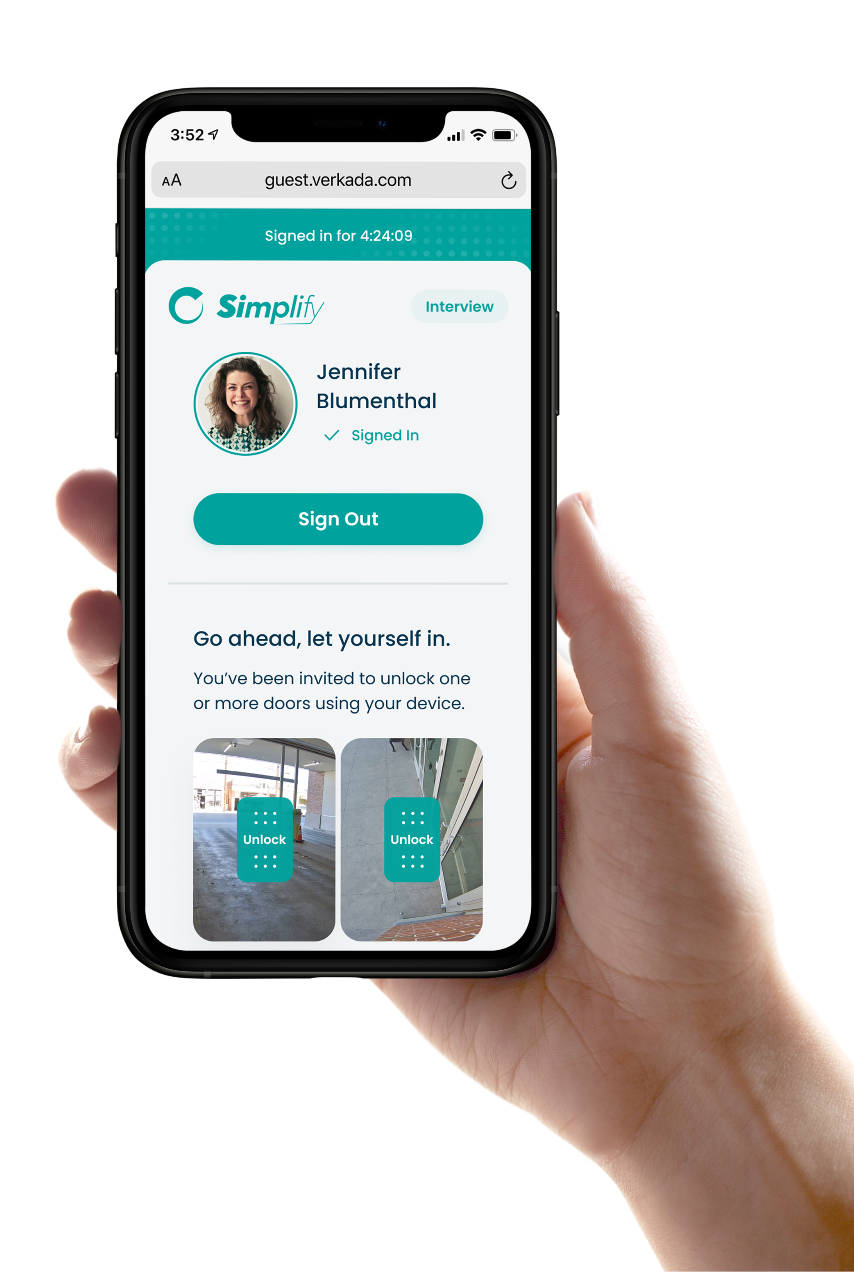
Visitors can be sent a Guest Portal link unique to their visit after sign-in. From this link, visitors can unlock doors remotely.
### Entry Codes
{% hint style="danger" %}
In order for visitors to be sent entry codes and unlock instructions, the Guest Type must include the **Contact Info** step.
{% endhint %}
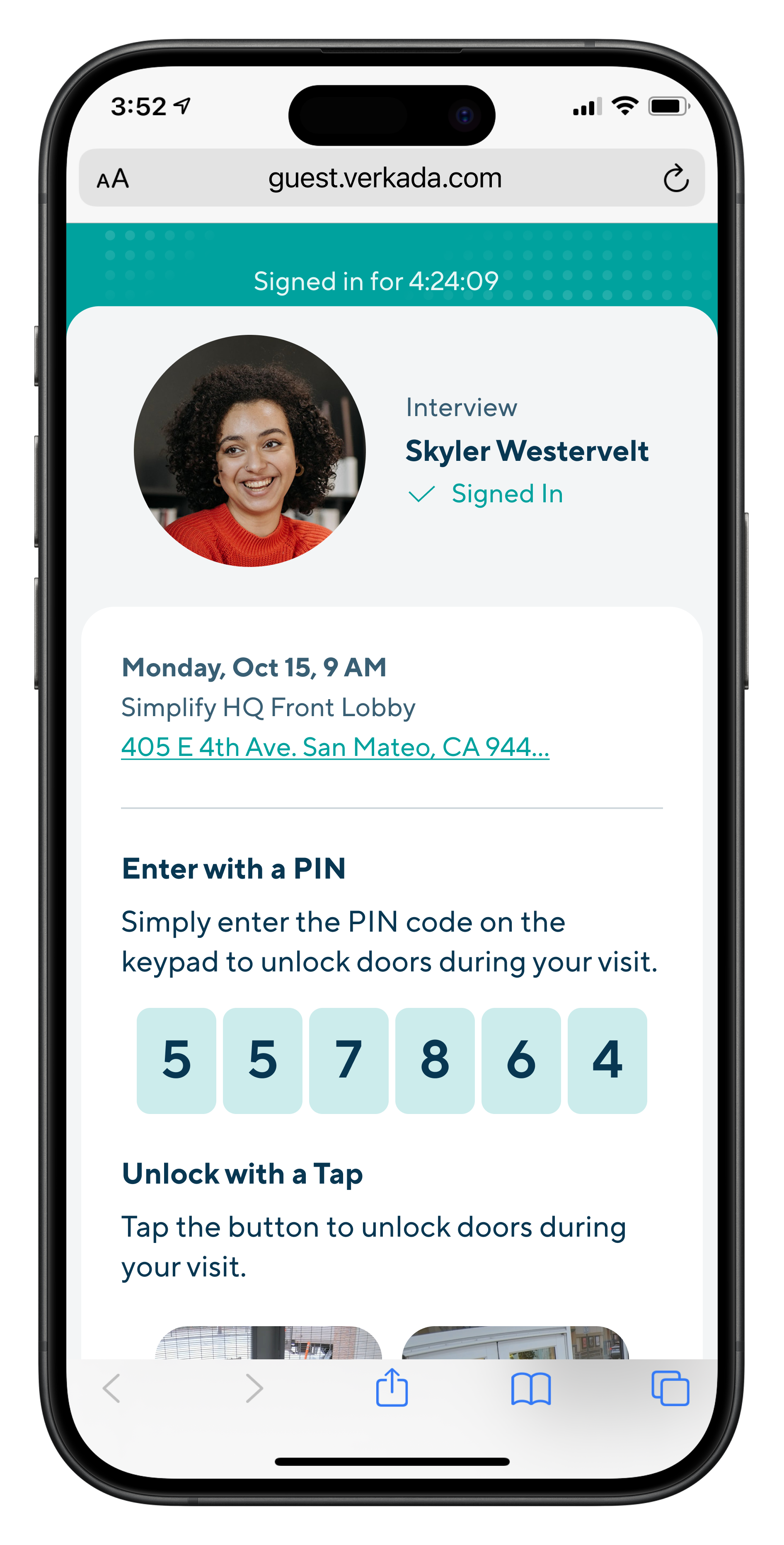
Visitors can be sent entry codes to unlock doors that are access-controlled by PIN code readers. Entry codes for visitors are six digits long. Visitors will be able to view entry codes from a link sent to them:
{% hint style="warning" %}
To submit an entry code on a keypad reader, enter the code followed by the **#** (pound) key. For example, if the code is 123456, enter **123456#**.
{% endhint %}
### QR Codes
{% hint style="danger" %}
In order for visitors to be sent QR codes and unlock instructions, the Guest Type must include the **Contact Info** step.
{% endhint %}
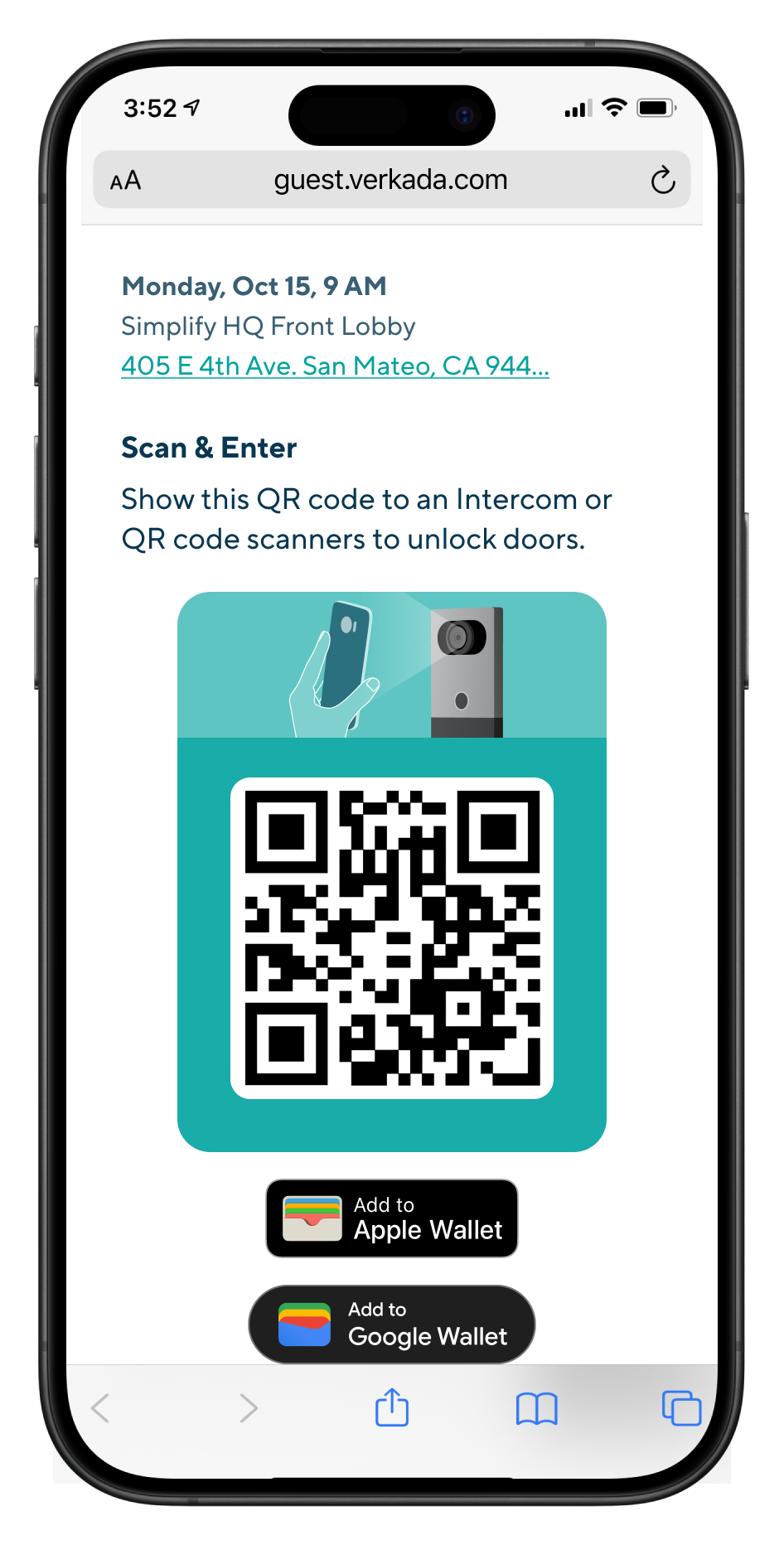
Visitors can be sent QR codes that allow them to unlock doors that are access-controlled with Verkada intercoms and third-party QR code readers. Visitors will be able to view QR codes from a link sent to them after sign-in.
Recommended 3rd Party QR code readers:
* Sycreader R35
* [ZKTeco QR500](https://www.zktecousa.com/product-page/qr-code-access-control-reader-qr500)
{% hint style="danger" %}
QR code unlock at an intercom is only supported for two door mode configurations:
* **Directly to the intercom**
* **Paired to a Verkada door**
{% endhint %}
### Face Unlock
{% hint style="danger" %}
To let visitors use Face Unlock, the Guest Type must include the **Badge Photo** step.
{% endhint %}
Visitors can opt-in to using Face Unlock to open doors access-controlled by an [Access Station Pro](https://help.verkada.com/access-control/configuration/access-station-pro-end-to-end-setup-guide).
The face data used for the feature is deleted once the credential is revoked or the visitor is signed out. Future visits will recall a visitor's previous preference, but a visitor can opt in or out of Face Unlock during any sign-in.
***
## Restrict door access to invited visitors only
Regular and invited visitors can access doors by default based on the guest type’s access control settings. If needed, access can be restricted to invited visitors only.
{% stepper %}
{% step %}
**In Verkada Command, go to All Products > Workplace >** **Guest.**
{% endstep %}
{% step %}
**On the left navigation, click Guest Settings.**
{% endstep %}
{% step %}
**Select Sites > your site.**
{% endstep %}
{% step %}
**Under Guest Types, click Manage Guest Types.**
{% endstep %}
{% step %}
**Select your guest type.**
{% endstep %}
{% step %}
**In the bottom right, select Door Access & Roll Call.**
{% endstep %}
{% step %}
**Check Only Allow Invited Guests to Unlock Doors.**
{% endstep %}
{% endstepper %}
***
## FAQ
**Guest.**
{% endstep %}
{% step %}
**On the left navigation, click Guest Settings.**
{% endstep %}
{% step %}
**Select Sites > your site.**
{% endstep %}
{% step %}
**Under Guest Types, click Manage Guest Types.**
{% endstep %}
{% step %}
**Select a Guest Type.**
{% endstep %}
{% step %}
**In the bottom right, select Door Access & Roll Call.**
{% endstep %}
{% step %}
**Select Visit Access Type, and choose a** [**Visit Access Type**](/access-control/users-and-credentials/add-a-user-to-the-verkada-access-system/visitor-access-visit-access-type.md) **or create a new one.**
{% endstep %}
{% step %}
**Navigate back to the guest type and add the Visit Access Type.**
{% endstep %}
{% endstepper %}
{% hint style="danger" %}
Admin discretion is advised when configuring guest types with door access. Consider including the **Host Approval**, **Approved List Only**, and **Security Screening** settings to ensure that only desired visitors can open doors.
{% endhint %}
***
## Supported Visitor Access Credentials
Verkada Guest supports issuing visitors the following credentials:
1. [Keycards](https://help.verkada.com/guest/~/revisions/EoCxP3hpfoyJZDsFs6y8/configuration/door-access-for-guests/assigning-a-keycard-in-guest)
2. Unlock Links
3. Entry code
4. QR code
5. Face Unlock
### Keycards
Visitors can be assigned a temporary keycard natively in Guest.
Learn more about [assigning keycards to visitors](/guest/configuration/door-access-for-guests/assigning-a-keycard-in-guest.md).
### Unlock links
{% hint style="danger" %}
To enable unlock links for visitors, the Guest Type must include the **Contact Info** step.
{% endhint %}
Visitors can be sent a Guest Portal link unique to their visit after sign-in. From this link, visitors can unlock doors remotely.
### Entry Codes
{% hint style="danger" %}
In order for visitors to be sent entry codes and unlock instructions, the Guest Type must include the **Contact Info** step.
{% endhint %}
Visitors can be sent entry codes to unlock doors that are access-controlled by PIN code readers. Entry codes for visitors are six digits long. Visitors will be able to view entry codes from a link sent to them:
{% hint style="warning" %}
To submit an entry code on a keypad reader, enter the code followed by the **#** (pound) key. For example, if the code is 123456, enter **123456#**.
{% endhint %}
### QR Codes
{% hint style="danger" %}
In order for visitors to be sent QR codes and unlock instructions, the Guest Type must include the **Contact Info** step.
{% endhint %}
Visitors can be sent QR codes that allow them to unlock doors that are access-controlled with Verkada intercoms and third-party QR code readers. Visitors will be able to view QR codes from a link sent to them after sign-in.
Recommended 3rd Party QR code readers:
* Sycreader R35
* [ZKTeco QR500](https://www.zktecousa.com/product-page/qr-code-access-control-reader-qr500)
{% hint style="danger" %}
QR code unlock at an intercom is only supported for two door mode configurations:
* **Directly to the intercom**
* **Paired to a Verkada door**
{% endhint %}
### Face Unlock
{% hint style="danger" %}
To let visitors use Face Unlock, the Guest Type must include the **Badge Photo** step.
{% endhint %}
Visitors can opt-in to using Face Unlock to open doors access-controlled by an [Access Station Pro](https://help.verkada.com/access-control/configuration/access-station-pro-end-to-end-setup-guide).
The face data used for the feature is deleted once the credential is revoked or the visitor is signed out. Future visits will recall a visitor's previous preference, but a visitor can opt in or out of Face Unlock during any sign-in.
***
## Restrict door access to invited visitors only
Regular and invited visitors can access doors by default based on the guest type’s access control settings. If needed, access can be restricted to invited visitors only.
{% stepper %}
{% step %}
**In Verkada Command, go to All Products > Workplace >** **Guest.**
{% endstep %}
{% step %}
**On the left navigation, click Guest Settings.**
{% endstep %}
{% step %}
**Select Sites > your site.**
{% endstep %}
{% step %}
**Under Guest Types, click Manage Guest Types.**
{% endstep %}
{% step %}
**Select your guest type.**
{% endstep %}
{% step %}
**In the bottom right, select Door Access & Roll Call.**
{% endstep %}
{% step %}
**Check Only Allow Invited Guests to Unlock Doors.**
{% endstep %}
{% endstepper %}
***
## FAQ
Can visitors be included in roll call reports without giving them door access?
Yes, visitors can be included in roll call reports without having door access. The guest type must be configured with a visit access type with roll call enabled.
Can global guest types be configured with a visit access type?
No, global guest types cannot be configured with a visit access type. For this reason, global guest types cannot provision door access and do not support including visitors in roll call reports.
Can visitors unlock doors that require Two-Factor Entry?
Yes, visitors can unlock doors that follow a Door Schedule that requires Two-Factor Entry. Visitors must scan their keycard/QR code, then enter their Entry code.
---
# Agent Instructions
This documentation is published with GitBook. GitBook is the documentation platform designed so that both humans and AI agents can read, navigate, and reason over technical content effectively. Learn more at gitbook.com.
## Querying This Documentation
If you need additional information that is not directly available in this page, you can query the documentation by asking a question.
Perform an HTTP GET request on the following URL with the `ask` and `goal` query parameters:
```
GET https://help.verkada.com/guest/configuration/door-access-for-guests.md?ask=&goal=
```
`ask` is the immediate question: it should be specific, self-contained, and written in natural language.
`goal` is what the user is ultimately trying to achieve, the reason they need the answer. Sharing it helps GitBook give you a better, more relevant answer. A goal is most helpful when it describes the outcome the user wants rather than restating the question. For example, with `ask=how do I create an API token`, a goal like `automate deployments from our CI pipeline` lets GitBook tailor the answer to that use case.
The response will contain a direct answer to the question and relevant excerpts and sources from the documentation.
Use this mechanism when the answer is not explicitly present in the current page, you need clarification or additional context, or you want to retrieve related documentation sections.