> For the complete documentation index, see [llms.txt](https://help.verkada.com/llms.txt). Markdown versions of documentation pages are available by appending `.md` to page URLs; this page is available as [Markdown](https://help.verkada.com/verkada-cameras/video-streaming-and-sharing/live-streaming/camera-high-efficiency-video-encoding-hevc.md).
# Camera High Efficiency Video Encoding (HEVC)
H.265 (High Efficiency Video Coding, or HEVC) is a video compression standard developed as the successor to H.264 (Advanced Video Coding, or AVC). It provides higher compression efficiency, allowing similar video quality at lower bandwidth and storage usage, making it well-suited for security video streaming.
{% hint style="warning" %}
For a deeper overview of the standard, see: [High Efficiency Video Coding](https://en.wikipedia.org/wiki/High_Efficiency_Video_Coding).
{% endhint %}
All Verkada cameras support H.265 encoding. When viewing video in Verkada Command, playback is optimized based on device capability. Devices that support H.265 receive the native stream for best quality, while unsupported devices automatically receive a transcoded H.264 stream for compatibility.
***
## Cloud transcoding in Command
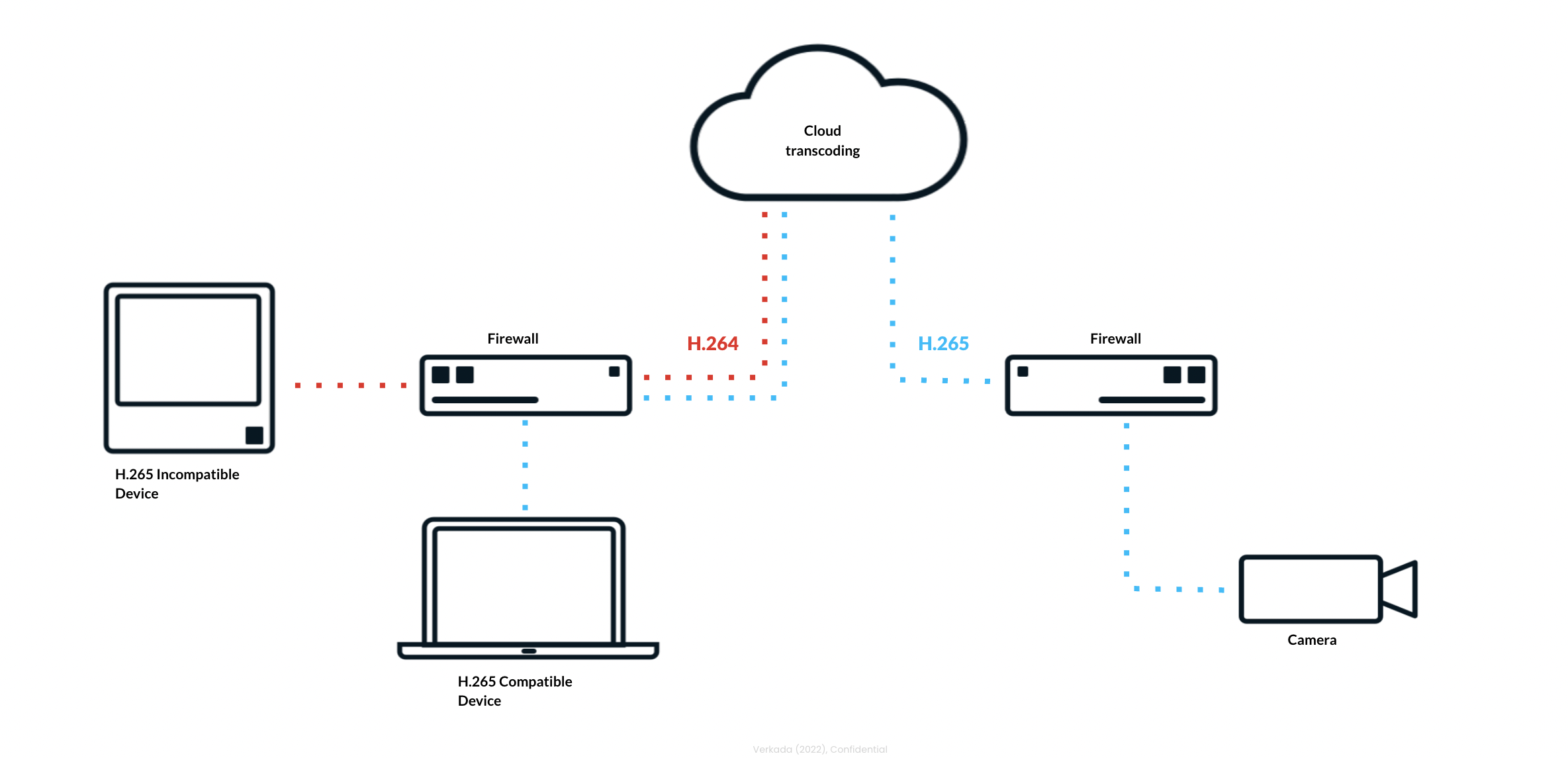
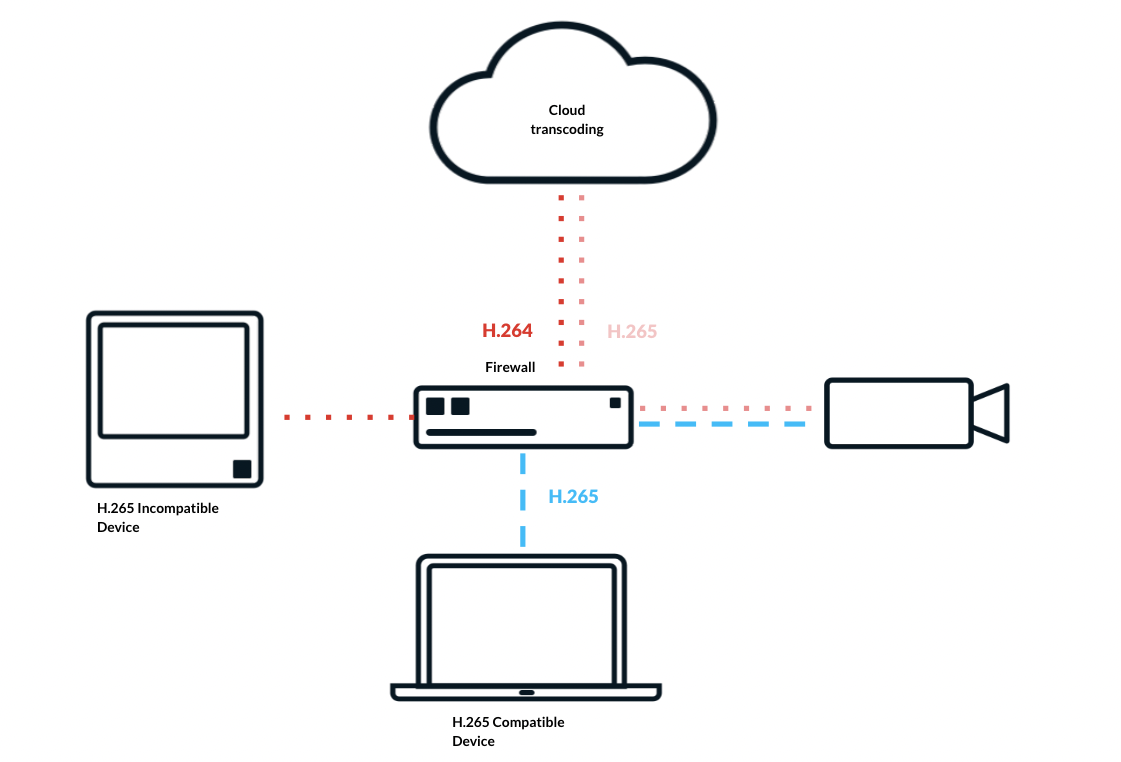
Cloud transcoding enables H.265 on Verkada cameras even when some users or devices do not support the codec. In the example below, a camera is configured for H.265, with both compatible and incompatible devices accessing the same stream.
When a compatible device initiates playback, Verkada Command delivers the native H.265 stream end-to-end. When an incompatible device requests video, Command automatically transcodes the stream in the cloud and delivers it as H.264 for smooth playback.
For local streaming, compatible devices receive H.265 directly over the local network, while unsupported devices are served H.264. In all cases, Command ensures consistent access to live and recorded video regardless of device capability.
***
***
## Device requirements
{% hint style="info" %}
Users with incompatible devices can still stream from H.265 cameras using cloud transcoding. However, a compatible device is recommended for the best playback experience.
{% endhint %}
CPU with HEVC support
**7th Generation Intel® Core™ Processors**
* Intel® HD Graphics 610+
* Intel® Iris® Plus Graphics 640+
**Apple M series processors**
* All are supported.
Operating systems with HEVC support
* macOS Big Sur (11.0) and above
* Windows 8 and above
* Android 5.0 and above
* Chrome OS (only GPUs that support the VAAPI interface, for example, Intel GPU)
* Linux (Chrome version ≥ 108.0.5354.0; only GPUs that support the VAAPI interface, for example, Intel GPU)
* iOS 11 and above
Browser support for HEVC
* **Chrome:** Supported in versions 105+
* **Edge:** Requires the HEVC plugin from the Microsoft Store (paid)
* **Safari:** Supported in versions 11–16.4+
* **Opera:** Supported in versions 94+
* **Firefox:** Supported in version 137+
GPU support for HEVC
* AMD RX460 and above (integrated GPU)
* Intel HD4400, HD515 and above
* AMD Radeon R7, Vega M, and above
* Apple M1, M1 Pro, M1 Max, M1 Ultra and above
***
## Configuration
{% stepper %}
{% step %}
**In Verkada Command, go to All Products > Cameras.**
{% endstep %}
{% step %}
**Select a camera to view.**
{% endstep %}
{% step %}
**In the bottom right, click Settings.**
{% endstep %}
{% step %}
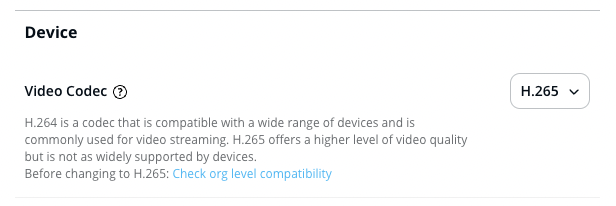
**Under Device, select H.265 from the drop-down.**
{% hint style="warning" %}
To get a list of users in the organization who have used an incompatible browser or device, click **Check org level compatibility**.
{% endhint %}
{% endstep %}
{% endstepper %}
***
***
## FAQ
Why enable H.265 video encoding on Verkada cameras?
H.265 encoding improves video quality, delivering up to 2x better clarity while significantly reducing artifacts. It also preserves key details more effectively, even when zooming in digitally.
Which Verkada cameras support H.265 video encoding?
All Verkada camera models support H.265.
What are the minimum system requirements to play Verkada HEVC?
H.265 requires more processing power to encode and decode compared to H.264, which can make it more challenging to use in certain devices or browsers. Verkada H.265 video decoding requires a compatible device hardware and a browser. Refer to the [device requirements](#device-requirements) section of this article for more information.
What are the limitations of Verkada H.265?
* **Local viewing:** Command users without compatible devices + browsers won’t be able to play native H.265 video, but will still be able to play video transcoded to H.264.
* **Cloud viewing:** If a Command user tries to stream video from a device + browser combination that cannot support H.265 video decoding, the video will be automatically transcoded in the Verkada cloud to H.264. *Note: Due to the additional step, there will be a slight increase in delay and time to load the video.*
* **Share links:** Transcoding is not supported with share links. If a user tries to stream video from a device + browser combination that cannot support H.265 video decoding, only SQ video will be playable.
Will H.265 support RTSP?
H.265 can be used with cameras running RTSP. You will need to make sure the device configured to stream from the camera is compatible with H.265, as transcoding to H.264 is not supported for RTSP streams.
{% hint style="warning" %}
H.265 is not automatically enabled for cameras with RTSP; you will need to modify this setting manually through the camera settings.
{% endhint %}
---
# Agent Instructions
This documentation is published with GitBook. GitBook is the documentation platform designed so that both humans and AI agents can read, navigate, and reason over technical content effectively. Learn more at gitbook.com.
## Querying This Documentation
If you need additional information that is not directly available in this page, you can query the documentation by asking a question.
Perform an HTTP GET request on the following URL with the `ask` and `goal` query parameters:
```
GET https://help.verkada.com/verkada-cameras/video-streaming-and-sharing/live-streaming/camera-high-efficiency-video-encoding-hevc.md?ask=&goal=
```
`ask` is the immediate question: it should be specific, self-contained, and written in natural language.
`goal` is what the user is ultimately trying to achieve, the reason they need the answer. Sharing it helps GitBook give you a better, more relevant answer. A goal is most helpful when it describes the outcome the user wants rather than restating the question. For example, with `ask=how do I create an API token`, a goal like `automate deployments from our CI pipeline` lets GitBook tailor the answer to that use case.
The response will contain a direct answer to the question and relevant excerpts and sources from the documentation.
Use this mechanism when the answer is not explicitly present in the current page, you need clarification or additional context, or you want to retrieve related documentation sections.