> For the complete documentation index, see [llms.txt](https://help.verkada.com/llms.txt). Markdown versions of documentation pages are available by appending `.md` to page URLs; this page is available as [Markdown](https://help.verkada.com/verkada-cameras/maintenance-and-troubleshooting/waterproof-outdoor-cameras.md).
# Waterproof Outdoor Cameras
Learn how to waterproof Verkada’s outdoor cameras
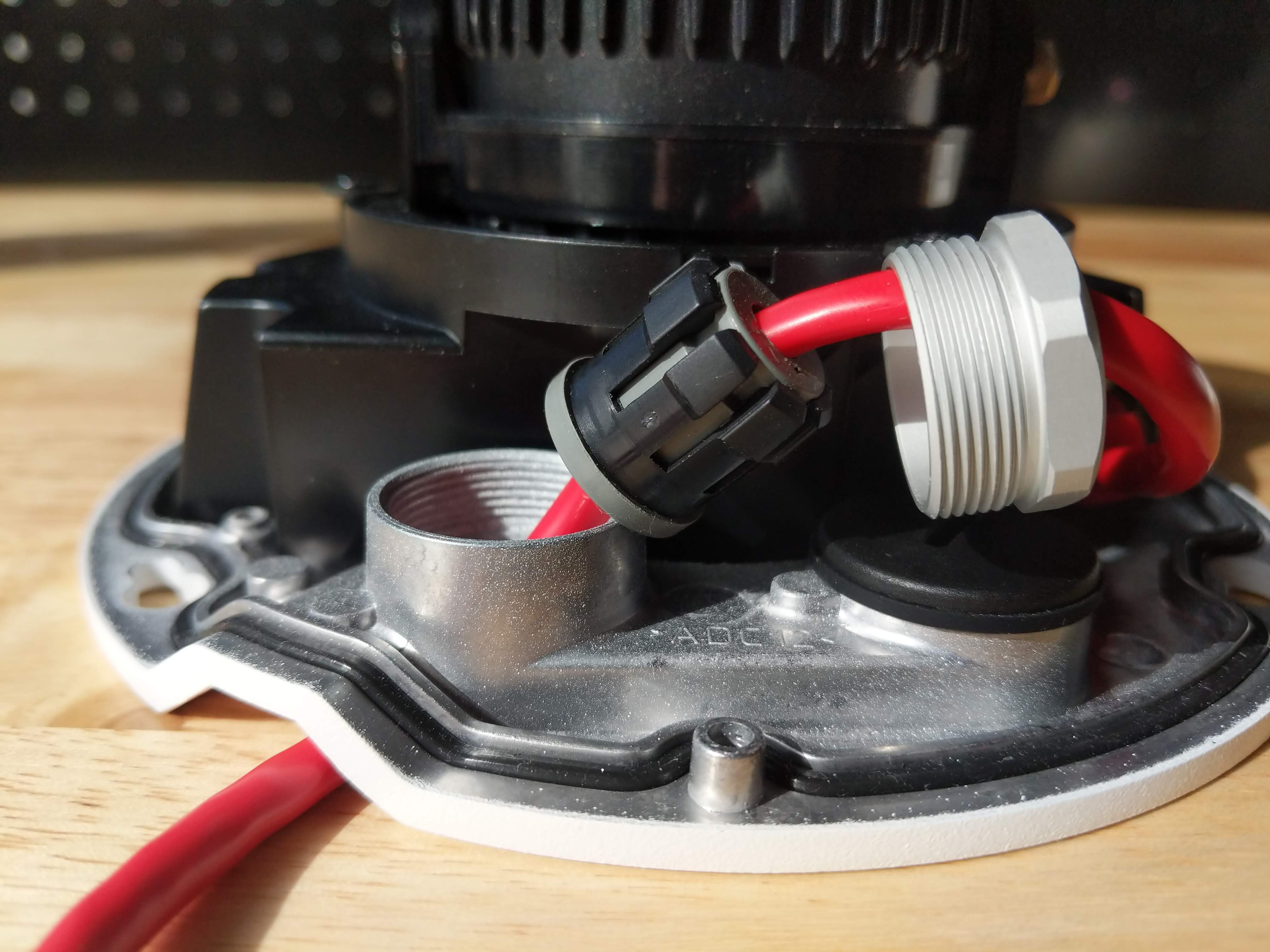
Preventing water damage (also known as waterproofing), Verkada’s outdoor cameras require the Ethernet cable to be sealed, and the desiccant pack needs to be properly installed.
***
## Cameras
{% hint style="info" %}
Waterproofing outdoor cameras happens during the mounting process. Refer to the [installation guide](https://www.verkada.com/docs/?product=videoSecurity\&contentType=setupGuide\&search=outdoor) for your camera model for complete mounting instructions.
{% endhint %}
{% tabs %}
{% tab title="3rd generation CX series" %}
{% stepper %}
{% step %}
**Loosen the screw on the cable latch, using a T10 Torx Security Screwdriver.**
1. Open the cable latch.
2. Remove the cable gland and set it aside.
{% endstep %}
{% step %}
**Lead the Ethernet cable through the cable gland opening and latch.**
{% endstep %}
{% step %}
**Connect the Ethernet cable to the camera.**
1. Press the cable gland into the cable gland hole.
2. In case of cable slack, press the excess Ethernet\
cable into the cable gland.
{% endstep %}
{% step %}
**Ensure that the cable gland is firmly in place with no gaps or unevenness.**
{% endstep %}
{% step %}
**Make sure the slit in the grommet is positioned under the latch. Incorrect installation may result in water ingress that could damage the device.**
{% endstep %}
{% step %}
**Ensure the latch is fully down and closed before tightening the security screw.**
{% endstep %}
{% step %}
**Mount and position the camera.**
1. Align the blue holes to the thumbscrews and rotate the camera clockwise.
2. Tighten the thumbscrews using the T10 Security Screwdriver to secure.
3. Close the latch and use the provided T10 Security Screwdriver to secure and seal the Ethernet cable.
{% hint style="info" %}
Secure the camera case to confirm proper fit, then remove it to install the desiccant pack.
{% endhint %}
{% endstep %}
{% step %}
**Open the outer desiccant bag, remove the desiccant pack, and peel back the packaging to expose the adhesive. Attach the desiccant to the camera body at the “Attach Desiccant Here” label. Be sure it does not obscure the camera.**
{% endstep %}
{% step %}
**Align the top cover Security Torx Screw positions to the corresponding holes on**\
**the camera base and hold it in place. To secure, tighten the two T10 Torx Security**\
**Screws.**
{% endstep %}
{% endstepper %}
{% endtab %}
{% tab title="1st & 2nd generation CX series" %}
{% hint style="warning" %}
Bullet series cameras and the CF81-E are sealed and do not require a desiccant pack.
{% endhint %}
{% stepper %}
{% step %}
**Disassemble the cable access port in the camera base plate.**
{% endstep %}
{% step %}
**Feed the ethernet cable up through the baseplate and thread it through the port components.**
1. Insert the cable into the through-hole.
{% hint style="warning" %}
Leave 3–5 inches (7.62–12.7 cm) of Ethernet cable extending from the top of the through-hole.
{% endhint %}
2. Place the rubber seal around the cable.
3. Push the plastic collar firmly over the rubber seal until it snaps into position.
4. Firmly insert the seal and collar assembly into the through-hole until it is secured in position.
{% endstep %}
{% step %}
**Place the metal nut over the rubber seal and engage the threads on the through-hole. Tighten the nut with a wrench until it sits flush against the base plate. No threads should be visible.**
| Proper Installation | Improper Installation |
| --------------------------------------------------------------------------------------------------------------------------------------------------------------------------------------------------------------------------------------------------------------- | --------------------------------------------------------------------------------------------------------------------------------------------------------------------------------------------------------------------------------------------------------------- |
|  |  |
| {% endstep %} | |
{% step %}
**Insert the Ethernet jack into the camera port at a 90-degree angle to the base of the camera.**
{% endstep %}
{% step %}
**Mount and position the camera.**
{% hint style="info" %}
Secure the camera case to confirm proper fit, then remove it to install the desiccant pack.
{% endhint %}
{% endstep %}
{% step %}
**Open the outer desiccant bag, remove the desiccant pack, and peel back the packaging to expose the adhesive. Attach the desiccant to the camera body at the “Attach Desiccant Here” label. Be sure it does not obscure the camera.**
{% endstep %}
{% step %}
**Replace the camera cover and secure it using the provided T10 Torx security screwdriver.**
{% endstep %}
{% endstepper %}
{% endtab %}
{% tab title="D series" %}
{% stepper %}
{% step %}
**Disassemble the cable access port in the camera base plate.**
{% endstep %}
{% step %}
**Feed the ethernet cable up through the baseplate and thread it through the port components.**
1. Insert the cable into the pass-through hole.
{% hint style="warning" %}
Leave 3–5 inches (7.62–12.7 cm) of Ethernet cable extending from the top of the pass-through hole.
{% endhint %}
2. Slide the rubber part of the cable gland onto the cable and press it onto the cable.
3. Slide the plastic part of the cable gland and the metal nut onto the cable.
4. Push the plastic part of the cable gland over the rubber part.
{% endstep %}
{% step %}
**Move the cable gland into the pass-through hole, then place the nut on top.**
{% endstep %}
{% step %}
**Insert the Ethernet jack into the camera port at a 90-degree angle to the base of the camera.**
{% endstep %}
{% step %}
**Tighten the nut with a wrench until it sits flush against the base plate. No threads should be visible.**
| Proper installation | Improper installation |
| --------------------------------------------------------------------------------------------------------------------------------------------------------------------------------------------------------------------------------------------------------------- | --------------------------------------------------------------------------------------------------------------------------------------------------------------------------------------------------------------------------------------------------------------- |
|  |  |
| {% endstep %} | |
{% step %}
**Mount and position the camera.**
{% hint style="info" %}
Secure the camera case to confirm proper fit, then remove it to install the desiccant pack.
{% endhint %}
{% endstep %}
{% step %}
**Open the outer desiccant bag, remove the desiccant pack, and peel back the packaging to expose the adhesive. Attach the desiccant to the camera body at the “Attach Desiccant Here” label. Be sure it does not obscure the camera.**
{% endstep %}
{% step %}
**Replace the camera cover and secure it using the provided T10 Torx security screwdriver.**
{% endstep %}
{% endstepper %}
{% endtab %}
{% endtabs %}
## Mounting equipment
To waterproof mounting hardware after installation, we recommend using waterproof silicone caulk to seal any gaps.
{% hint style="danger" %}
Remove the black mounting plate from the camera before installing the angle mount (ACC–MNT–7) or pendant cap mount (ACC–MNT–8). Leaving it in place may allow water ingress and damage the device.
{% endhint %}
---
# Agent Instructions
This documentation is published with GitBook. GitBook is the documentation platform designed so that both humans and AI agents can read, navigate, and reason over technical content effectively. Learn more at gitbook.com.
## Querying This Documentation
If you need additional information that is not directly available in this page, you can query the documentation by asking a question.
Perform an HTTP GET request on the following URL with the `ask` and `goal` query parameters:
```
GET https://help.verkada.com/verkada-cameras/maintenance-and-troubleshooting/waterproof-outdoor-cameras.md?ask=&goal=
```
`ask` is the immediate question: it should be specific, self-contained, and written in natural language.
`goal` is what the user is ultimately trying to achieve, the reason they need the answer. Sharing it helps GitBook give you a better, more relevant answer. A goal is most helpful when it describes the outcome the user wants rather than restating the question. For example, with `ask=how do I create an API token`, a goal like `automate deployments from our CI pipeline` lets GitBook tailor the answer to that use case.
The response will contain a direct answer to the question and relevant excerpts and sources from the documentation.
Use this mechanism when the answer is not explicitly present in the current page, you need clarification or additional context, or you want to retrieve related documentation sections.