> For the complete documentation index, see [llms.txt](https://help.verkada.com/llms.txt). Markdown versions of documentation pages are available by appending `.md` to page URLs; this page is available as [Markdown](https://help.verkada.com/verkada-cameras/maintenance-and-troubleshooting/troubleshooting/troubleshooting-guide-for-ptz-cameras.md).
# Troubleshooting Guide for PTZ Cameras
Troubleshoot PTZ cameras with WebRTC
The PTZ cameras uses Web Real-Time Communications ([WebRTC](https://webrtc.org/)) to achieve ultra-low latency for both streaming and camera controls, from anywhere in the world. The expected latency should be around 0.5 seconds when the camera has properly established a WebRTC connection. However, there are some instances where the WebRTC connection might fail due to networking issues or firewall configurations.
Use this article to learn how to achieve the best performance and lowest latency for PTZ cameras through the use of WebRTC.
***
## Common questions
### How do I know if WebRTC is not working?
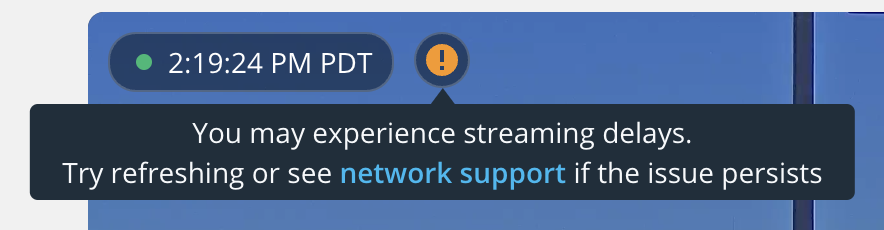
If you are experiencing a latency of around \~2 seconds, WebRTC has most likely failed. You will be able to easily determine this by looking at the video feed’s layover UI in Command. If you notice an orange exclamation mark (see image below) at the top of the camera’s video feed, this indicates that the camera was unable to establish a WebRTC connection.
### What are the recommended domains to use?
Verkada devices need to communicate with specific domains to provide you with a full-featured experience. The following domains must be accessible by the camera in order to establish a WebRTC connection:
```
*.control.verkada.com - TCP+UDP/443
*.verkada.com - TCP+UDP/443
time.control.verkada.com - UDP/123
*:4100 - TCP/UDP on LAN (only required for local streaming)
*.kinesisvideo.us-west-2.amazonaws.com - TCP/443
*.kinesisvideo.us-west-2.amazonaws.com - UDP/443
```
{% hint style="warning" %}
See [Camera Network Settings](/verkada-cameras/configuration/camera-network-settings.md) for more information.
{% endhint %}
#### Video resolution
| | | |
| ------------------------------------------------------------------------------ | --------------------- | --------------------------------------------------------------------------------------------------------------------------------------------------------------- |
| **Model** | **Sensor Resolution** | **Streaming Settings** |
| [CP52-E](https://docs.verkada.com/docs/video-security-ptz-series-overview.pdf) | 5MP (2688 x 1944) | Static PTZ: 600–2500 Kbps
User-controlled PTZ: 2000–4500 Kbps
Sentry Mode: 1500–4000 Kbps
|
| [CP63-E](https://docs.verkada.com/docs/video-security-cp63-e-datasheet.pdf) | 4K (3840 x 2160) | Static PTZ: 600–3000 Kbps
User-controlled PTZ: 2500–5000 Kbps
Sentry Mode: 1500–5000 Kbps
|
### What if I still cannot establish a low-latency WebRTC connection?
If your network is configured properly as per the instructions above, and you still cannot establish a low-latency WebRTC connection:
{% stepper %}
{% step %}
**Contact** [**Verkada Support**](https://www.verkada.com/support/)**.**
{% endstep %}
{% step %}
**Use the** [**Network Troubleshooting - Internet Sharing guide**](/verkada-cameras/maintenance-and-troubleshooting/troubleshooting/network-troubleshooting-internet-sharing.md) **to provide a packet capture to the team so we can best solve your issue.**
{% endstep %}
{% endstepper %}
---
# Agent Instructions
This documentation is published with GitBook. GitBook is the documentation platform designed so that both humans and AI agents can read, navigate, and reason over technical content effectively. Learn more at gitbook.com.
## Querying This Documentation
If you need additional information that is not directly available in this page, you can query the documentation by asking a question.
Perform an HTTP GET request on the following URL with the `ask` and `goal` query parameters:
```
GET https://help.verkada.com/verkada-cameras/maintenance-and-troubleshooting/troubleshooting/troubleshooting-guide-for-ptz-cameras.md?ask=&goal=
```
`ask` is the immediate question: it should be specific, self-contained, and written in natural language.
`goal` is what the user is ultimately trying to achieve, the reason they need the answer. Sharing it helps GitBook give you a better, more relevant answer. A goal is most helpful when it describes the outcome the user wants rather than restating the question. For example, with `ask=how do I create an API token`, a goal like `automate deployments from our CI pipeline` lets GitBook tailor the answer to that use case.
The response will contain a direct answer to the question and relevant excerpts and sources from the documentation.
Use this mechanism when the answer is not explicitly present in the current page, you need clarification or additional context, or you want to retrieve related documentation sections.