> For the complete documentation index, see [llms.txt](https://help.verkada.com/llms.txt). Markdown versions of documentation pages are available by appending `.md` to page URLs; this page is available as [Markdown](https://help.verkada.com/verkada-cameras/ja/insutru/camera-environmental-ratingsik-and-ip.md).
# カメラの環境評価—IKおよびIP
耐衝撃性および環境条件に関する標準ベースの評価について学びます
Verkadaのカメラには、カメラの物理的衝撃(「IK」)および特定の環境条件(「IP」)に対する耐性能力に関連する特定の評価があります。
***
## IK評価
IK評価は、 [国際電気標準会議(IEC)によって定義されています。](https://www.iec.ch/)。IEC [標準60529](https://en.wikipedia.org/wiki/EN_62262) は、「電気機器用筐体が外部の機械的衝撃から提供する保護の度合い」を説明しています。
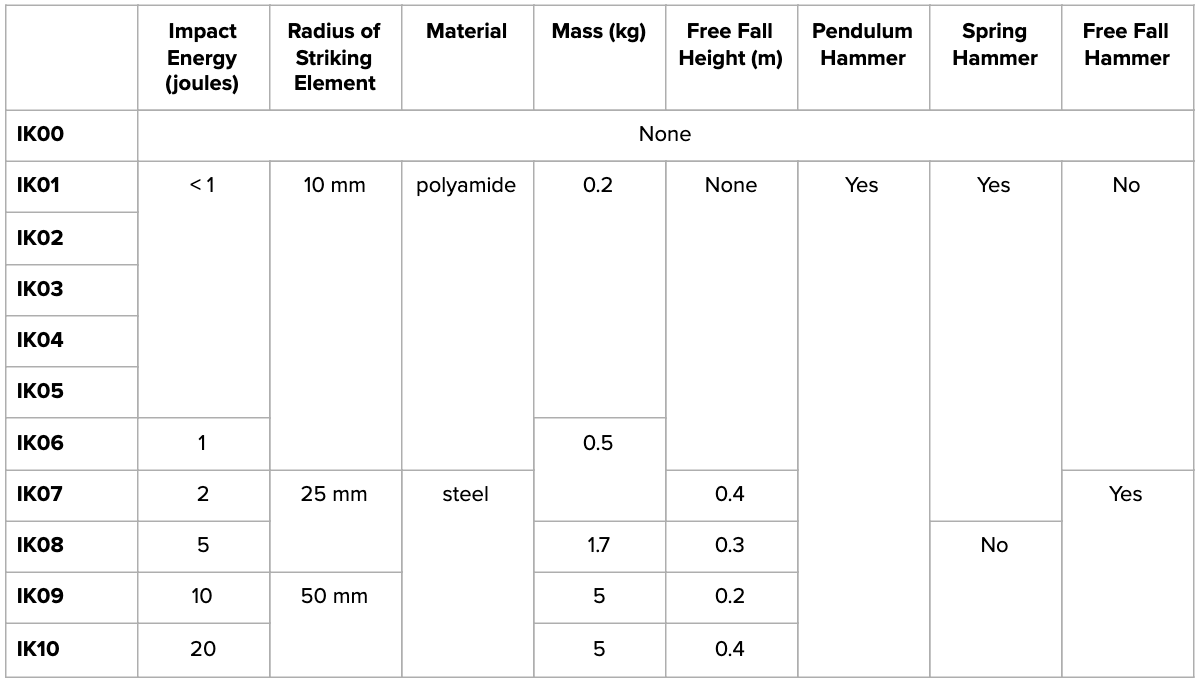
IK等級は0から10の尺度で、各試験レベルは、より高いレベルの物理的衝撃試験を示します。尺度が上がるにつれて、衝撃試験はより長い距離、より強い材料、より大きな質量、そして異なる種類の打撃器具を用いて実施されます。
#### IK08等級
Verkadaの屋内用CM41 Mini DomeとCamera Dome屋内シリーズは、すべてIK08等級です。
#### IK10等級
VerkadaのCM41-E、Camera Dome屋外シリーズ(型番中の「-E」)、CF83-EおよびCF81-E Fisheyeカメラ、Bulletカメラ、ならびにCR63-E/TE Remote Camerasは、すべてIK10等級です。
***
## IP評価
侵入保護(IP)評価もIECによって定義されています。IEC [標準60529](https://en.wikipedia.org/wiki/IP_Code) は、「機械的筐体および電気的筐体が、侵入、粉塵、偶発的接触、水に対して提供する保護の度合い」を説明しています。
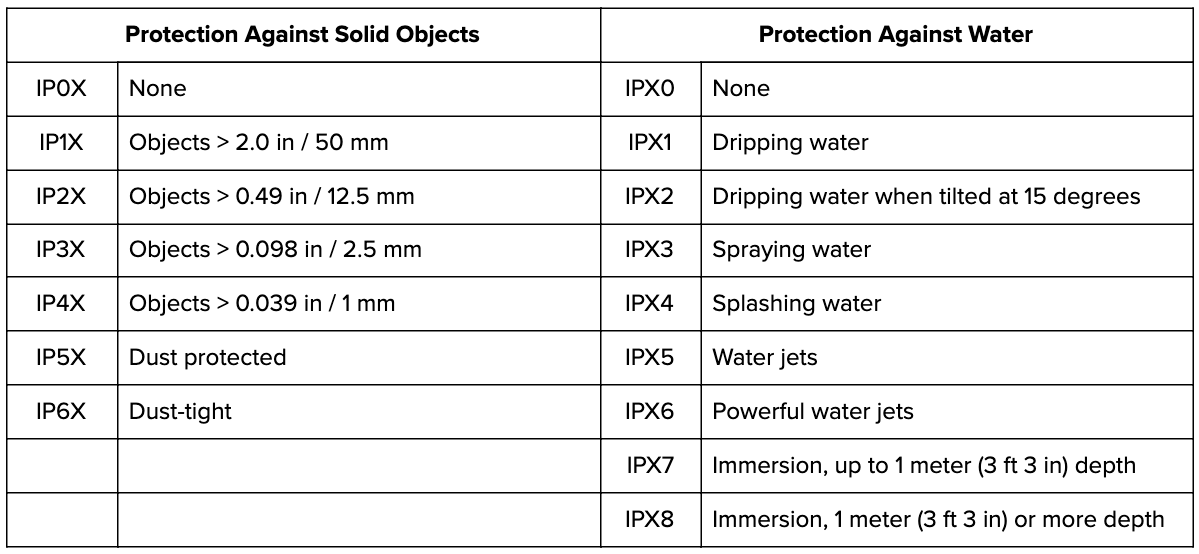
IP等級は、0から6および0から8までの数値の組み合わせとして示され、次のようになります:
* 最初の数字は、固体に対する保護の度合いを示します。
* 2つ目の数字は、水に対する保護の度合いを示します。尺度が上がるにつれて、物理的な固体の大きさは小さくなり、耐水試験はより厳格になります:
#### IP67等級
VerkadaのCM41-E、Camera Dome屋外シリーズ(型番中の「-E」)、CF83-EおよびCF81-E Fisheyeカメラ、Bulletカメラ、ならびにCR63-E/TE Remote CamerasはIP67等級であり、これは防塵(IP6X)かつ耐水(IPX7)であることを意味します。
---
# Agent Instructions
This documentation is published with GitBook. GitBook is the documentation platform designed so that both humans and AI agents can read, navigate, and reason over technical content effectively. Learn more at gitbook.com.
## Querying This Documentation
If you need additional information that is not directly available in this page, you can query the documentation by asking a question.
Perform an HTTP GET request on the following URL with the `ask` and `goal` query parameters:
```
GET https://help.verkada.com/verkada-cameras/ja/insutru/camera-environmental-ratingsik-and-ip.md?ask=&goal=
```
`ask` is the immediate question: it should be specific, self-contained, and written in natural language.
`goal` is what the user is ultimately trying to achieve, the reason they need the answer. Sharing it helps GitBook give you a better, more relevant answer. A goal is most helpful when it describes the outcome the user wants rather than restating the question. For example, with `ask=how do I create an API token`, a goal like `automate deployments from our CI pipeline` lets GitBook tailor the answer to that use case.
The response will contain a direct answer to the question and relevant excerpts and sources from the documentation.
Use this mechanism when the answer is not explicitly present in the current page, you need clarification or additional context, or you want to retrieve related documentation sections.