> For the complete documentation index, see [llms.txt](https://help.verkada.com/llms.txt). Markdown versions of documentation pages are available by appending `.md` to page URLs; this page is available as [Markdown](https://help.verkada.com/verkada-cameras/ja/insutru/camera-deployment/set-up-verkada-with-zscaler.md).
# ZScalerでVerkadaをセットアップする
Zscalerを使用してVerkadaカメラを展開する方法を学びます
Verkada の secure-by-default アーキテクチャの一部として、カメラからのすべての接続は外向きのみであり、Verkada のサーバーへの接続には TLS 1.2 を使用します。
プロキシは、クライアントから発信されるトラフィックを中継し、意図した宛先へ転送します。これらは、トラフィックのフィルタリング、監査、セキュリティなど、さまざまな理由で利用されます。場所によっては、これらの利点を活用するために、インターネット向けのすべてのトラフィックをプロキシ経由にリダイレクトするようネットワークを設定しています。
***
## Command を介して証明書を管理する
~を防ぐために *中間者攻撃*、Verkada のカメラと Verkada Command は管理された証明書を利用します。導入済みのプロキシの動作によっては、これらの証明書に調整が加えられると(SSL/TLS 復号化など)、カメラが起動しない、または正常に動作しません。
## SSL 検査を設定する
プロキシのユーザーは、SSL 検査をサポートできない技術に対してバイパスルールをよく利用します。これは、トラフィックがプロキシをバイパスできるようにするために使用する、特定のアドレス、FQDN、またはその他の識別特性を指定します。
{% hint style="info" %}
Verkada のカメラが正常に動作するよう、これを設定することを推奨します。
{% endhint %}
## 例
### Zscaler の例
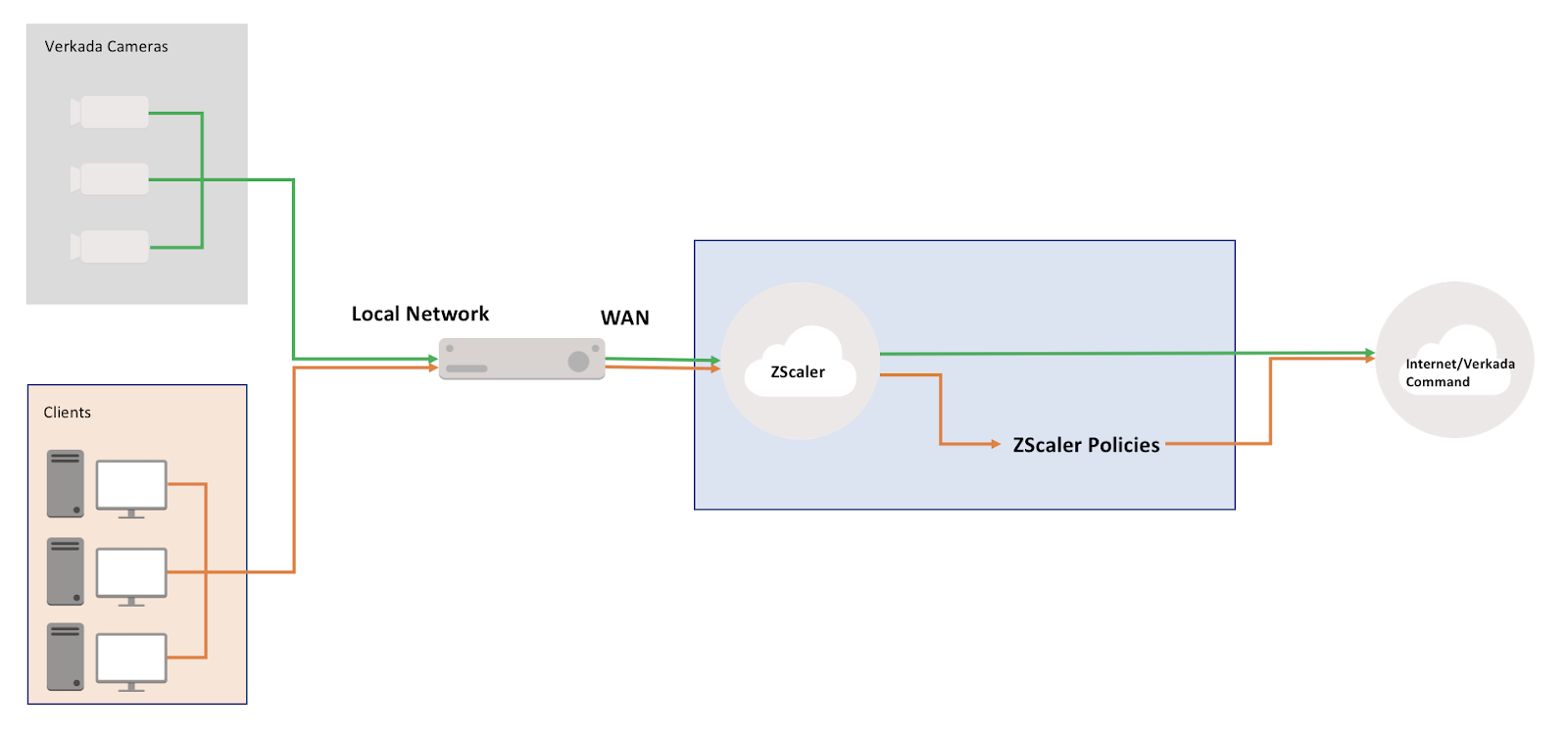
Zscaler は、クラウドベースのプロキシおよびファイアウォールソリューションです。トラフィックはオンプレミスからサービスへルーティングされ、そこでさまざまなポリシーを適用できます。
### トポロジーの例
このトポロジーは、望ましい最終的な状態を示しています。すべてのトラフィックは、元の設定に基づいて Zscaler に転送されます。
{% hint style="info" %}
Verkada が、カメラの安全な接続の確立に問題を引き起こす可能性のある Zscaler ポリシーの影響を受けないようにするには、Verkada のカメラからのトラフィックをそのようなポリシーから除外する除外ポリシーを設定する必要があります。
{% endhint %}
## 例外を設定する
Zscaler で SSL 検査を利用する場合、例外ポリシーを設定する必要があります。詳細はこちらをご覧ください: [設定方法](https://help.zscaler.com/zia/skipping-inspection-traffic-specific-urls-or-cloud-apps).
## カメラのトラフィックをローカルで Zscaler をバイパスする
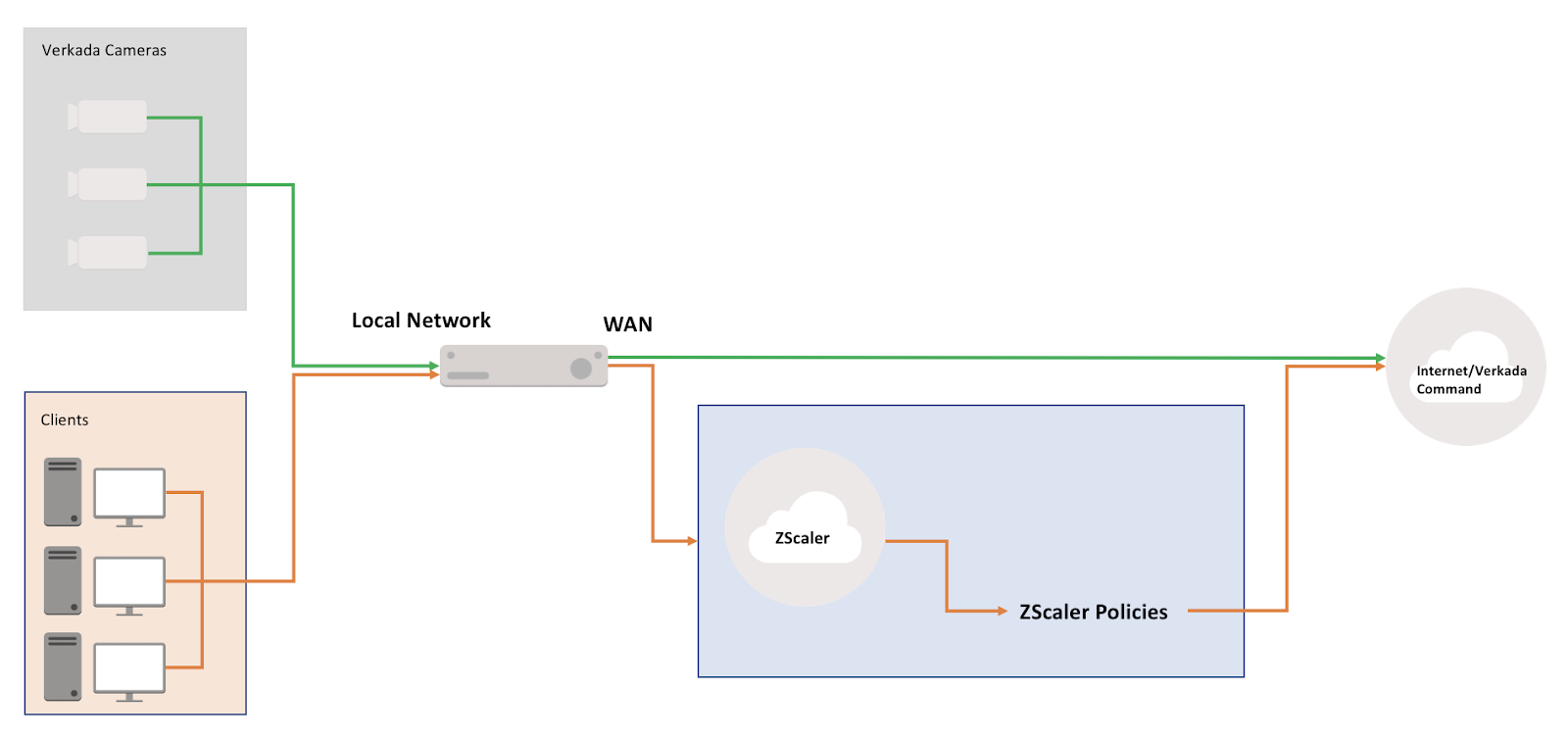
Zscaler サービスの設定によっては、Verkada のカメラのトラフィックを Zscaler にまったく転送しないことも可能です。たとえば、PBR を利用してクライアント VLAN のトラフィックのみを Zscaler に転送し、デフォルトルートを使ってトラフィックを GRE/IPSec トンネル経由で Zscaler DC に渡すのではなく、ルーティングを調整できる余地があります。
つまり、Verkada のカメラが専用 VLAN 上にある場合、その VLAN からのトラフィックを通常の方法でインターネットへ送出するようネットワークを設定しつつ、クライアントベースの VLAN は下図のように引き続き Zscaler に転送できます。
### トポロジーの例
## 考慮すべき Zscaler の機能
Zscaler には、活用できる追加機能がいくつかあります。 [帯域制御](https://help.zscaler.com/zia/about-bandwidth-control) を読んで、Verkada のカメラの動作に影響し得るものを確認してください。
Verkada のカメラがまだオンラインにならない場合は、 [新しいカメラがオンラインにならない](/verkada-cameras/ja/mentenansutotoraburushtingu/troubleshooting/troubleshoot-offline-camera.md).
---
# Agent Instructions
This documentation is published with GitBook. GitBook is the documentation platform designed so that both humans and AI agents can read, navigate, and reason over technical content effectively. Learn more at gitbook.com.
## Querying This Documentation
If you need additional information that is not directly available in this page, you can query the documentation by asking a question.
Perform an HTTP GET request on the following URL with the `ask` and `goal` query parameters:
```
GET https://help.verkada.com/verkada-cameras/ja/insutru/camera-deployment/set-up-verkada-with-zscaler.md?ask=&goal=
```
`ask` is the immediate question: it should be specific, self-contained, and written in natural language.
`goal` is what the user is ultimately trying to achieve, the reason they need the answer. Sharing it helps GitBook give you a better, more relevant answer. A goal is most helpful when it describes the outcome the user wants rather than restating the question. For example, with `ask=how do I create an API token`, a goal like `automate deployments from our CI pipeline` lets GitBook tailor the answer to that use case.
The response will contain a direct answer to the question and relevant excerpts and sources from the documentation.
Use this mechanism when the answer is not explicitly present in the current page, you need clarification or additional context, or you want to retrieve related documentation sections.