> For the complete documentation index, see [llms.txt](https://help.verkada.com/llms.txt). Markdown versions of documentation pages are available by appending `.md` to page URLs; this page is available as [Markdown](https://help.verkada.com/verkada-cameras/ja/insutru/camera-led-status-indicators.md).
# カメラのLEDステータスインジケーター
VerkadaカメラのLEDステータスインジケーターを理解する
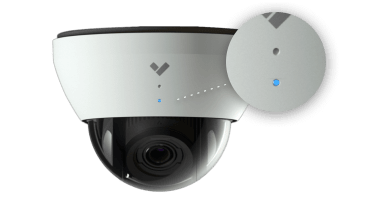
Verkadaカメラには外部LEDステータスライトが搭載されており、何が起きているかをひと目で確認できます。新しいモデルには、LANまたはWANのエラー特定に役立つ内部LEDもあります。
***
## 外部LEDステータス
ほとんどのVerkadaカメラには、カメラのステータスを示す白いリング状のLEDがあります。カメラのモデルによっては、このLEDが異なる色に変わったり点滅したりし、イベントやカメラの現在の状態を示すことがあります。
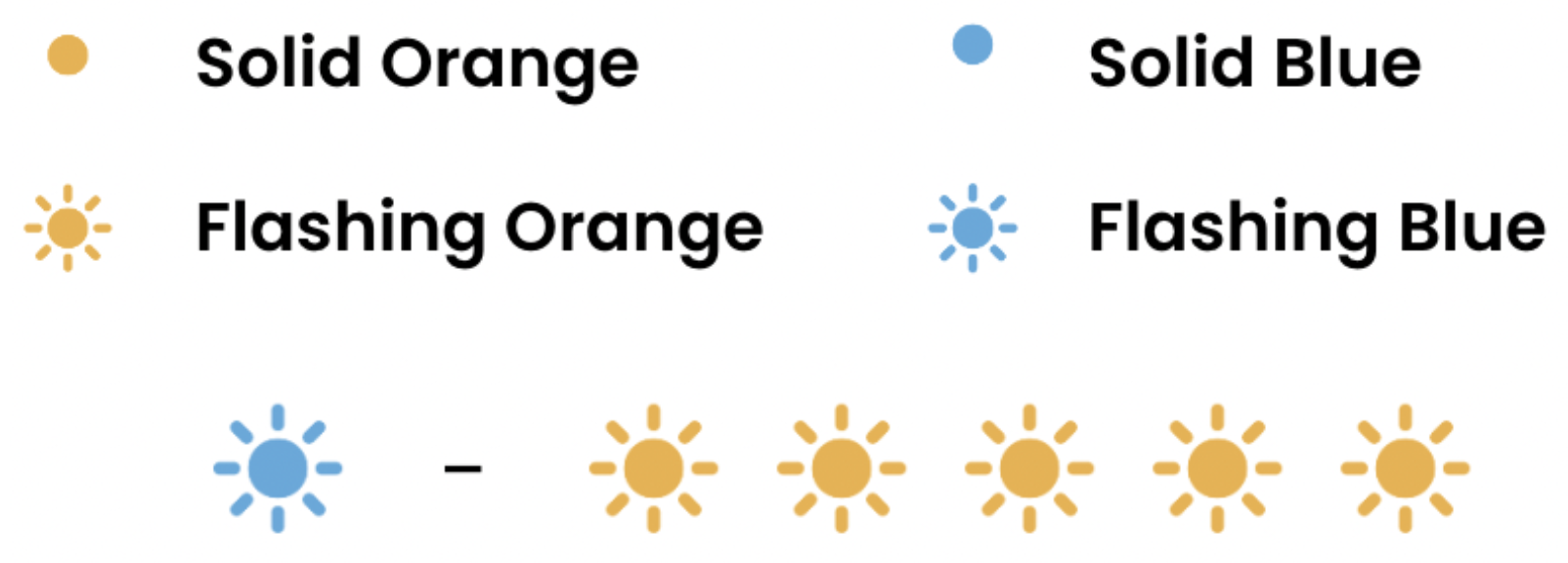
通常動作中、カメラはステータスを示すために1色のみを使用します:
* **点灯オレンジ**: カメラはオンで起動中
* **点滅オレンジ**: カメラがファームウェアを更新しています
* **点灯青**: カメラは動作中、接続済み、かつデータを記録しています
* **オレンジ+青の点滅:** 特定のネットワークエラー、下記を参照
* **赤点灯**\***:** Verkadaサポートに問い合わせる
* **赤点滅**\***:** 特定のネットワークエラー、 [下記を参照](#h_d4e6c0b640)
{% hint style="warning" %}
初回起動シーケンス(オレンジ点灯)は、カメラがいずれのエンドポイントにも到達できない場合、正しいLEDステータスが反映されるまで最大20分かかることがあります。
{% endhint %}
{% hint style="success" %}
**\*** CF83、CP63、CBx3、CDx3、CHx3、CYx3モデルでのみ利用可能です。
{% endhint %}
### Command上のステータスインジケーター
カメラには、カメラのステータスをひと目で示すCommand上のステータスインジケーターもあります:
* オレンジのステータスインジケーター: カメラがオフラインです
* 青点滅のステータスインジケーター: カメラがファームウェアをダウンロードしてアップグレードしています
* 青点灯のステータスインジケーター: カメラが新しいファームウェアバージョンを検証しています
* 緑のステータスインジケーター: カメラがオンラインです
* 白い円の中の緑のステータスインジケーター: カメラはローカル ストリーミング機能中です
* 緑のステータスインジケーターがゆっくり点滅: ライブフィードがバッファリング中です
***
## ネットワークエラー
カメラが通常動作に必要なエンドポイントおよびサービスに到達できない場合、ネットワークチェックを実行してVerkada Commandと通信を試みます。
カメラが各ネットワークチェックを実行した後、以下のいずれかのLEDステータスを表示します。
### 外部LED
カメラの上部カバーが取り付けられている場合、エラーは外側のステータスLEDで通知され、エラー状態に応じた回数だけ点滅します。
| | | |
| -------------- | ------------------------------------------------------ | -------------------------------------------------------------------------------------- |
| **LED のステータス** | **LANエラー** | **初期トラブルシューティング手順** |
| 赤1回 | カメラがIPアドレスを受信していません。 | ケーブルを確認し、さらにカメラがDynamic Host Configuration Protocol (DHCP) サーバーからIP割り当てを受けていることを確認します。 |
| 赤2回 | カメラがLAN上で重複したIPアドレスを検出しました。 | 重複IPを持つデバイスのうち1台を特定して再設定し、一意のIPアドレスを使用するか、DHCPを有効にして競合を回避します。 |
| 赤3回 | カメラが構成済みゲートウェイに到達できません。 | カメラのIPアドレス、サブネットマスク、ゲートウェイが正しく構成されていること、およびゲートウェイが正常に動作してアクセス可能であることを確認します。 |
| 赤4回 | カメラはPower over Ethernet (PoE) で接続されていますが、スイッチに接続できません。 | カメラのEthernetインターフェースの物理層ステータスを確認します。 |
| 赤5回 | カメラがVerkadaのホスト名を解決できません。 | カメラが正常に動作しているDNSサーバーに到達できることを確認します。 |
| 赤6回 | カメラがNetwork Time Protocol (NTP) サーバーから応答を受信できません。 | 正しいNTPサーバーアドレスが構成されていることを確認し、サーバーにネットワークから到達できることを確認します。 |
| 赤7回 | 起動後にVerkadaのエンドポイントに到達できません。 | Verkadaのエンドポイントへのアクセスをブロックしている可能性のあるファイアウォールルールを確認します。 |
### 内部LED
カメラの上部カバーを取り外すと、特定のエラーはLANまたはWANのデバッグLEDでローカルに通知され、デバイスステータスLEDは赤点灯になります。
#### LANエラー
| | | |
| -------------- | ------------------------------------------------------ | -------------------------------------------------------------------------------------- |
| **LED のステータス** | **LANエラー** | **初期トラブルシューティング手順** |
| 赤1回 | カメラがIPアドレスを受信していません。 | ケーブルを確認し、さらにカメラがDynamic Host Configuration Protocol (DHCP) サーバーからIP割り当てを受けていることを確認します。 |
| 赤2回 | カメラがLAN上で重複したIPアドレスを検出しました。 | 重複IPを持つデバイスのうち1台を特定して再設定し、一意のIPアドレスを使用するか、DHCPを有効にして競合を回避します。 |
| 赤3回 | カメラが構成済みゲートウェイに到達できません。 | カメラのIPアドレス、サブネットマスク、ゲートウェイが正しく構成されていること、およびゲートウェイが正常に動作してアクセス可能であることを確認します。 |
| 赤4回 | カメラはPower over Ethernet (PoE) で接続されていますが、スイッチに接続できません。 | カメラのEthernetインターフェースの物理層ステータスを確認します。 |
#### WANエラー
| | | |
| -------------- | ------------------------------------------------- | -------------------------------------------------------- |
| **LED のステータス** | **WANエラー** | **初期トラブルシューティング手順** |
| 赤1回 | カメラがVerkadaのホスト名を解決できません。 | カメラが正常に動作しているDNSサーバーに到達できることを確認します。 |
| 赤2回 | カメラがNetwork Time Protocol (NTP) サーバーから応答を受信できません。 | 正しいNTPサーバーアドレスが構成されていることを確認し、サーバーにネットワークから到達できることを確認します。 |
| 赤3回 | 起動後にVerkadaのエンドポイントに到達できません。 | Verkadaのエンドポイントへのアクセスをブロックしている可能性のあるファイアウォールルールを確認します。 |
***
## 他のカメラモデルでのネットワークエラー
カメラが通常動作に必要なエンドポイントおよびサービスに到達できない場合、ネットワークチェックを実行してVerkada Commandと通信を試みます。
カメラが各ネットワークチェックを実行した後、以下のいずれかのLEDステータスを表示します。
#### 青点滅LED
カメラがVerkada Commandに接続できません。
{% hint style="warning" %}
青点滅LEDのステータスは、ファームウェアが工場出荷時のカメラでのみ表示されます。カメラがCommandに接続して最新のファームウェアに更新されると、以下に示す詳細なLEDステータスのみが使用されます。
{% endhint %}
#### 青+オレンジのLED
| | | |
| ----------------------- | ------------------------------------------------------------------------------------------------------------ | ---------------------------------------------------------------------------------- |
| **LED のステータス** | **ネットワークエラー** | **初期トラブルシューティング手順** |
| 青1回
オレンジ1回
| カメラはPower over Ethernet (PoE) で接続されていますが、スイッチに接続できません。 | カメラのEthernetインターフェースの物理層ステータスを確認します。 |
| 青1回
オレンジ2回
| カメラがIPアドレスを受信していません。 | カメラがDynamic Host Configuration Protocol (DHCP) サーバーからIP割り当てを受けていることを確認します。 |
| 青1回
オレンジ3回
| カメラが構成済みゲートウェイに到達できません。 | カメラのIPアドレス、サブネットマスク、ゲートウェイが正しく構成されていること、およびゲートウェイが正常に動作してアクセス可能であることを確認します。 |
| 青1回
オレンジ4回
| カメラがLAN上で重複したIPアドレスを検出しました。 | 重複IPを持つデバイスのうち1台を特定して再設定し、一意のIPアドレスを使用するか、DHCPを有効にして競合を回避します。 |
| 青1回
オレンジ5回
| カメラがVerkadaのホスト名を解決できません。 | カメラが正常に動作しているDNSサーバーに到達できることを確認します。 |
| 青1回
オレンジ6回
| カメラがNetwork Time Protocol (NTP) サーバーから応答を受信できません。 | 正しいNTPサーバーアドレスが構成されていることを確認し、サーバーにネットワークから到達できることを確認します。 |
| 青1回
オレンジ7回
| カメラはSecure Sockets Layer (SSL) 接続を証明できません。SSLインスペクションが原因である可能性が高いです。 | VerkadaのエンドポイントとのTransport Layer Security (TLS) ハンドシェイクを試行する際に、カメラに提示される証明書を検証します。 |
| 青1回
オレンジ8回
| 起動後にVerkadaのエンドポイントに到達できません。
注: このLEDステータスは、少なくとも1つのエンドポイントに到達できない場合にのみ表示されます。
| Verkadaのエンドポイントへのアクセスをブロックしている可能性のあるファイアウォールルールを確認します。 |
***
## ネットワーク診断に使用されるエンドポイント
カメラが使用できるエンドポイントは、有効になっている機能によって複数あります。LEDステータスについては、カメラの動作に不可欠なエンドポイントのみがテストされ、LEDステータスに反映されます。
#### **米国**
テストされるエンドポイントの一覧は次のとおりです:
```
*.kinesisvideo.us-west-2.amazonaws.com - TCP+UDP/443
*.us-west-2.compute.amazonaws.com - TCP+UDP/443
*:4100 - LAN上のTCP/UDP(ローカルストリーミング機能にのみ必要)
```
#### EU
```
*.kinesisvideo.eu-west-1.amazonaws.com - TCP+UDP/443
*.eu-west-1.compute.amazonaws.com - TCP+UDP/443
*:4100 - LAN上のTCP/UDP(ローカルストリーミング機能にのみ必要)
```
#### 米国およびEU (NTPサーバー)
これらのエンドポイントに加えて、時刻同期の到達性を確認するため、カメラは次のサーバーを検証します:
```
NTSサーバー
time.cloudflare.com - TCP/4460
time.cloudflare.com - UDP/123
NTPサーバー
time.control.verkada.com - UDP/123
```
{% hint style="info" %}
Network Time Security (NTS) は、NTP とは異なり、安全な時刻同期のために Secure Sockets Layer (SSL) を使用します。これらの接続は SSL 復号ポリシーの対象外にすることを推奨します。
{% endhint %}
***
{% hint style="info" %}
**実際の動作をご覧になりますか?** こちらをご覧ください: [動画チュートリアル](https://www.youtube.com/watch?v=AV8a6OrrA4c).
{% endhint %}
---
# Agent Instructions
This documentation is published with GitBook. GitBook is the documentation platform designed so that both humans and AI agents can read, navigate, and reason over technical content effectively. Learn more at gitbook.com.
## Querying This Documentation
If you need additional information that is not directly available in this page, you can query the documentation by asking a question.
Perform an HTTP GET request on the following URL with the `ask` and `goal` query parameters:
```
GET https://help.verkada.com/verkada-cameras/ja/insutru/camera-led-status-indicators.md?ask=&goal=
```
`ask` is the immediate question: it should be specific, self-contained, and written in natural language.
`goal` is what the user is ultimately trying to achieve, the reason they need the answer. Sharing it helps GitBook give you a better, more relevant answer. A goal is most helpful when it describes the outcome the user wants rather than restating the question. For example, with `ask=how do I create an API token`, a goal like `automate deployments from our CI pipeline` lets GitBook tailor the answer to that use case.
The response will contain a direct answer to the question and relevant excerpts and sources from the documentation.
Use this mechanism when the answer is not explicitly present in the current page, you need clarification or additional context, or you want to retrieve related documentation sections.