> For the complete documentation index, see [llms.txt](https://help.verkada.com/llms.txt). Markdown versions of documentation pages are available by appending `.md` to page URLs; this page is available as [Markdown](https://help.verkada.com/verkada-cameras/ja/she-ding/view-and-edit-camera-settings/schedule-camera-firmware-updates.md).
# カメラのファームウェア更新をスケジュールする
カメラがファームウェア更新を実行するタイミングを設定します
Verkada は定期的にカメラのファームウェア更新をリリースしています。これらの更新はセキュリティと機能を強化し、クラウドライセンスの一部として追加費用なしで含まれています。
ファームウェア更新は自動的に配信されます。ただし、構成済みの時間枠内に実行されるようにファームウェア更新をスケジュールできます。
## ファームウェア更新をスケジュールする
{% stepper %}
{% step %}
**Verkada Command で、\[All Products] > \[Cameras] に移動します。**
{% endstep %}
{% step %}
**スケジュール対象のカメラを選択します。**
{% endstep %}
{% step %}
**右下の[Settings]をクリックします。**
{% endstep %}
{% step %}
**[一般]で、[ファームウェア更新をスケジュール]をオンにします。**
{% endstep %}
{% step %}
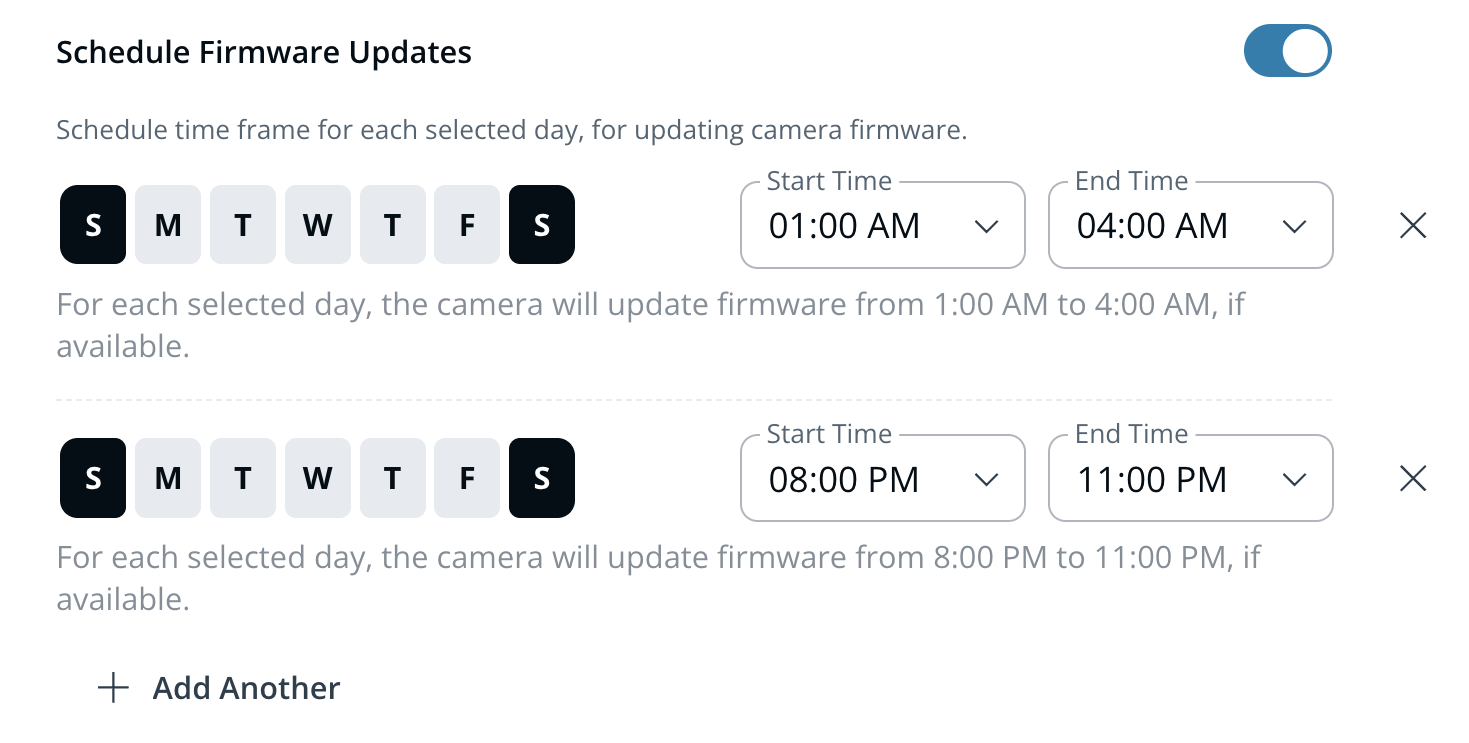
**更新を実行する時間枠を設定します。**
{% endstep %}
{% endstepper %}
{% hint style="danger" %}
更新の時間枠は最低 2 時間必要です。この間、カメラが再起動する場合があります。
{% endhint %}
***
## ファームウェア更新とバージョン管理
### 今すぐ更新
新しい更新が利用可能な場合、 **今すぐ更新** ファームウェアバージョンの下に表示されます。クリック **今すぐ更新** して更新を開始します。処理の開始から完了まで最大 20 分かかる場合があります。
### ファームウェアのバージョン管理
カメラのファームウェアバージョンは、カメラ設定ページの以下に表示されます。 **ファームウェア**.
該当バージョンのファームウェアリリースノートは、以下で確認できます。 [Verkada の更新ページ](https://www.verkada.com/updates/?category=release-notes\&page=1)、C.29.0.6 から開始します。
### 自動フェイルオーバー
各 Verkada カメラには、信頼性の高い更新を実現するためのデュアルパーティションのファームウェアバンクがあります。まれにファームウェア更新が失敗した場合、デバイスは自動的に以前のバージョンに戻り、後で更新を再試行します。
### ファームウェア更新中、カメラの録画は停止しますか?
サービスの中断を最小限に抑えるため、フェイルセーフなファームウェア更新を優先しています。更新プロセスの最終段階でカメラが一時的にオフラインになる場合がありますが、これらの更新は通常のメンテナンス時間帯にスケジュールされるため、影響は最小限です。
---
# Agent Instructions
This documentation is published with GitBook. GitBook is the documentation platform designed so that both humans and AI agents can read, navigate, and reason over technical content effectively. Learn more at gitbook.com.
## Querying This Documentation
If you need additional information that is not directly available in this page, you can query the documentation by asking a question.
Perform an HTTP GET request on the following URL with the `ask` and `goal` query parameters:
```
GET https://help.verkada.com/verkada-cameras/ja/she-ding/view-and-edit-camera-settings/schedule-camera-firmware-updates.md?ask=&goal=
```
`ask` is the immediate question: it should be specific, self-contained, and written in natural language.
`goal` is what the user is ultimately trying to achieve, the reason they need the answer. Sharing it helps GitBook give you a better, more relevant answer. A goal is most helpful when it describes the outcome the user wants rather than restating the question. For example, with `ask=how do I create an API token`, a goal like `automate deployments from our CI pipeline` lets GitBook tailor the answer to that use case.
The response will contain a direct answer to the question and relevant excerpts and sources from the documentation.
Use this mechanism when the answer is not explicitly present in the current page, you need clarification or additional context, or you want to retrieve related documentation sections.