> For the complete documentation index, see [llms.txt](https://help.verkada.com/llms.txt). Markdown versions of documentation pages are available by appending `.md` to page URLs; this page is available as [Markdown](https://help.verkada.com/verkada-cameras/ja/she-ding/view-and-edit-camera-settings/find-a-cameras-serial-number-and-mac-address.md).
# カメラのシリアル番号とMACアドレスを確認する
カメラのシリアル番号とMACアドレスを見つける
Command に追加して、アクセスして管理できるようにするには、カメラのシリアル番号が必要です。
カメラのメディアアクセスコントロール (MAC) アドレスを把握しておくと、トラブルシューティング、静的な DHCP の割り当て、ファイアウォールの許可リストなどに役立ちます。
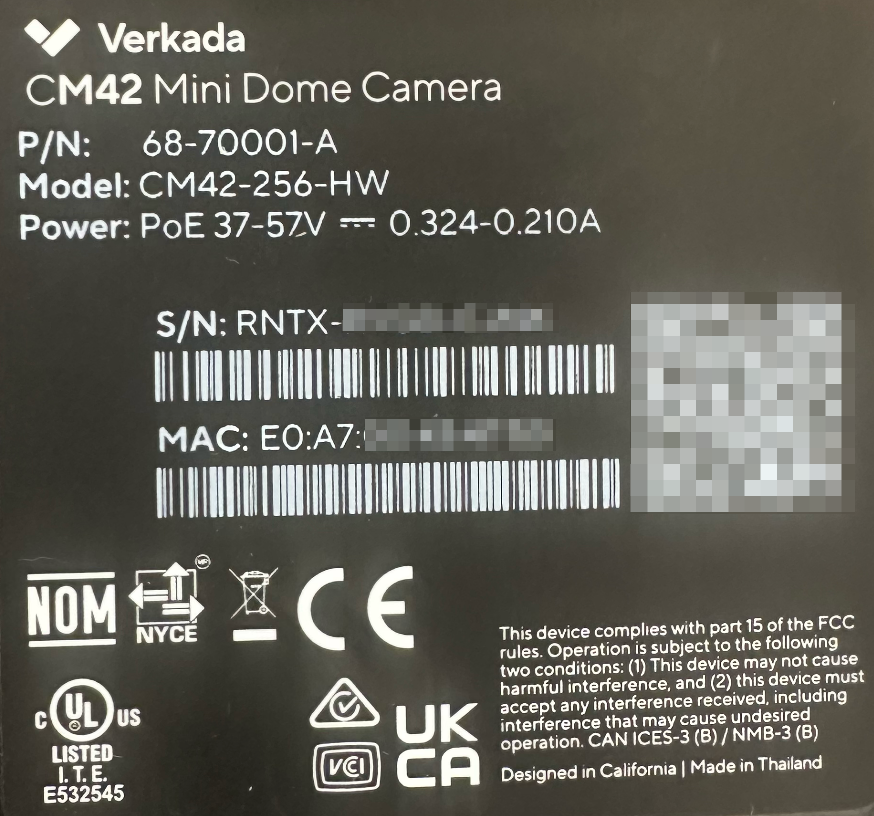
カメラのシリアル番号と MAC アドレスは、 [カメラのラベル](#h_a39c069cd2) および [カメラの設定ページ](#h_5539707d87) Command で。
{% hint style="warning" %}
すべての Verkada の MAC アドレスは **E0:A7:00**.
{% endhint %}
***
### カメラのラベル
各カメラの底面には、シリアル番号、クイック追加用の QR コード、MAC アドレスが記載されたラベルがあります。
***
### カメラの設定ページ
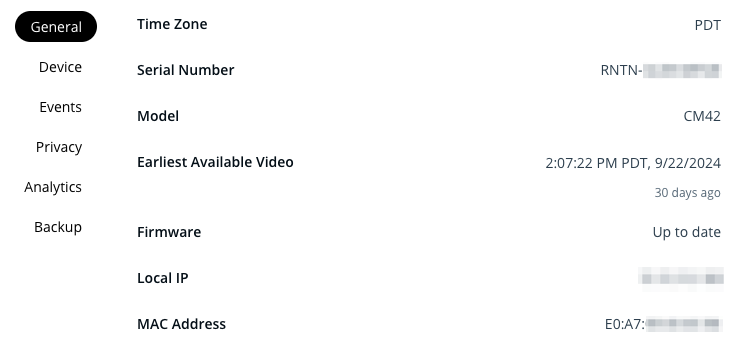
カメラがオンラインになると、MAC アドレスが Command に表示されます。
{% hint style="danger" %}
必要です [組織管理者の権限](/command/ja/yzto/roles-and-permissions-for-command.md) Command でカメラの MAC アドレスを表示するために。
{% endhint %}
{% stepper %}
{% step %}
**Verkada Command で、\[All Products] > \[Cameras] に移動します。**
{% endstep %}
{% step %}
**カメラを選択します。**
{% endstep %}
{% step %}
**右下の[設定]をクリックします。**
{% endstep %}
{% step %}
**[一般]では、シリアル番号、MAC アドレス、その他の設定を確認できます。**
{% endstep %}
{% endstepper %}
---
# Agent Instructions
This documentation is published with GitBook. GitBook is the documentation platform designed so that both humans and AI agents can read, navigate, and reason over technical content effectively. Learn more at gitbook.com.
## Querying This Documentation
If you need additional information that is not directly available in this page, you can query the documentation by asking a question.
Perform an HTTP GET request on the following URL with the `ask` and `goal` query parameters:
```
GET https://help.verkada.com/verkada-cameras/ja/she-ding/view-and-edit-camera-settings/find-a-cameras-serial-number-and-mac-address.md?ask=&goal=
```
`ask` is the immediate question: it should be specific, self-contained, and written in natural language.
`goal` is what the user is ultimately trying to achieve, the reason they need the answer. Sharing it helps GitBook give you a better, more relevant answer. A goal is most helpful when it describes the outcome the user wants rather than restating the question. For example, with `ask=how do I create an API token`, a goal like `automate deployments from our CI pipeline` lets GitBook tailor the answer to that use case.
The response will contain a direct answer to the question and relevant excerpts and sources from the documentation.
Use this mechanism when the answer is not explicitly present in the current page, you need clarification or additional context, or you want to retrieve related documentation sections.