> For the complete documentation index, see [llms.txt](https://help.verkada.com/llms.txt). Markdown versions of documentation pages are available by appending `.md` to page URLs; this page is available as [Markdown](https://help.verkada.com/verkada-cameras/ja/fen-xi/create-camera-event-alerts/license-plate-of-interest-alerts.md).
# 注目ナンバープレートアラート
注目ナンバープレート(LPOI)アラートを設定する方法を学びます
VerkadaのLicense Plate of Interest(LPOI)機能を使用すると、検出されたときにアラートを発するナンバープレートの一覧を定義できます。
License Plate of Interest(LPOI)リストを整理して管理するには、次のことができます。
* カスタムタグを使用してプロファイルを分類し、整理します。
* [特定のナンバープレートに対するアラートを簡単に作成および管理できます。](#configure-alerts)
* タグを検索して登録人物プロファイルをすばやく見つけます。
* 登録人物プロファイル用のカスタムタグを作成し、それらのプロファイルをそのタグに関連付けます。
* [登録人物プロファイルをLPOIプロファイルに関連付けます。](#associate-an-lpoi-with-a-poi)
{% hint style="warning" %}
LPOIはオーガナイゼーション'単位で設定されます。LPOIリストはオーガナイゼーション'のすべてのユーザーで共有されます。メールとSMSの通知はユーザーごとに設定されます。SMSまたはメールの通知を有効にすると、オーガナイゼーション'内のすべてのLPOIについて通知を受け取ります。
{% endhint %}
***
{% tabs %}
{% tab title="LPOIを設定" %}
{% hint style="danger" %}
LPOIイベントを作成するには、オーガナイゼーション'内の少なくとも1つのサイトでSite Adminである必要があります。参照 [Command のロールと権限](/command/ja/yzto/roles-and-permissions-for-command.md) 詳細情報は
{% endhint %}
{% stepper %}
{% step %}
**Verkada Command で、\[All Products] > \[Cameras] に移動します。**
{% endstep %}
{% step %}
**左側のナビゲーションで、Vehiclesを選択します。**
{% endstep %}
{% step %}
**左側の[License Plate Lists]で、LPOIを選択します。**
{% endstep %}
{% step %}
**上部で、クリックします** :plus:.
{% endstep %}
{% step %}
**[LPOIに新しいナンバープレートを追加]で、次のいずれかのオプションを選択します。**
* **ナンバープレートを手動で追加。**
1. ナンバープレート番号を入力します。
2. (任意)説明を追加します。
3. クリックします **確認。**
* **CSVファイルから一括アップロード。**
1. CSVテンプレートをダウンロードします。
2. テンプレートにLPOIを追加します。
3. ファイルをドロップするか、アップロードするファイルを選択します。
{% hint style="warning" %}
ファイルのアップロード後、成功したアップロードと失敗したアップロードを示すメールが届きます。エラーがあるCSVをダウンロードして、失敗したアップロードを修正できます。
{% endhint %}
* **既存のものから選択。**
1. 一覧からナンバープレートを検索または選択します。
2. クリックします **確認。**
{% endstep %}
{% endstepper %}
{% endtab %}
{% tab title="LPOIを登録人物に関連付ける" %}
License Plate of Interestプロファイルを登録人物プロファイルに関連付けることができます。これにより、特定の人物を調査する際にイベントを確認しやすくなります。
{% stepper %}
{% step %}
**Verkada Command で、\[All Products] > \[Cameras] に移動します。**
{% endstep %}
{% step %}
**左側のナビゲーションで、Peopleを選択します。**
{% endstep %}
{% step %}
**左側の[People List]で、登録人物を選択します。**
{% endstep %}
{% step %}
**登録人物を選択します。**
a. 左側で、 **ナンバープレート、** をクリックします :plus:.\
b. 一覧からナンバープレートを検索または選択して、プロファイルに追加します。\
c. あるいは、プレートがまだCommandに追加されていない場合は、検索バーにプレート番号を入力してクリック **関心対象ナンバープレートを作成する**.
{% endstep %}
{% endstepper %}
{% endtab %}
{% tab title="アラートを構成" %}
### アラートを作成 > イベント
{% stepper %}
{% step %}
**Commandのホームページで、左側のナビゲーションから「アラート」をクリックします。**
{% endstep %}
{% step %}
**上部で、\[新しいアラート] をクリックします。**
{% endstep %}
{% step %}
**[イベントの選択]で、カメラ > 関心対象ナンバープレートを選択します。**
{% endstep %}
{% step %}
**[カメラ]で:**
1. アラートの受信元として **すべてのカメラ、** **サイト、** または **個別のカメラ**.
2. クリックします **[完了]** して続行します。
{% endstep %}
{% step %}
**[関心対象ナンバープレート]で:**
1. 選択 **すべて、特定のナンバープレート、** または **ナンバープレート一覧。**
2. クリックします **[完了]** アラートを続けて [通知スケジュール](#create-alert-greater-than-cameras).
{% endstep %}
{% endstepper %}
### アラートの作成 > 通知スケジュール
{% stepper %}
{% step %}
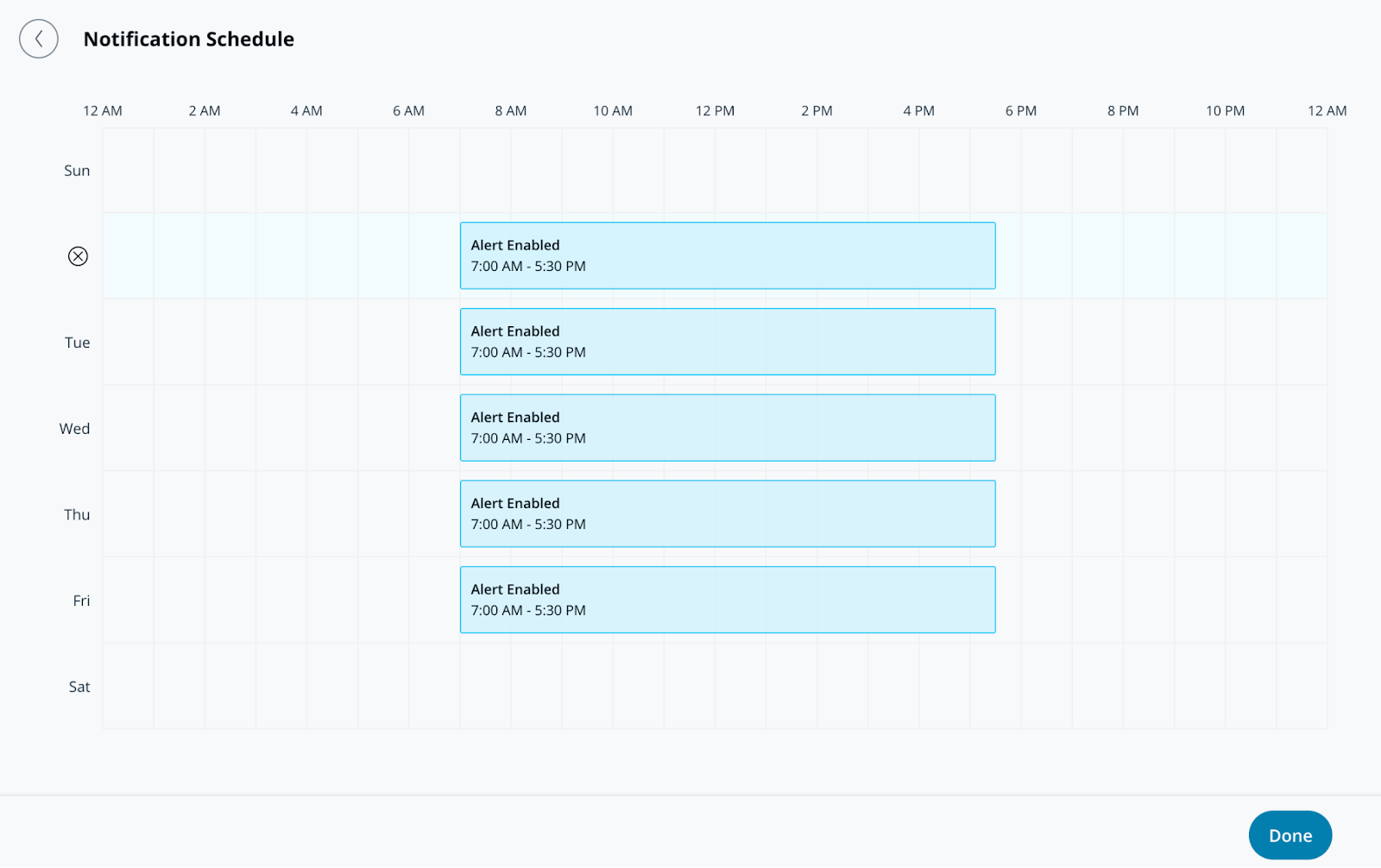
**通知スケジュールでは、アラートが通知を送信する曜日と時刻を指定します。アラートは既定で24時間365日送信されます。**
{% endstep %}
{% step %}
**「完了」をクリックして、アラートの設定を続行します** [**通知**](#create-alert-greater-than-notification)**.**
{% endstep %}
{% endstepper %}
### アラートの作成 > 通知
{% stepper %}
{% step %}
**通知では、ユーザーを個別に追加するか、アラートをグループに割り当てます。**
{% endstep %}
{% step %}
**ユーザーまたはグループの横にあるドロップダウンメニューを選択して、通知方法を選びます。受信者には、プッシュ通知、SMS、メッセージングプラットフォームのアラート、またはメール通知で通知できます。**
{% hint style="info" %}
このアラートに追加された受信者には、以下の **共有アラート** 各自の **アラート** ページ。
{% endhint %}
{% endstep %}
{% step %}
**(オプション)既定では、あなたはアラートの受信者になります。ドロップダウンメニューを選択し、「削除」をクリックして自分を削除します。**
{% endstep %}
{% step %}
**「完了」をクリックして、アラートの** [**オプション設定**](#optional-settings)**、または** [**アラートを完了します**](#finish-the-alert)**.**
{% endstep %}
{% endstepper %}
### オプション設定
#### アラートの作成 > 運用
{% stepper %}
{% step %}
**アラートからチケットを作成するには、[運用へルーティング]をオンにします。**
{% endstep %}
{% step %}
**(オプション)[チケットの手順]を選択してチケットに情報を追加し、「完了」をクリックします。**
{% endstep %}
{% step %}
**「完了」をクリックして次へ進みます** [**アラートを完了します**](#finish-the-alert)**.**
{% endstep %}
{% endstepper %}
#### アラートの作成 > デバイスアクション
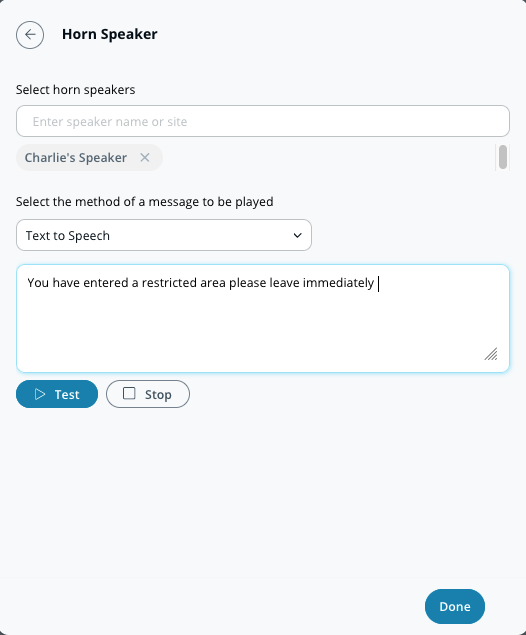
個人への通知に加えて、アラートがトリガーされたときにホーンスピーカーを再生するよう設定できます。これらのアラートは、テキスト読み上げまたはアップロードしたMP3ファイルを使用できます。
{% stepper %}
{% step %}
**デバイスアクションでは、メッセージを再生したいホーンスピーカーを選択します。**
{% endstep %}
{% step %}
**通知の設定を選択します(テキスト読み上げまたは音声ファイル)。**
a. **テキスト読み上げ、** 200文字以内のメッセージを入力します。\
b. **音声ファイル、** ファイルをドラッグ&ドロップするか、 **ファイルを選択** して音声クリップをアップロードします。
{% endstep %}
{% step %}
**「完了」をクリックして次へ進みます** [**アラートを完了します**](#finish-the-alert)**.**
{% endstep %}
{% endstepper %}
### アラートを完了する
{% stepper %}
{% step %}
**構成ウィンドウの右下で、「次へ」をクリックします。**
{% endstep %}
{% step %}
**アラートの説明的な名前を入力します。**
{% endstep %}
{% step %}
**設定を完了するには、「完了」をクリックします。**
{% endstep %}
{% endstepper %}
{% endtab %}
{% endtabs %}
---
# Agent Instructions
This documentation is published with GitBook. GitBook is the documentation platform designed so that both humans and AI agents can read, navigate, and reason over technical content effectively. Learn more at gitbook.com.
## Querying This Documentation
If you need additional information that is not directly available in this page, you can query the documentation by asking a question.
Perform an HTTP GET request on the following URL with the `ask` and `goal` query parameters:
```
GET https://help.verkada.com/verkada-cameras/ja/fen-xi/create-camera-event-alerts/license-plate-of-interest-alerts.md?ask=&goal=
```
`ask` is the immediate question: it should be specific, self-contained, and written in natural language.
`goal` is what the user is ultimately trying to achieve, the reason they need the answer. Sharing it helps GitBook give you a better, more relevant answer. A goal is most helpful when it describes the outcome the user wants rather than restating the question. For example, with `ask=how do I create an API token`, a goal like `automate deployments from our CI pipeline` lets GitBook tailor the answer to that use case.
The response will contain a direct answer to the question and relevant excerpts and sources from the documentation.
Use this mechanism when the answer is not explicitly present in the current page, you need clarification or additional context, or you want to retrieve related documentation sections.