> For the complete documentation index, see [llms.txt](https://help.verkada.com/llms.txt). Markdown versions of documentation pages are available by appending `.md` to page URLs; this page is available as [Markdown](https://help.verkada.com/verkada-cameras/ja/bideosutorminguto/live-streaming/modify-high-quality-video-bitrates.md).
# 高品質ビデオのビットレートを変更する
HQビットレートを調整してカメラのビデオ品質を最適化します
カメラの高品質 (HQ) ビットレートを変更して、視聴体験を最適化できます。
{% hint style="danger" %}
この機能は、以下と互換性がありません [PTZシリーズカメラ](https://www.verkada.com/security-cameras/ptz/#overview).
{% endhint %}
### 考慮事項
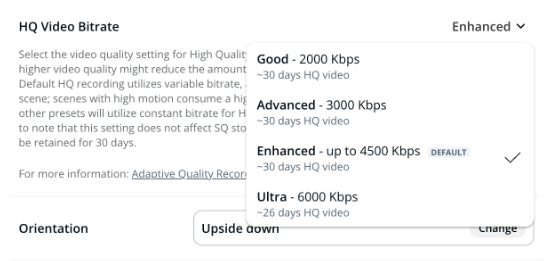
* デフォルトのHQビットレートプリセット(Enhanced)は可変ビットレートを使用し、シーンに応じて動的に調整されます。動きの多いシーンでは、より高品質にするためにより多くの帯域幅を使用し、より単純なシーンでは少なくなるため、ストレージ容量を最適化できます。これに対し、他のプリセットはHQ映像に固定ビットレートを使用します。
* より高い映像品質を選択すると、後で視聴するために保存されるHQ映像の保存期間は短くなります。
* 推定値は、カメラの録画履歴に基づいて計算され、既存のHQ映像を使用して保持期間中の動きのレベルを見積もります。カメラの設置からまだ短時間しか経過していない場合(例: 1時間)、Command が正確な推定値を提供するためのデータが十分でない可能性があります。
{% hint style="info" %}
ビットレートを下げてネットワークリソースを節約し、帯域幅が制約された環境でパフォーマンスを最適化します。混雑した廊下など動きの多い場所では、ビットレートを上げて、より良い映像品質を確保します。
{% endhint %}
***
## HQ映像品質を変更
{% hint style="danger" %}
必要です [サイト管理者](/verkada-cameras/ja/hajimeni/roles-and-permissions-for-cameras.md) カメラのHQ映像ビットレートを変更する権限。
{% endhint %}
{% stepper %}
{% step %}
**Verkada Command で、\[All Products] > \[Cameras] に移動します。**
{% endstep %}
{% step %}
**変更するカメラを選択します。**
{% endstep %}
{% step %}
**右側で[設定]をクリックします。**
{% endstep %}
{% step %}
**[デバイス]>[HQ Video Bitrate]で、ドロップダウンからオプションを選択します。**
{% endstep %}
{% endstepper %}
{% hint style="warning" %}
この設定はSQの保存容量に影響しません。SQ映像は、カメラで設定した保持日数の間保持されます。
{% endhint %}
***
### HQビットレート(Kbps)
| | | | | |
| ---------------------------------------------------------------------------------------------------------------------------------------------------------------------------------------------------------------------------------------------------------------------------------------------------------------------------------------- | ------ | ------ | ------------------- | --------- |
| **モデル** | **良好** | **詳細** | **Enhanced(デフォルト)** | **Ultra** |
| CR63-E, CR63-TE | 2,000 | 2,000 | 2,000 | 2,000 |
| CD63-E, CD63-F, CD63-E-F, CD63, CD62-E, CD62, CD61-E, CD61, CF83-E, CF81-E, CB63-TE, CB63-E, CB62-TE, CB62-E, CB61-TE, CB61-E, CY63-E, CH63-E | 2,000 | 3,000 | 4,500 | 6,000 |
| CD53-E, CD53-F, CD53-E-F, CD53, CD43-E, CD43-F, CD43-E-F, CD43, CD52-E, CD52, CD52-F, CD52-E-F, CD51-E, CD51, CD42-E, CD42, CD42-F, CD42-E-F, CD41-E, CD41, CD32-E, CD32, CD31-E, CD31, CD22-E, CD22, CY53-E, CH53-E, CH52-E, CH52-E-F, CB53-TE, CB53-E, CB52-TE, CB52-E, CB51-TE, CB51-E, CM42, CM42-S, CM41-E, CM41, CM41-S, CM22, D40 | 1,000 | 1,500 | 3,000 | 4,500 |
| CM61, D80 | 1,000 | 2,000 | 3,000 | 4,000 |
| D30, D50 | 800 | 1,000 | 2,000 | 3,000 |
### SQおよび音声ビットレート(Kbps)
| | | |
| ------------------------------------------------------------------------------------------------------------------------------------------------------------------------------------------------------------------------------------------------------------------------------------------------------------------------------------------------------------------ | ------------ | ------------ |
| **モデル** | **SQビットレート** | **音声ビットレート** |
| CD53-E, CD53-F, CD53-E-F, CD53, CD43-E, CD43-F, CD43-E-F, CD43, CD52-E, CD52-F, CD52-E-F, CD52, CD51-E, CD51, CD42-E, CD42-F, CD42-E-F, CD42, CD41-E, CD41, CD32-E, CD32, CD31-E, CD31, CD22-E, CD22, CY53-E, CH53-E, CH52-E, CH52-E-F, CB53-TE\*, CB53-E\*, CB52-TE\*, CB52-E\*, CB51-TE\*, CB51-E\*, CM42, CM42-S, CM41-E, CM41, CM41-S, CM22\*, D50\*, D40, D30 | 300 | 16 |
| CR63-E, CR63-TE, CD63-E, CD63-F, CD63-E-F, CD63, CD62-E, CD62, CD61-E, CD61, CF83-E, CF81-E, CB63-TE\*, CB63-E\*, CB62-TE\*, CB62-E\*, CB61-TE\*, CB61-E\*, CY63-E, CH63-E, CM61, D80\* | 600 | 16 |
{% hint style="warning" %}
\* 音声はサポートされていません。
{% endhint %}
---
# Agent Instructions
This documentation is published with GitBook. GitBook is the documentation platform designed so that both humans and AI agents can read, navigate, and reason over technical content effectively. Learn more at gitbook.com.
## Querying This Documentation
If you need additional information that is not directly available in this page, you can query the documentation by asking a question.
Perform an HTTP GET request on the following URL with the `ask` and `goal` query parameters:
```
GET https://help.verkada.com/verkada-cameras/ja/bideosutorminguto/live-streaming/modify-high-quality-video-bitrates.md?ask=&goal=
```
`ask` is the immediate question: it should be specific, self-contained, and written in natural language.
`goal` is what the user is ultimately trying to achieve, the reason they need the answer. Sharing it helps GitBook give you a better, more relevant answer. A goal is most helpful when it describes the outcome the user wants rather than restating the question. For example, with `ask=how do I create an API token`, a goal like `automate deployments from our CI pipeline` lets GitBook tailor the answer to that use case.
The response will contain a direct answer to the question and relevant excerpts and sources from the documentation.
Use this mechanism when the answer is not explicitly present in the current page, you need clarification or additional context, or you want to retrieve related documentation sections.