> For the complete documentation index, see [llms.txt](https://help.verkada.com/llms.txt). Markdown versions of documentation pages are available by appending `.md` to page URLs; this page is available as [Markdown](https://help.verkada.com/verkada-cameras/ja/bideosutorminguto/live-streaming/camera-high-efficiency-video-encoding-hevc.md).
# カメラ高効率ビデオエンコーディング(HEVC)
H.265(High Efficiency Video Coding、または HEVC)は、H.264(Advanced Video Coding、または AVC)の後継として開発された動画圧縮規格です。より高い圧縮効率を提供し、同等の画質をより低い帯域幅とストレージ使用量で実現できるため、セキュリティ映像のストリーミング機能に適しています。
{% hint style="warning" %}
この規格の詳細な概要については、次を参照してください: [高効率動画符号化](https://en.wikipedia.org/wiki/High_Efficiency_Video_Coding).
{% endhint %}
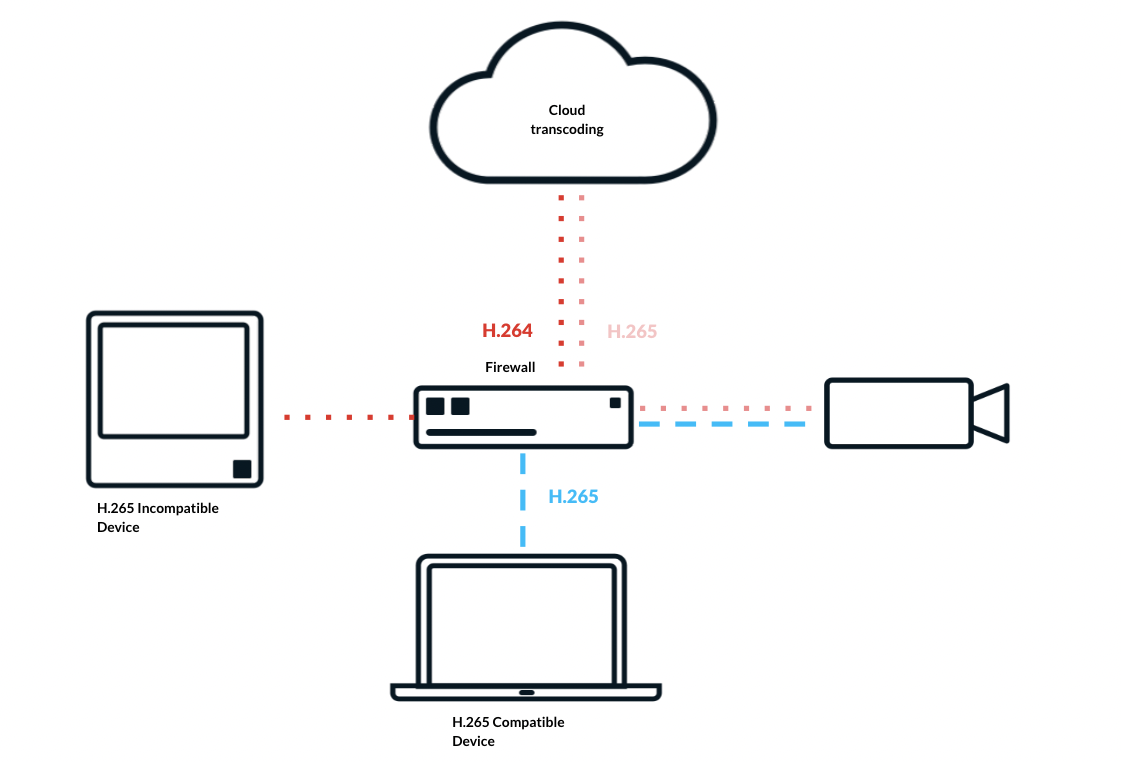
すべての Verkada カメラは H.265 エンコードをサポートしています。Verkada Command で動画を視聴する場合、再生はデバイスの性能に基づいて最適化されます。H.265 をサポートするデバイスは最良の画質のためにネイティブのストリーミングする映像を受信し、未対応のデバイスには互換性のために H.264 にトランスコードされたストリーミングする映像が自動的に送信されます。
***
## Command でのクラウドトランスコード
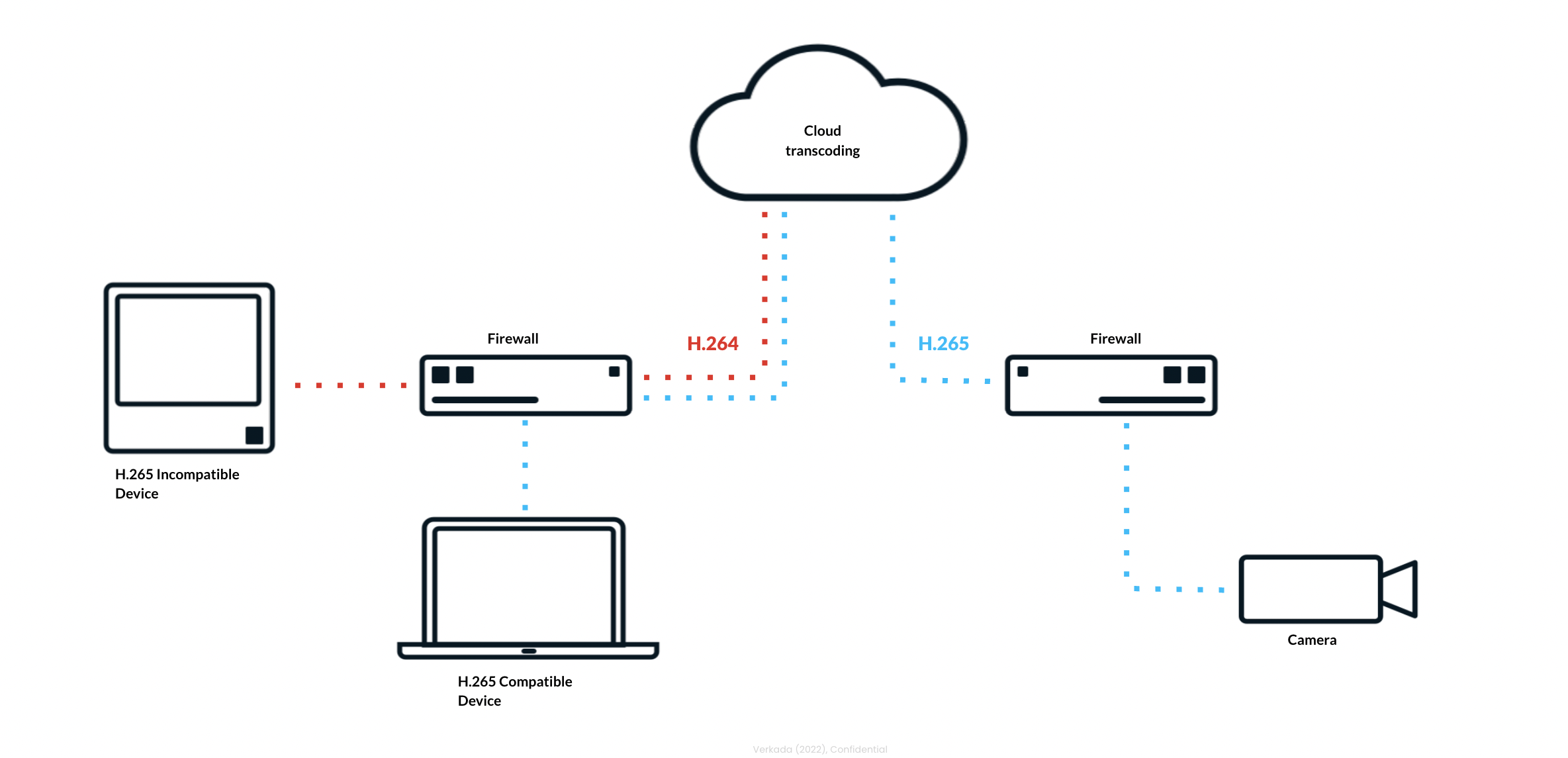
クラウドトランスコードにより、一部のユーザーやデバイスがそのコーデックをサポートしていない場合でも、Verkada カメラで H.265 を利用できます。以下の例では、カメラは H.265 に設定されており、互換性のあるデバイスと互換性のないデバイスの両方が同じストリーミングする映像にアクセスしています。
互換性のあるデバイスが再生を開始すると、Verkada Command はネイティブの H.265 ストリーミングする映像をエンドツーエンドで配信します。互換性のないデバイスが動画を要求すると、Command はクラウドで自動的にそのストリーミングする映像をトランスコードし、スムーズな再生のために H.264 として配信します。
ローカルのストリーミング機能では、互換性のあるデバイスはローカルネットワーク経由で直接 H.265 を受信し、未対応のデバイスには H.264 が提供されます。いずれの場合も、Command はデバイスの性能に関係なく、ライブ映像と録画映像への一貫したアクセスを保証します。
***
***
## デバイス要件
{% hint style="info" %}
互換性のないデバイスを使用しているユーザーでも、クラウドトランスコードを使用して H.265 カメラからストリーミングできます。ただし、最適な再生体験のためには互換性のあるデバイスを推奨します。
{% endhint %}
HEVC 対応 CPU
**第 7 世代 Intel® Core™ プロセッサー**
* Intel® HD Graphics 610 以上
* Intel® Iris® Plus Graphics 640 以上
**Apple M シリーズ プロセッサ**
* いずれもサポートされています。
HEVC 対応オペレーティングシステム
* macOS Big Sur(11.0)以降
* Windows 8 以降
* Android 5.0 以降
* Chrome OS(VAAPI インターフェースをサポートする GPU のみ。たとえば Intel GPU)
* Linux(Chrome バージョン ≥ 108.0.5354.0。VAAPI インターフェースをサポートする GPU のみ。たとえば Intel GPU)
* iOS 11 以降
HEVC のブラウザーサポート
* **Chrome:** 105 以降のバージョンでサポート
* **Edge:** Microsoft Store の HEVC プラグインが必要です(有料)
* **Safari:** 11~16.4 以降のバージョンでサポート
* **Opera:** 94 以降のバージョンでサポート
* **Firefox:** 137 以降のバージョンでサポート
HEVC の GPU サポート
* AMD RX460 以上(統合 GPU)
* Intel HD4400、HD515 以上
* AMD Radeon R7、Vega M 以上
* Apple M1、M1 Pro、M1 Max、M1 Ultra 以上
***
## 設定
{% stepper %}
{% step %}
**Verkada Command で、\[All Products] > \[Cameras] に移動します。**
{% endstep %}
{% step %}
**表示するカメラを選択します。**
{% endstep %}
{% step %}
**右下の[設定]をクリックします。**
{% endstep %}
{% step %}
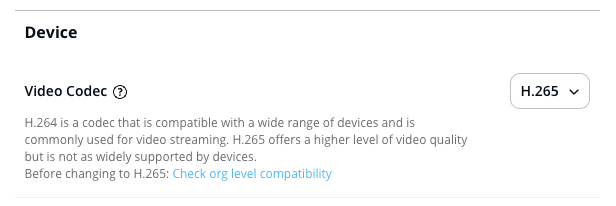
**「デバイス」で、ドロップダウンから H.265 を選択します。**
{% hint style="warning" %}
互換性のないブラウザーまたはデバイスを使用したオーガナイゼーション' 内のユーザー一覧を取得するには、次をクリックします **組織レベルの互換性を確認**.
{% endhint %}
{% endstep %}
{% endstepper %}
***
***
## FAQ
Verkada カメラで H.265 動画エンコードを有効にする理由は?
H.265 エンコードは画質を向上させ、アーティファクトを大幅に低減しながら、最大 2 倍の鮮明さを実現します。また、デジタルズーム時でも重要なディテールをより効果的に保持します。
どの Verkada カメラが H.265 動画エンコードをサポートしていますか?
すべての Verkada カメラモデルが H.265 をサポートしています。
Verkada HEVC を再生するための最小システム要件は何ですか?
H.265 は H.264 と比べてエンコードおよびデコードにより多くの処理能力を必要とするため、特定のデバイスやブラウザーでは使用が難しくなる場合があります。Verkada の H.265 動画デコードには、互換性のあるデバイスのハードウェアとブラウザーが必要です。次を参照してください。 [デバイス要件](#device-requirements) 詳細については、この記事の該当セクションを参照してください。
Verkada H.265 の制限は何ですか?
* **ローカルでの視聴:** 互換性のあるデバイスとブラウザーを持たない Command ユーザーは、ネイティブの H.265 動画を再生できませんが、H.264 にトランスコードされた動画は引き続き再生できます。
* **クラウドでの視聴:** Command ユーザーが、H.265 動画デコードをサポートできないデバイス + ブラウザーの組み合わせから動画をストリーミングしようとすると、動画は Verkada クラウドで自動的に H.264 にトランスコードされます。 *注: 追加の処理があるため、遅延と動画の読み込み時間がわずかに増加します。*
* **共有リンク:** 共有リンクではトランスコードはサポートされていません。ユーザーが、H.265 動画デコードをサポートできないデバイス + ブラウザーの組み合わせから動画をストリーミングしようとすると、再生できるのは SQ 動画のみです。
H.265 は RTSP をサポートしますか?
H.265 は RTSP を実行しているカメラで使用できます。カメラからストリーミングするように設定されたデバイスが H.265 に対応していることを確認する必要があります。RTSP ストリーミング機能では H.264 へのトランスコードはサポートされていないためです。
{% hint style="warning" %}
RTSP を使用するカメラでは H.265 は自動的には有効になりません。カメラ設定からこの設定を手動で変更する必要があります。
{% endhint %}
---
# Agent Instructions
This documentation is published with GitBook. GitBook is the documentation platform designed so that both humans and AI agents can read, navigate, and reason over technical content effectively. Learn more at gitbook.com.
## Querying This Documentation
If you need additional information that is not directly available in this page, you can query the documentation by asking a question.
Perform an HTTP GET request on the following URL with the `ask` and `goal` query parameters:
```
GET https://help.verkada.com/verkada-cameras/ja/bideosutorminguto/live-streaming/camera-high-efficiency-video-encoding-hevc.md?ask=&goal=
```
`ask` is the immediate question: it should be specific, self-contained, and written in natural language.
`goal` is what the user is ultimately trying to achieve, the reason they need the answer. Sharing it helps GitBook give you a better, more relevant answer. A goal is most helpful when it describes the outcome the user wants rather than restating the question. For example, with `ask=how do I create an API token`, a goal like `automate deployments from our CI pipeline` lets GitBook tailor the answer to that use case.
The response will contain a direct answer to the question and relevant excerpts and sources from the documentation.
Use this mechanism when the answer is not explicitly present in the current page, you need clarification or additional context, or you want to retrieve related documentation sections.