> For the complete documentation index, see [llms.txt](https://help.verkada.com/llms.txt). Markdown versions of documentation pages are available by appending `.md` to page URLs; this page is available as [Markdown](https://help.verkada.com/verkada-cameras/es/configuracion/camera-network-settings/configure-port-based-device-authentication-for-cameras.md).
# Configurar autenticación de dispositivo basada en puerto para cámaras
Configura la autenticación basada en puertos para cámaras Verkada
Las cámaras Verkada pueden configurarse con autenticación de dispositivos basada en puertos que utiliza IEEE 802.1x. Esta función está diseñada para ayudar a las organizaciones a proteger sus dispositivos de red y mantener altos estándares de seguridad.
{% hint style="danger" %}
El [D30](https://docs.verkada.com/docs/video-security-d30-datasheet.pdf), [D40](https://docs.verkada.com/docs/video-security-d40-datasheet.pdf), [D50](https://docs.verkada.com/docs/video-security-d50-datasheet.pdf), y [D80](https://docs.verkada.com/docs/video-security-d80-datasheet_1.pdf) no admiten la autenticación basada en puertos.
{% endhint %}
### Antes de comenzar
{% hint style="warning" %}
Para configurar la autenticación basada en puertos en una cámara, la cámara debe conectarse inicialmente a Command y actualizarse al firmware más reciente usando DHCP. Una vez completada la actualización de la cámara, podrá recibir certificados de dispositivo cargados en Command y registrados para 802.1x.
{% endhint %}
***
## Configuración
{% hint style="danger" %}
Solo los administradores de la organización pueden habilitar o modificar la configuración de 802.1x.
{% endhint %}
{% stepper %}
{% step %}
**En Verkada Command, vaya a Todos los productos > Admin.**
{% endstep %}
{% step %}
**En la navegación izquierda, seleccione Inicio de sesión y acceso > Autenticación de dispositivos basada en puertos.**
{% endstep %}
{% step %}
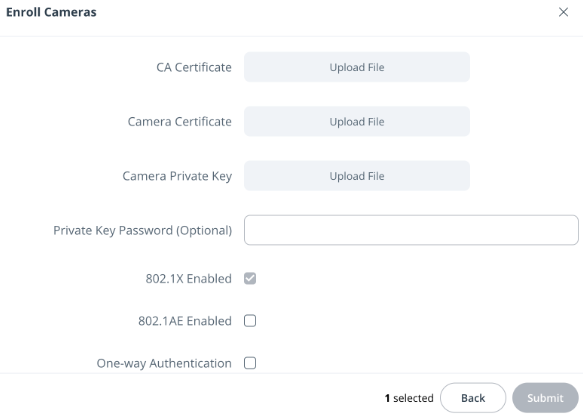
**En la parte superior derecha, haga clic en Inscribir.**
a. Seleccione las cámaras que desea configurar.\
b. Haga clic en **Siguiente.**\
c. Cargue un certificado de CA (`.crt`), certificado de cámara (`.crt`), y clave privada de la cámara (`.key`).\
d. Haga clic en **Enviar.**
{% endstep %}
{% step %}
**(Opcionalmente) Introduzca una contraseña de clave privada y seleccione los estándares de seguridad necesarios. Los certificados seleccionados se aplicarán a todos los dispositivos seleccionados. Repita este proceso para cada grupo para cargar diferentes certificados en dispositivos específicos.**
{% endstep %}
{% endstepper %}
{% hint style="warning" %}
Cargar nuevos certificados en cámaras ya inscritas en la autenticación basada en puertos reemplazará los certificados existentes.
{% endhint %}
---
# Agent Instructions
This documentation is published with GitBook. GitBook is the documentation platform designed so that both humans and AI agents can read, navigate, and reason over technical content effectively. Learn more at gitbook.com.
## Querying This Documentation
If you need additional information that is not directly available in this page, you can query the documentation by asking a question.
Perform an HTTP GET request on the following URL with the `ask` and `goal` query parameters:
```
GET https://help.verkada.com/verkada-cameras/es/configuracion/camera-network-settings/configure-port-based-device-authentication-for-cameras.md?ask=&goal=
```
`ask` is the immediate question: it should be specific, self-contained, and written in natural language.
`goal` is what the user is ultimately trying to achieve, the reason they need the answer. Sharing it helps GitBook give you a better, more relevant answer. A goal is most helpful when it describes the outcome the user wants rather than restating the question. For example, with `ask=how do I create an API token`, a goal like `automate deployments from our CI pipeline` lets GitBook tailor the answer to that use case.
The response will contain a direct answer to the question and relevant excerpts and sources from the documentation.
Use this mechanism when the answer is not explicitly present in the current page, you need clarification or additional context, or you want to retrieve related documentation sections.