> For the complete documentation index, see [llms.txt](https://help.verkada.com/llms.txt). Markdown versions of documentation pages are available by appending `.md` to page URLs; this page is available as [Markdown](https://help.verkada.com/verkada-cameras/es/analiticas/create-camera-event-alerts/camera-status-alerts.md).
# Alertas de estado de la cámara
Habilita alertas de eventos de estado de la cámara para tus cámaras
Las alertas de estado de la cámara te notifican cuando tu cámara se desconecta o vuelve a conectarse.
Verkada recibe señales de latido periódicas de cada cámara para garantizar su conexión.
* Verkada cambia el estado de una cámara a sin conexión cuando no se recibe una señal de latido en un plazo de 15 minutos.
* Verkada cambia el estado de una cámara a en línea cuando se recibe una señal de latido de una cámara sin conexión.
{% hint style="warning" %}
Todas las cámaras crean automáticamente eventos de estado de la cámara, por lo que no necesitas configurar estos eventos por separado.
{% endhint %}
***
## Configura alertas de estado de la cámara
### Crear alerta > Eventos
{% stepper %}
{% step %}
**Inicia sesión en Verkada Command.**
{% endstep %}
{% step %}
**En la página principal de Command, en la navegación izquierda, haga clic en Alertas.**
{% endstep %}
{% step %}
**En la parte superior, haga clic en Nueva alerta.**
{% endstep %}
{% step %}
**En Seleccionar evento, elige Cámara > En línea/Sin conexión.**
{% endstep %}
{% step %}
**En Cámaras:**
1. Elija recibir alertas de **Todas las cámaras, sitios,** o **Cámaras individuales**.
2. Haz clic en **Listo** y continúe con el horario de notificación de la alerta [notificación](#create-alert-greater-than-cameras).
{% endstep %}
{% endstepper %}
### Crear alerta > Programación de notificaciones
{% stepper %}
{% step %}
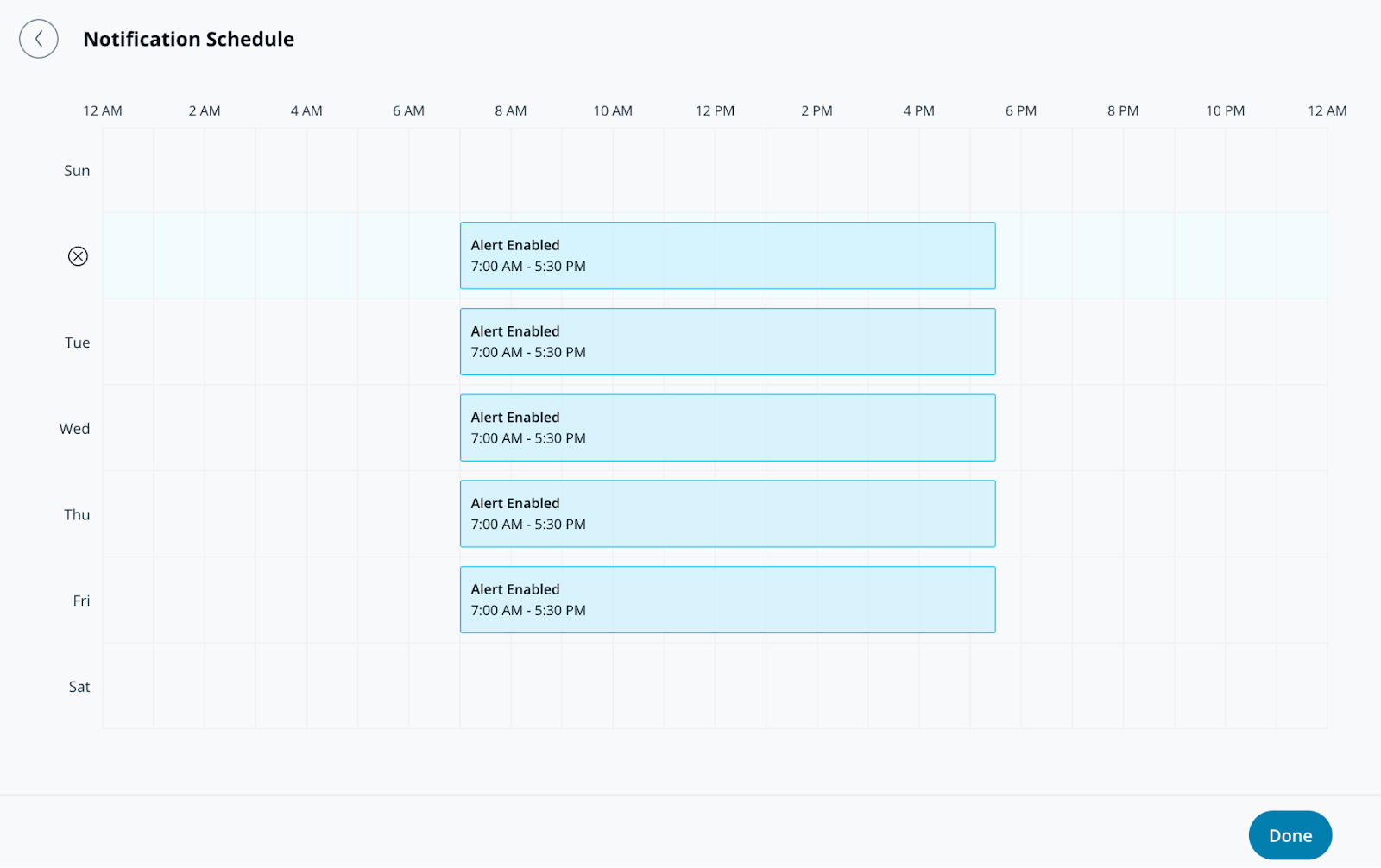
**En Programación de notificaciones, especifique los días y las horas para que las alertas envíen notificaciones. Las alertas se generan las 24 horas del día, los 7 días de la semana de forma predeterminada.**
{% endstep %}
{% step %}
**Haga clic en Listo y continúe con la alerta** [**notificación**](#create-alert-greater-than-notification)**.**
{% endstep %}
{% endstepper %}
### Crear alerta > Notificación
{% stepper %}
{% step %}
**En Notificación, agregue usuarios individualmente o asigne la alerta a un grupo.**
{% endstep %}
{% step %}
**Seleccione el menú desplegable junto a un usuario o grupo para elegir su(s) método(s) de notificación. Los destinatarios pueden recibir notificaciones mediante push, SMS, alertas de plataformas de mensajería o notificaciones por correo electrónico.**
{% hint style="info" %}
Cualquier destinatario agregado a esta alerta la verá aparecer en la **Alertas compartidas** sección de su **Alertas** página.
{% endhint %}
{% endstep %}
{% step %}
**(Opcional) De forma predeterminada, usted será destinatario de la alerta. Seleccione el menú desplegable y haga clic en Eliminar para eliminarse.**
{% endstep %}
{% step %}
**Haga clic en Listo y continúe con la** [**configuración opcional**](#optional-settings)**, o** [**finalizar la alerta**](#finish-the-alert)**.**
{% endstep %}
{% endstepper %}
### Configuración opcional
#### Crear alerta > Operaciones
{% stepper %}
{% step %}
**Active Route to Operations para crear un ticket a partir de la alerta.**
{% endstep %}
{% step %}
**(Opcional) Seleccione Instrucciones del ticket para agregar información al ticket y haga clic en Listo.**
{% endstep %}
{% step %}
**Haga clic en Listo y continúe con** [**finalizar la alerta**](#finish-the-alert)**.**
{% endstep %}
{% endstepper %}
#### Crear alerta > Acción del dispositivo
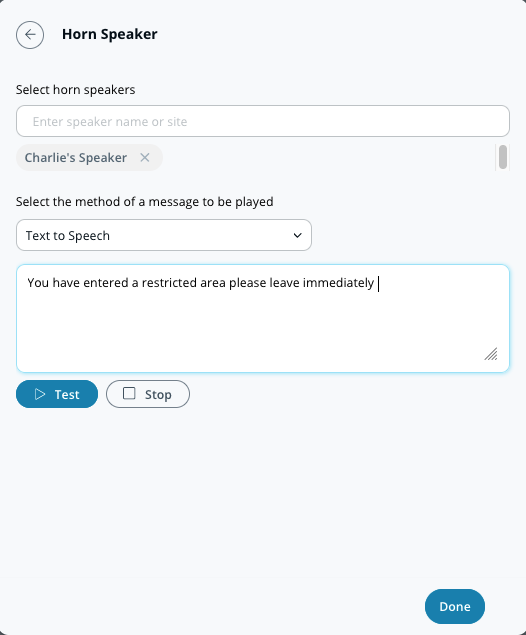
Además de notificar a personas individuales, puede configurar su altavoz de bocina para que se reproduzca cuando se active una alerta. Estas alertas pueden ser de texto a voz o un archivo MP3 cargado.
{% stepper %}
{% step %}
**En Acción del dispositivo, seleccione el/los altavoz(es) de bocina en los que desea reproducir su mensaje.**
{% endstep %}
{% step %}
**Seleccione su preferencia de notificación (Texto a voz o archivo de audio).**
a. Para **Texto a voz,** introduzca un mensaje de hasta 200 caracteres.\
b. Para **Archivo de audio,** arrastre y suelte el archivo o haga clic en **elegir un archivo** para cargar su clip de audio.
{% endstep %}
{% step %}
**Haga clic en Listo y continúe con** [**finalizar la alerta**](#finish-the-alert)**.**
{% endstep %}
{% endstepper %}
### Finalice la alerta
{% stepper %}
{% step %}
**En la esquina inferior derecha de la ventana de configuración, haga clic en Siguiente.**
{% endstep %}
{% step %}
**Introduzca un nombre descriptivo para la alerta.**
{% endstep %}
{% step %}
**Haga clic en Listo para completar la configuración.**
{% endstep %}
{% endstepper %}
---
# Agent Instructions
This documentation is published with GitBook. GitBook is the documentation platform designed so that both humans and AI agents can read, navigate, and reason over technical content effectively. Learn more at gitbook.com.
## Querying This Documentation
If you need additional information that is not directly available in this page, you can query the documentation by asking a question.
Perform an HTTP GET request on the following URL with the `ask` and `goal` query parameters:
```
GET https://help.verkada.com/verkada-cameras/es/analiticas/create-camera-event-alerts/camera-status-alerts.md?ask=&goal=
```
`ask` is the immediate question: it should be specific, self-contained, and written in natural language.
`goal` is what the user is ultimately trying to achieve, the reason they need the answer. Sharing it helps GitBook give you a better, more relevant answer. A goal is most helpful when it describes the outcome the user wants rather than restating the question. For example, with `ask=how do I create an API token`, a goal like `automate deployments from our CI pipeline` lets GitBook tailor the answer to that use case.
The response will contain a direct answer to the question and relevant excerpts and sources from the documentation.
Use this mechanism when the answer is not explicitly present in the current page, you need clarification or additional context, or you want to retrieve related documentation sections.