> For the complete documentation index, see [llms.txt](https://help.verkada.com/llms.txt). Markdown versions of documentation pages are available by appending `.md` to page URLs; this page is available as [Markdown](https://help.verkada.com/verkada-cameras/de/video-streaming-und-freigabe/live-streaming/modify-high-quality-video-bitrates.md).
# Bitraten für hochqualitatives Video ändern
Optimieren Sie die Videoqualität Ihrer Kamera, indem Sie die HQ-Bitrate anpassen
Sie können die High-Quality-(HQ)-Bitrate einer Kamera ändern, um das Seherlebnis zu optimieren.
{% hint style="danger" %}
Diese Funktion ist nicht kompatibel mit den [PTZ-Serienkameras](https://www.verkada.com/security-cameras/ptz/#overview).
{% endhint %}
### Hinweise
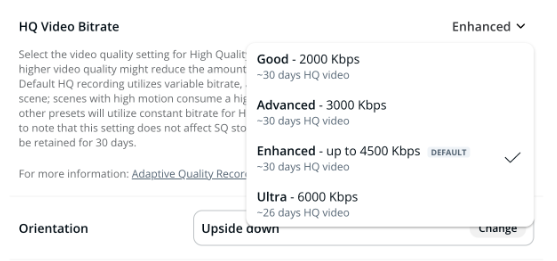
* Die voreingestellte HQ-Bitrate-Vorgabe (Verbessert) verwendet eine variable Bitrate und passt sich dynamisch an die Szene an. Szenen mit viel Bewegung verbrauchen für eine bessere Qualität mehr Bandbreite, während einfachere Szenen weniger verbrauchen, was den Speicherplatz optimiert. Im Gegensatz dazu verwenden andere Vorgaben für HQ-Video eine konstante Bitrate.
* Wenn Sie eine höhere Videoqualität wählen, wird eine kürzere Dauer von HQ-Video für die spätere Ansicht gespeichert.
* Schätzungen werden anhand des Aufzeichnungsverlaufs der Kamera berechnet. Dabei werden vorhandene HQ-Aufnahmen verwendet, um während der Aufbewahrungsdauer den Bewegungsgrad zu schätzen. Wenn die Kamera erst seit kurzer Zeit installiert ist (z. B. 1 Stunde), liegen möglicherweise nicht genügend Daten vor, damit Command eine genaue Schätzung liefern kann.
{% hint style="info" %}
Reduzieren Sie die Bitrate, um Netzwerkressourcen zu sparen und die Leistung in bandbreitenbegrenzten Umgebungen zu optimieren. Erhöhen Sie die Bitrate für Bereiche mit viel Bewegung, z. B. stark frequentierte Flure, um eine bessere Videoqualität sicherzustellen.
{% endhint %}
***
## HQ-Videoqualität ändern
{% hint style="danger" %}
Sie benötigen [Site-Admin](/verkada-cameras/de/erste-schritte/roles-and-permissions-for-cameras.md) Berechtigungen zum Ändern der HQ-Video-Bitrate einer Kamera.
{% endhint %}
{% stepper %}
{% step %}
**Navigieren Sie in Verkada Command zu Alle Produkte > Kameras.**
{% endstep %}
{% step %}
**Wählen Sie eine Kamera aus, die Sie ändern möchten.**
{% endstep %}
{% step %}
**Klicken Sie rechts auf Einstellungen.**
{% endstep %}
{% step %}
**Wählen Sie unter Gerät > HQ-Video-Bitrate eine Option aus dem Dropdown-Menü aus.**
{% endstep %}
{% endstepper %}
{% hint style="warning" %}
Diese Einstellung hat keinen Einfluss auf den SQ-Speicher. SQ-Video wird für die für die Kamera festgelegte Aufbewahrungsdauer gespeichert.
{% endhint %}
***
### HQ-Bitraten (in Kbps)
| | | | | |
| ---------------------------------------------------------------------------------------------------------------------------------------------------------------------------------------------------------------------------------------------------------------------------------------------------------------------------------------- | ------- | ------------------- | ------------------------- | --------- |
| **Modelle** | **Gut** | **Fortgeschritten** | **Verbessert (Standard)** | **Ultra** |
| CR63-E, CR63-TE | 2,000 | 2,000 | 2,000 | 2,000 |
| CD63-E, CD63-F, CD63-E-F, CD63, CD62-E, CD62, CD61-E, CD61, CF83-E, CF81-E, CB63-TE, CB63-E, CB62-TE, CB62-E, CB61-TE, CB61-E, CY63-E, CH63-E | 2,000 | 3,000 | 4,500 | 6,000 |
| CD53-E, CD53-F, CD53-E-F, CD53, CD43-E, CD43-F, CD43-E-F, CD43, CD52-E, CD52, CD52-F, CD52-E-F, CD51-E, CD51, CD42-E, CD42, CD42-F, CD42-E-F, CD41-E, CD41, CD32-E, CD32, CD31-E, CD31, CD22-E, CD22, CY53-E, CH53-E, CH52-E, CH52-E-F, CB53-TE, CB53-E, CB52-TE, CB52-E, CB51-TE, CB51-E, CM42, CM42-S, CM41-E, CM41, CM41-S, CM22, D40 | 1,000 | 1,500 | 3,000 | 4,500 |
| CM61, D80 | 1,000 | 2,000 | 3,000 | 4,000 |
| D30, D50 | 800 | 1,000 | 2,000 | 3,000 |
### SQ- und Audio-Bitraten (in Kbps)
| | | |
| ------------------------------------------------------------------------------------------------------------------------------------------------------------------------------------------------------------------------------------------------------------------------------------------------------------------------------------------------------------------ | --------------- | ------------------ |
| **Modelle** | **SQ-Bitraten** | **Audio-Bitraten** |
| CD53-E, CD53-F, CD53-E-F, CD53, CD43-E, CD43-F, CD43-E-F, CD43, CD52-E, CD52-F, CD52-E-F, CD52, CD51-E, CD51, CD42-E, CD42-F, CD42-E-F, CD42, CD41-E, CD41, CD32-E, CD32, CD31-E, CD31, CD22-E, CD22, CY53-E, CH53-E, CH52-E, CH52-E-F, CB53-TE\*, CB53-E\*, CB52-TE\*, CB52-E\*, CB51-TE\*, CB51-E\*, CM42, CM42-S, CM41-E, CM41, CM41-S, CM22\*, D50\*, D40, D30 | 300 | 16 |
| CR63-E, CR63-TE, CD63-E, CD63-F, CD63-E-F, CD63, CD62-E, CD62, CD61-E, CD61, CF83-E, CF81-E, CB63-TE\*, CB63-E\*, CB62-TE\*, CB62-E\*, CB61-TE\*, CB61-E\*, CY63-E, CH63-E, CM61, D80\* | 600 | 16 |
{% hint style="warning" %}
\* Audio wird nicht unterstützt.
{% endhint %}
---
# Agent Instructions
This documentation is published with GitBook. GitBook is the documentation platform designed so that both humans and AI agents can read, navigate, and reason over technical content effectively. Learn more at gitbook.com.
## Querying This Documentation
If you need additional information that is not directly available in this page, you can query the documentation by asking a question.
Perform an HTTP GET request on the following URL with the `ask` and `goal` query parameters:
```
GET https://help.verkada.com/verkada-cameras/de/video-streaming-und-freigabe/live-streaming/modify-high-quality-video-bitrates.md?ask=&goal=
```
`ask` is the immediate question: it should be specific, self-contained, and written in natural language.
`goal` is what the user is ultimately trying to achieve, the reason they need the answer. Sharing it helps GitBook give you a better, more relevant answer. A goal is most helpful when it describes the outcome the user wants rather than restating the question. For example, with `ask=how do I create an API token`, a goal like `automate deployments from our CI pipeline` lets GitBook tailor the answer to that use case.
The response will contain a direct answer to the question and relevant excerpts and sources from the documentation.
Use this mechanism when the answer is not explicitly present in the current page, you need clarification or additional context, or you want to retrieve related documentation sections.