> For the complete documentation index, see [llms.txt](https://help.verkada.com/llms.txt). Markdown versions of documentation pages are available by appending `.md` to page URLs; this page is available as [Markdown](https://help.verkada.com/new-alarms/ja/she-ding/wireless-alarms-devices/supervised-wiring.md).
# 監視配線
アラームの監視機能を使用して、断線および短絡を検出します
{% hint style="success" %}
この記事は新しいアラーム向けのガイドです。こちらを参照してください [記事](/classic-alarms/ja/she-zhi/alarm-setup-and-install-best-practices/supervised-wiring-with-classic-alarms.md) クラシック アラームをお使いの場合は、こちらを参照してください。詳細は [New アラームと Classic アラームの違い](/new-alarms/ja/hajimeni/new-alarms-vs-classic-alarms.md) どのバージョンのアラームをお使いか不明な場合は、こちらをご覧ください。
{% endhint %}
***
監視されていない回路では、通常開に有線されたセンサーの断線や、通常閉に有線されたセンサーの短絡は、アラームトリガーとして検出されません。監視により、Verkada BP52アラームパネルはこれらのイベントを検出し、通知またはアラームをトリガーできます。
***
## 監視の種類
BP52アラームパネルは、2種類の監視をサポートしています:
* シングル終端抵抗(EOLR)(抵抗1個)
* ダブルEOLR(抵抗2個)
これら2種類の監視は、通常開(NO)または通常閉(NC)に有線されたセンサーに適用できます。各タイプの参考抵抗値を以下に示します。
### シングルEOLR監視(1000Ω抵抗)
| | | |
| ------- | ------------------ | -------------------- |
| **抵抗値** | **通常閉(NC)** | **通常開(NO)** |
| 0 Ω | 短絡回路;トラブル状態 | 短絡回路または閉イベント;アラームが作動 |
| 1000Ω | 正常状態 | 正常状態 |
| 無限大Ω | 断線または開イベント;アラームが作動 | 断線;トラブル状態 |
### ダブルEOLR監視
| | | |
| ------- | ------------- | ------------- |
| **抵抗値** | **通常閉(NC)** | **通常開(NO)** |
| 0 Ω | 短絡回路;トラブル状態 | 短絡回路;トラブル状態 |
| 1000Ω | 正常状態 | 閉イベント;アラームが作動 |
| 2000Ω | 開イベント;アラームが作動 | 正常状態 |
| 無限大Ω | 断線;トラブル状態 | 断線;トラブル状態 |
***
## EOLRをBP52アラームパネルに有線します
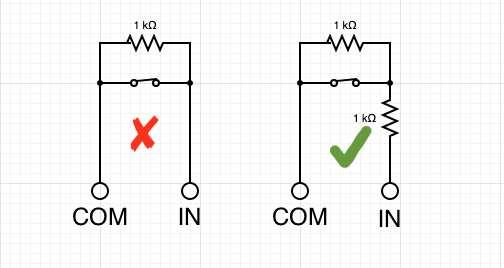
シングルおよびダブルEOL抵抗では、抵抗器は回路の末端、センサーにできるだけ近い位置に設置します。パネル側にEOL抵抗を設置すると、監視の目的が損なわれます。
| | |
| --------------------------------------------------------------------------------------------------------------------------------------------------------------------------------------------------------------------------------------------------------------- | --------------------------------------------------------------------------------------------------------------------------------------------------------------------------------------------------------------------------------------------------------------- |
| **シングルEOLR** | **ダブルEOLR** |
|  |  |
{% hint style="danger" %}
通常閉のアラームセンサーを使用していて、抵抗が並列に有線されている場合は互換性がありません。この構成では、単一の抵抗を直列に追加してダブルEOLRに変換します。
{% endhint %}
---
# Agent Instructions
This documentation is published with GitBook. GitBook is the documentation platform designed so that both humans and AI agents can read, navigate, and reason over technical content effectively. Learn more at gitbook.com.
## Querying This Documentation
If you need additional information that is not directly available in this page, you can query the documentation by asking a question.
Perform an HTTP GET request on the following URL with the `ask` and `goal` query parameters:
```
GET https://help.verkada.com/new-alarms/ja/she-ding/wireless-alarms-devices/supervised-wiring.md?ask=&goal=
```
`ask` is the immediate question: it should be specific, self-contained, and written in natural language.
`goal` is what the user is ultimately trying to achieve, the reason they need the answer. Sharing it helps GitBook give you a better, more relevant answer. A goal is most helpful when it describes the outcome the user wants rather than restating the question. For example, with `ask=how do I create an API token`, a goal like `automate deployments from our CI pipeline` lets GitBook tailor the answer to that use case.
The response will contain a direct answer to the question and relevant excerpts and sources from the documentation.
Use this mechanism when the answer is not explicitly present in the current page, you need clarification or additional context, or you want to retrieve related documentation sections.