> For the complete documentation index, see [llms.txt](https://help.verkada.com/llms.txt). Markdown versions of documentation pages are available by appending `.md` to page URLs; this page is available as [Markdown](https://help.verkada.com/new-alarms/ja/she-ding/getting-started-with-verkada-alarms-1.md).
# アラームシステムのリーダーパネルを交換する
**リーダーの切り替え** 既存の構成を失うことなく、アラームパネルを交換またはアップグレードできます。各サイトに設定できるアラームパネルは1台のみです。新しいパネルが既存のサイトに導入されると、Verkada は現在のパネルから新しいデバイスへ、サポートされている設定を自動的に転送できます。これにはデバイス名、サイト構成、その他のパネルレベルの設定が含まれ、最小限のダウンタイムでシームレスにハードウェアを移行できます。
{% hint style="warning" %}
* リーダーの切り替えはソフトウェアレベルのプロセスです。構成の転送を正常に完了するには、すべてのデバイスを新しいリーダーに物理的に接続する必要があります。
* リーダーの切り替えは、同一モデルのパネルの交換と、BP32 から BP52 へのアップグレードのような異なるパネルモデル間の切り替えの両方をサポートします。
{% endhint %}
***
## 構成
{% hint style="danger" %}
新しいものを Command に追加する前に、古いパネルを切断してください。
{% endhint %}
{% stepper %}
{% step %}
[**追加**](/command/ja/ganaizshon/add-a-device-to-your-command-organization.md) **そして、Command オーガナイゼーション' で新しいアラームパネルをセットアップします。**
{% endstep %}
{% step %}
**交換する必要があるパネルがあるサイトを選択します。**
{% endstep %}
{% step %}
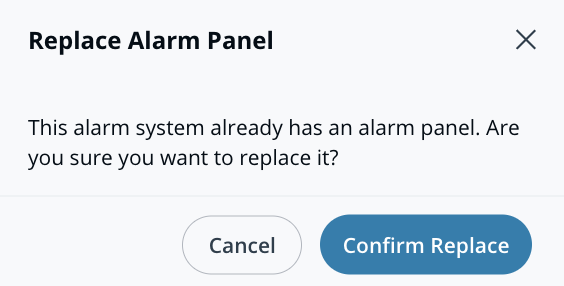
**システムは既存のパネルを検出します。モデル画面で[交換を確認]を選択します。**
{% endstep %}
{% step %}
**[アラームサイト]>[デバイス]で新しいアラームパネルを選択します。**
{% endstep %}
{% step %}
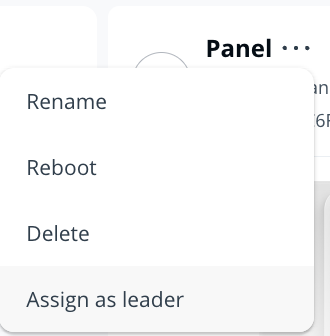
**右上で、**  **> リーダーとして割り当てます。**
{% endstep %}
{% endstepper %}
{% hint style="warning" %}
確認すると、構成の移行が開始され、通常1〜2分で完了します。このプロセス中、デバイスは現在のパネルから切断され、Command 内で自動的に新しいパネルへ再接続されます。
{% endhint %}
### 交換後のチェックリスト
* [ ] 無線センサーは、新しいリーダーに再接続するまで最大30分かかる場合があります。各センサーを手動でトリガーすることで、このプロセスを短縮できます(たとえば、ドアを開けるなど)。
* [ ] 必要に応じて、元のリーダーに戻すことができます *その前に* サイトから削除する前に **アラームサイト > デバイス** ページ。
{% hint style="info" %}
Verkada は、保守的な移行アプローチを使用します。リーダーの切り替え中にハードウェアの不一致が発生しても、既存の設定が削除されることはありません。
{% endhint %}
* [ ] 新しいパネルがオンラインになり、確認されたら、古いパネルを削除します:
* 移動先: **アラームサイト > デバイス**
* サイトから古いパネルを削除する
{% hint style="danger" %}
* 特定のデバイスのみを削除し、アラームサイト全体は削除しないでください。
{% endhint %}
---
# Agent Instructions
This documentation is published with GitBook. GitBook is the documentation platform designed so that both humans and AI agents can read, navigate, and reason over technical content effectively. Learn more at gitbook.com.
## Querying This Documentation
If you need additional information that is not directly available in this page, you can query the documentation by asking a question.
Perform an HTTP GET request on the following URL with the `ask` and `goal` query parameters:
```
GET https://help.verkada.com/new-alarms/ja/she-ding/getting-started-with-verkada-alarms-1.md?ask=&goal=
```
`ask` is the immediate question: it should be specific, self-contained, and written in natural language.
`goal` is what the user is ultimately trying to achieve, the reason they need the answer. Sharing it helps GitBook give you a better, more relevant answer. A goal is most helpful when it describes the outcome the user wants rather than restating the question. For example, with `ask=how do I create an API token`, a goal like `automate deployments from our CI pipeline` lets GitBook tailor the answer to that use case.
The response will contain a direct answer to the question and relevant excerpts and sources from the documentation.
Use this mechanism when the answer is not explicitly present in the current page, you need clarification or additional context, or you want to retrieve related documentation sections.