> For the complete documentation index, see [llms.txt](https://help.verkada.com/llms.txt). Markdown versions of documentation pages are available by appending `.md` to page URLs; this page is available as [Markdown](https://help.verkada.com/new-alarms/ja/she-ding/configure-an-alarm-response/agent-talk-down.md).
# 担当者による呼びかけ
アラームが作動したときに、担当者による呼びかけを使用して侵入者を抑止します
{% hint style="success" %}
この記事は新しいアラーム向けのガイドです。こちらを参照してください [記事](/classic-alarms/ja/she-ding/agent-talk-down-with-classic-alarms.md) クラシック アラームをお使いの場合は、こちらを参照してください。詳細は [New アラームと Classic アラームの違い](/new-alarms/ja/hajimeni/new-alarms-vs-classic-alarms.md) どのバージョンのアラームをお使いか不明な場合は、こちらをご覧ください。
{% endhint %}
***
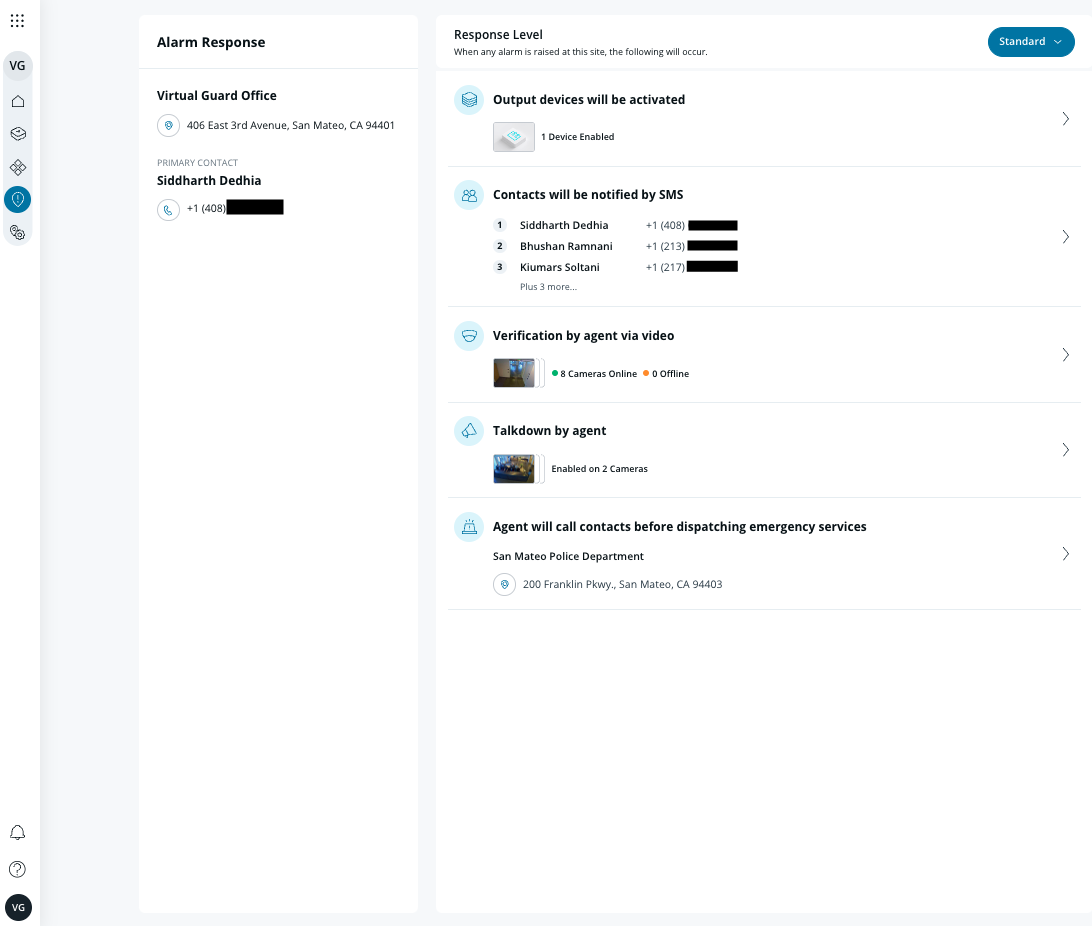
**担当者による呼びかけ** これにより、遠隔監視の担当者は、アラームが発報されたときにスピーカーを使ってライブで呼びかけ、当局を派遣する前に侵入者を抑止できます。
{% hint style="warning" %}
**対応スピーカー:** BZ11 ホーンスピーカー、すべての Verkada インターホンモデル。
{% endhint %}
### 要件
* BZ11 ホーンスピーカーを使用する場合:
* BZ11 は、アラーム発生場所のカメラとペアリングされている必要があります。
* BZ11 とペアリングされたカメラは、カメラパーティションでトリガーとして設定されている必要があります。
* インターホンを使用する場合:
* **ビデオインターホン:** 内蔵カメラは、カメラパーティションでトリガーとして設定されている必要があります。\
**注:** 担当者による呼びかけは、内蔵カメラが明示的にアラームトリガーとして追加されている場合にのみ機能します。
* **音声インターホン:** ペアリングされたカメラは、カメラパーティションでトリガーとして設定されている必要があります。
* 応答レベルは次に設定する必要があります **標準**.
{% hint style="danger" %}
上記の要件のいずれかが満たされていない場合、担当者による呼びかけはサイトで正しく設定されていない可能性があり、想定どおりに機能しないことがあります。
{% endhint %}
***
## 担当者による呼びかけを設定
{% hint style="warning" %}
**担当者による呼びかけ** スピーカーが、カメラトリガーとして追加されたカメラとペアリングされている場合、既定で有効になります。
{% endhint %}
{% stepper %}
{% step %}
**Verkada Command で、すべての製品 > アラーム に移動します。**
{% endstep %}
{% step %}
**設定するアラームサイトを選択します。**
{% endstep %}
{% step %}
**カメラを作成する** [**パーティション**](/new-alarms/ja/she-ding/alarm-sites/configure-partitions.md#create-a-camera-partition) **そして、スピーカーに関連付けられているカメラを追加します。**
{% endstep %}
{% step %}
**左側のナビゲーションで、[応答]>[トリガーとなるカメラでの担当者による呼びかけ]を選択します。**
{% hint style="danger" %}
担当者による呼びかけは、 **標準** 応答レベルでのみ利用可能です。
{% endhint %}
{% endstep %}
{% step %}
**右上で「Talkdown enabled」をオンにします。**
{% endstep %}
{% endstepper %}
***
{% hint style="info" %}
**動作を見てみますか?** 次を確認してください: [ビデオチュートリアル](https://www.youtube.com/watch?v=ff_TxRmg__c).
{% endhint %}
---
# Agent Instructions
This documentation is published with GitBook. GitBook is the documentation platform designed so that both humans and AI agents can read, navigate, and reason over technical content effectively. Learn more at gitbook.com.
## Querying This Documentation
If you need additional information that is not directly available in this page, you can query the documentation by asking a question.
Perform an HTTP GET request on the following URL with the `ask` and `goal` query parameters:
```
GET https://help.verkada.com/new-alarms/ja/she-ding/configure-an-alarm-response/agent-talk-down.md?ask=&goal=
```
`ask` is the immediate question: it should be specific, self-contained, and written in natural language.
`goal` is what the user is ultimately trying to achieve, the reason they need the answer. Sharing it helps GitBook give you a better, more relevant answer. A goal is most helpful when it describes the outcome the user wants rather than restating the question. For example, with `ask=how do I create an API token`, a goal like `automate deployments from our CI pipeline` lets GitBook tailor the answer to that use case.
The response will contain a direct answer to the question and relevant excerpts and sources from the documentation.
Use this mechanism when the answer is not explicitly present in the current page, you need clarification or additional context, or you want to retrieve related documentation sections.