> For the complete documentation index, see [llms.txt](https://help.verkada.com/llms.txt). Markdown versions of documentation pages are available by appending `.md` to page URLs; this page is available as [Markdown](https://help.verkada.com/new-alarms/ja/she-ding/br33-panic-button-configuration.md).
# BR33 パニックボタンの設定
BR33 パニックボタンに対して新しいアラームを正しく設定します
パニックボタンは、緊急時にアラームを発報するための目立たない方法です。パニックボタンがアラームを発報できるようにする前に、応答レベルを設定し、パニックボタンを含むパーティションを警戒設定する必要があります。
***
## 設定
{% hint style="danger" %}
パニックボタンの設定は3つの手順で構成されます。パニックボタンを押したときに常にアラームが発報されるようにするには、3つの手順すべてを設定する必要があります。3つの手順を正しく設定しないと、パニックボタンが期待どおりにアラームを発報しない場合があります。
{% endhint %}
{% stepper %}
{% step %}
**Verkada Commandで、すべての製品 > アラームに移動します。**
{% endstep %}
{% step %}
**アラームサイトを選択します。**
{% endstep %}
{% step %}
**左側のナビゲーションで、[デバイス]をクリックします。**
{% endstep %}
{% step %}
**センサーをクリックして、[デバイス設定]を表示します。**
{% endstep %}
{% step %}
**ここで、次の設定を構成できます。**
* **パニックジェスチャー:** パニック信号とアラームを発報するボタン押下パターンを選択します。オプションには、シングル、ダブル、トリプル、長押しがあります。
* **デバイスをミュート:** 有効にすると、デバイスはアラームを発報しなくなりますが、信号の録画は継続されます。
* **近くのカメラ:** 視覚的な状況確認のために、パニックボタンにペアリングするカメラを選択します。
{% endstep %}
{% endstepper %}
{% hint style="danger" %}
パニックボタンは映像で確認されません。ペアリングされたカメラの映像は、状況把握のためだけに提供されます。
{% endhint %}
### 応答を設定
{% stepper %}
{% step %}
**Verkada Commandで、すべての製品 > アラームに移動します。**
{% endstep %}
{% step %}
**設定するアラームサイトを選択します。**
{% endstep %}
{% step %}
**左側のナビゲーションで、[応答]> を選択します。**
{% endstep %}
{% step %}
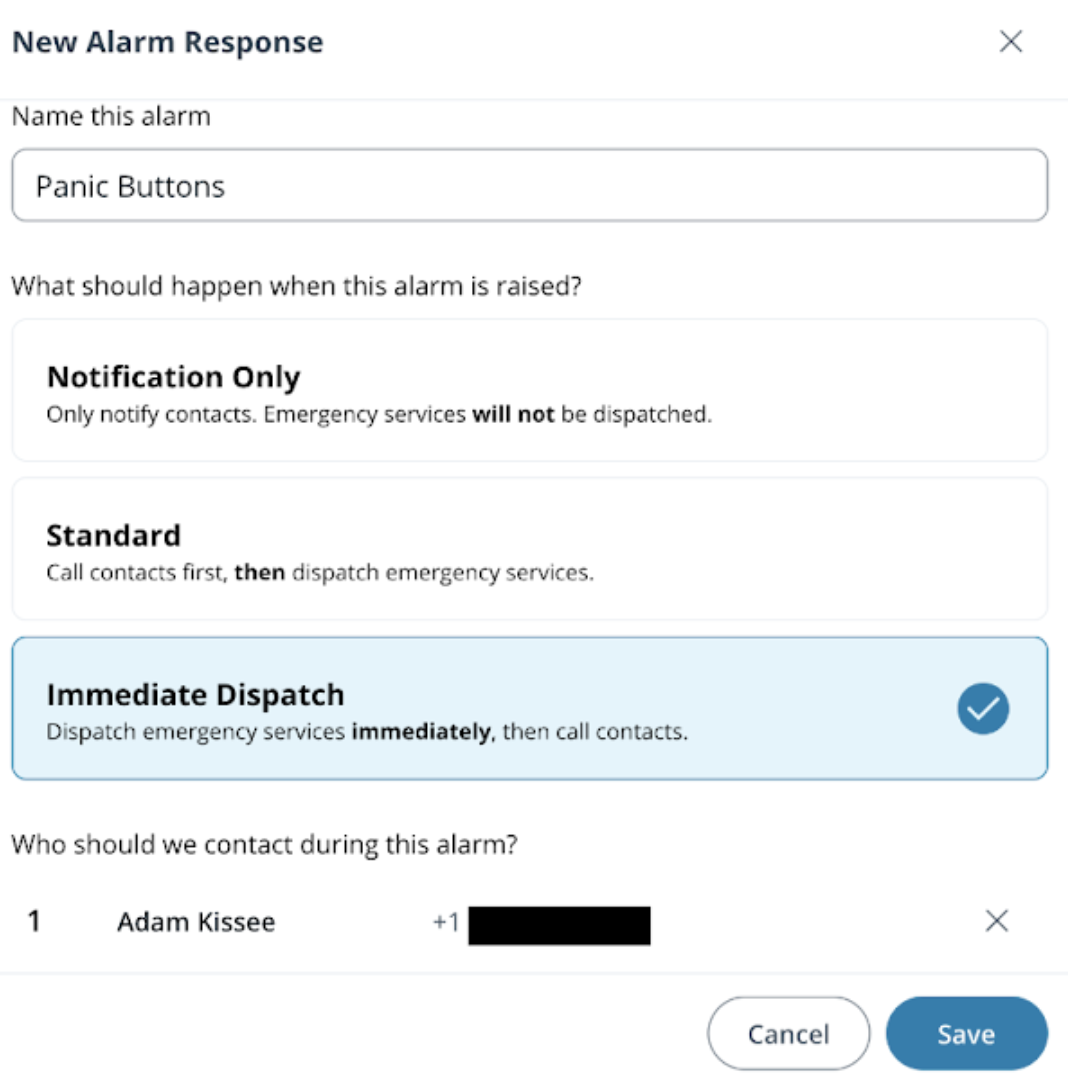
**次のいずれかの応答を選択します。**
* 通知のみ
* 標準
* 即時出動
{% endstep %}
{% step %}
**連絡先を追加**
{% endstep %}
{% step %}
**[保存]をクリックします。**
{% endstep %}
{% endstepper %}
### 常時警戒設定のパーティションを設定する
{% stepper %}
{% step %}
[**新しいパーティションを作成**](/new-alarms/ja/she-ding/alarm-sites/configure-partitions.md) **そしてアラーム応答を割り当てます。**
{% endstep %}
{% step %}
**すべてのパニックボタンをそのパーティションに追加します。**
{% endstep %}
{% step %}
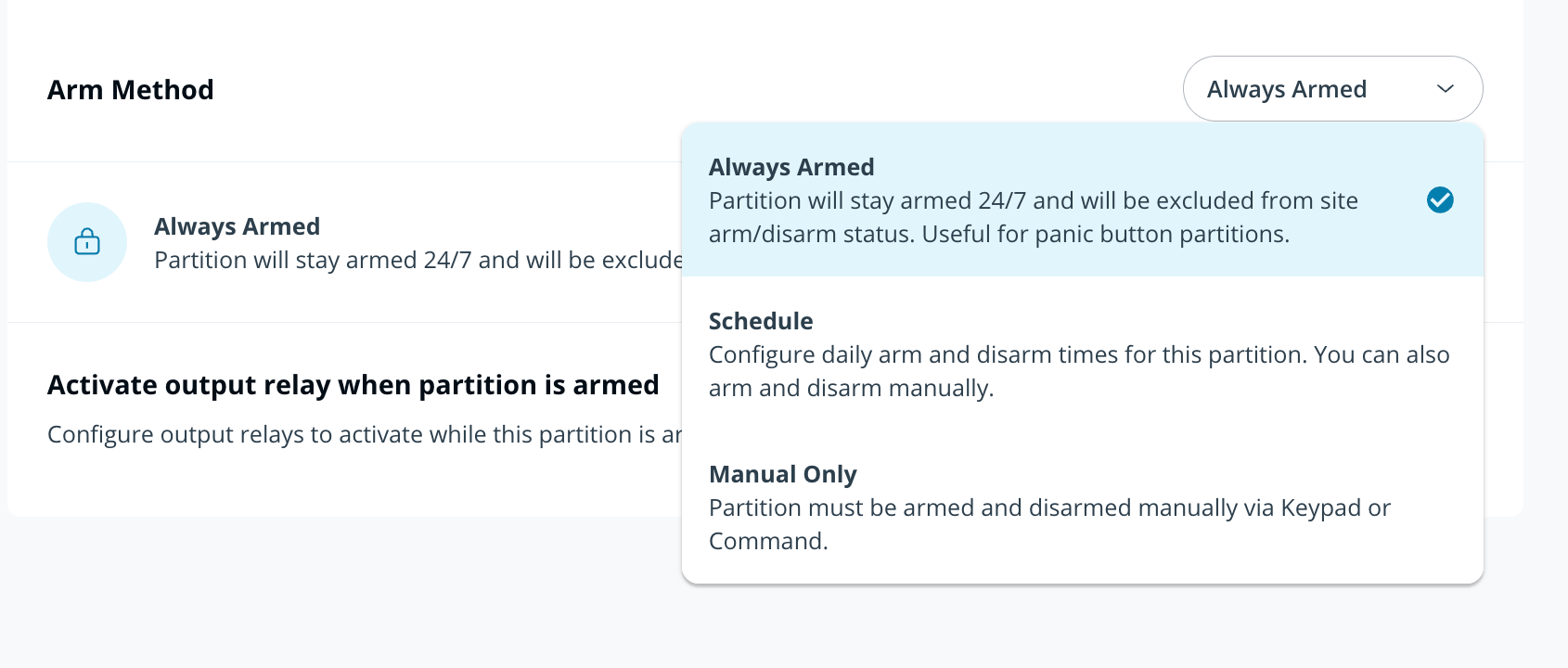
**[警戒設定方法]のドロップダウンで、[常時警戒設定]を選択します。**
{% endstep %}
{% endstepper %}
{% hint style="warning" %}
* 常時警戒設定は、パーティションレベルで有効です。
* 常時警戒設定のパーティションからアラームが発報された場合、それを解決してもそのパーティションは警戒解除されません。
{% endhint %}
---
# Agent Instructions
This documentation is published with GitBook. GitBook is the documentation platform designed so that both humans and AI agents can read, navigate, and reason over technical content effectively. Learn more at gitbook.com.
## Querying This Documentation
If you need additional information that is not directly available in this page, you can query the documentation by asking a question.
Perform an HTTP GET request on the following URL with the `ask` and `goal` query parameters:
```
GET https://help.verkada.com/new-alarms/ja/she-ding/br33-panic-button-configuration.md?ask=&goal=
```
`ask` is the immediate question: it should be specific, self-contained, and written in natural language.
`goal` is what the user is ultimately trying to achieve, the reason they need the answer. Sharing it helps GitBook give you a better, more relevant answer. A goal is most helpful when it describes the outcome the user wants rather than restating the question. For example, with `ask=how do I create an API token`, a goal like `automate deployments from our CI pipeline` lets GitBook tailor the answer to that use case.
The response will contain a direct answer to the question and relevant excerpts and sources from the documentation.
Use this mechanism when the answer is not explicitly present in the current page, you need clarification or additional context, or you want to retrieve related documentation sections.