> For the complete documentation index, see [llms.txt](https://help.verkada.com/llms.txt). Markdown versions of documentation pages are available by appending `.md` to page URLs; this page is available as [Markdown](https://help.verkada.com/new-alarms/ja/she-ding/bp32-alarm-panel-configurations-and-battery-backup-estimator.md).
# BP32 アラームパネルの構成とバッテリーバックアップ見積もり
BP32には、キーパッドとエクスパンダーを接続するためのRS-485出力が1つ含まれています。対応デバイスを接続し、さまざまな構成でのバッテリーバックアップ時間を計算できます。
***
## BK22キーパッドを接続する
* **RS-485接続(推奨) -** 停電または接続障害時にBK22キーパッドを完全にバックアップするには、BP32の **RS-485 Out** ポートに接続してください。この接続により、BK22(明るさ80%)とBP32の両方に最大8時間のバッテリーバックアップが提供されます。
* **LAN接続 -** より簡単に設置するには、BK22キーパッドをBP32に **LAN**経由で接続します。これにより、BP32には最大30時間のバッテリーバックアップが提供されますが、停電または接続障害時にBK22はバックアップされません。
### 追加の構成オプション
* **LAN:** WH52 無線ハブなどのデバイスを接続して、カバレッジを拡張できます。
* **RS-485ポート:** RS-485 Outポートを通じて追加デバイスを接続できます。バッテリーバックアップは構成によって異なります:
* **無線リピーター:**
* WH32を1台接続したBP32
* WH32を4台デイジーチェーン接続したBP32
* **有線エクスパンダー:**
* BE32 + 8個のドア接点センサーを接続したBP32
* BE32 + 8個のモーションセンサーを接続したBP32
* **サイレンとストロボ:**
* BZ32を1台接続したBP32
***
## BP32のバッテリーバックアップ時間を計算する
接続デバイスの合計消費電力に基づいて、BP32パネルのバッテリーバックアップ動作時間を計算します。これにより、停電時に必要な稼働時間を計画できます。
次の式を使用します:
**バッテリーバックアップ(時間) = 42.9 Wh ÷ \[接続デバイスの合計消費電力]**
{% hint style="warning" %}
BP32の実効バッテリー容量は42.9 Whです。
{% endhint %}
**構成例**
| | | |
| ----------------------------------------------- | -------- | ------------------------ |
| **構成** | **消費電力** | **利用可能なバッテリーバックアップ(時間)** |
| WH32を1台接続したBP32 | 2.2 W | 最大19時間 |
| WH32を4台デイジーチェーン接続したBP32 | 2.81 W | 最大15時間 |
| BK22を接続したBP32(画面常時表示、明るさ80%) | 5.24 W | 最大8時間 |
| BK22を接続したBP32(画面常時表示、明るさ50%) | 4.51W | 最大10時間 |
| BK22を接続したBP32(画面常時表示、明るさ25%) | 4.01 W | 最大11時間 |
| BK22を接続したBP32(画面常時表示、明るさ1%) | 3.55 W | 最大12時間 |
| BE32 + 8個のドアセンサーを接続したBP32 | 2.78 W | 最大15時間 |
| BE32 + 8個のモーションセンサーを接続したBP32 | 3.98 W | 最大11時間 |
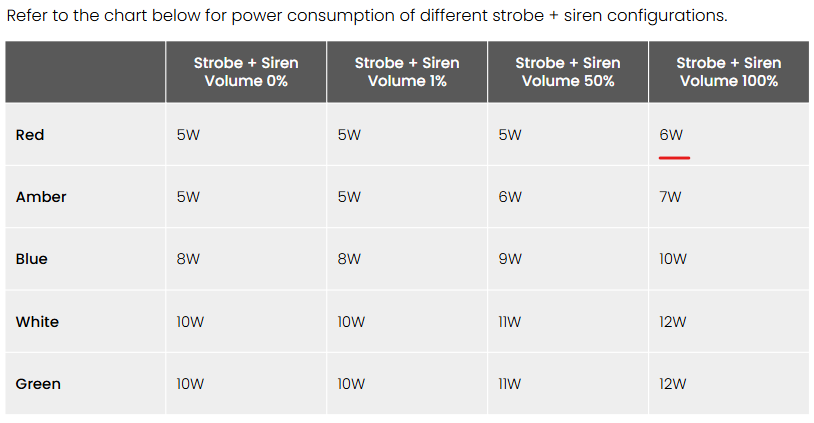
| BE32 + 8個のモーションセンサー + 15分サイレン(1.7A)を接続したBP32 \* | 4.81W | 最大9時間 |
{% hint style="warning" %}
15分サイレンのバックアップ時間は、赤色LEDを100%音量で使用した場合を基準にしています。BP32は最大6 WのRS-485出力をサポートします。
{% endhint %}
### 充電時間
システムはバッテリー充電用に最低5.35 Wを割り当て、システム負荷に余裕があれば追加の電力を利用できます。この速度では、完全に放電したBP32バッテリーは約11.5時間で再充電されます。
---
# Agent Instructions
This documentation is published with GitBook. GitBook is the documentation platform designed so that both humans and AI agents can read, navigate, and reason over technical content effectively. Learn more at gitbook.com.
## Querying This Documentation
If you need additional information that is not directly available in this page, you can query the documentation by asking a question.
Perform an HTTP GET request on the following URL with the `ask` and `goal` query parameters:
```
GET https://help.verkada.com/new-alarms/ja/she-ding/bp32-alarm-panel-configurations-and-battery-backup-estimator.md?ask=&goal=
```
`ask` is the immediate question: it should be specific, self-contained, and written in natural language.
`goal` is what the user is ultimately trying to achieve, the reason they need the answer. Sharing it helps GitBook give you a better, more relevant answer. A goal is most helpful when it describes the outcome the user wants rather than restating the question. For example, with `ask=how do I create an API token`, a goal like `automate deployments from our CI pipeline` lets GitBook tailor the answer to that use case.
The response will contain a direct answer to the question and relevant excerpts and sources from the documentation.
Use this mechanism when the answer is not explicitly present in the current page, you need clarification or additional context, or you want to retrieve related documentation sections.