> For the complete documentation index, see [llms.txt](https://help.verkada.com/llms.txt). Markdown versions of documentation pages are available by appending `.md` to page URLs; this page is available as [Markdown](https://help.verkada.com/new-alarms/installation/set-up-the-wh32.md).
# Set up the WH32
The WH32 is a wireless repeater that can extend the wireless range of a wired hub to improve coverage in areas where running cable is difficult. It can also operate as a hub when connected directly to the alarm panel via RS-485.
***
### Requirements
* WH32 as a **wireless repeater** (DC powered) - Requires 10-36V DC power supply (such as the [ACC-WA-30W-NA](https://docs.verkada.com/docs/12v-power-supply-datasheet.pdf)). The WH32 will extend the wireless range from any device with a hub, such as the BP52, WH52, WH32 (RS485), BK22, or BE32.
* WH32 as a **hub** (RS485) - Must be directly connected to the BP52 via one of its RS485 ports.
### Installation best practices
Install the WH32 facing down on the ceiling for the best wireless performance. Vertical wall mountings are also acceptable if ceiling mounting is not possible.
{% hint style="warning" %}
See [Wireless Installation FAQ](/new-alarms/installation/wireless-installations-faq.md) for more information on optimal repeater placement.
{% endhint %}
***
## WH32 setup
{% stepper %}
{% step %}
**Ensure that a BP52 is added to your New Alarms site and online.**
{% endstep %}
{% step %}
[**Add the WH32**](/command/organization-settings/add-a-device-to-your-command-organization.md) **serial number to your Command account.**
{% endstep %}
{% step %}
**Move the WH32 from unassigned devices to your New Alarms site.**
{% endstep %}
{% endstepper %}
### Repeater mode
{% stepper %}
{% step %}
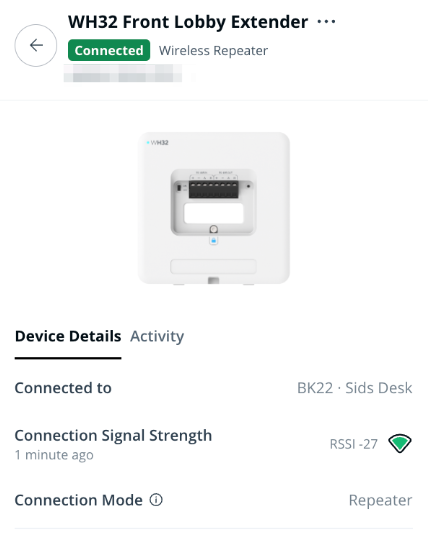
**In repeater mode, power the device (10–36V DC) and turn it on using the power switch. The WH32 will automatically connect to the nearest hub.**
{% endstep %}
{% step %}
**Check the device activity to confirm it is connected and that the RSSI signal strength is -80 dBm or better.**
{% endstep %}
{% endstepper %}
### Hub mode
{% stepper %}
{% step %}
**Connect the WH32 to the alarm panel via RS-485.**
{% endstep %}
{% step %}
**Verify the WH32 displays a "connected" event, confirming communication with the panel and readiness to route alarm events.**
{% endstep %}
{% endstepper %}
***
## FAQ
In repeater mode, how far should the WH32 be placed from the hub it is extending?
Optimal placement depends on environmental factors such as wall material, thickness, and obstructions. To maximize range, position the WH32 as far from the hub as possible while maintaining a signal strength of at least -80 dBm RSSI. If the RSSI falls below this threshold, move the WH32 closer to the hub.
Installation Tip: Avoid placing the WH32 near metal walls or enclosures, as this can significantly reduce wireless performance.
How often does the WH32 update its signal strength reading?
The RSSI reading updates every minute in Command.
Can multiple WH32 devices repeat signals in sequence?
No. The WH32 can only repeat from a wired hub, not from another WH32 in repeater mode.
How does the WH32 switch between wired hub and repeater mode?
The WH32 automatically determines its mode:
* If it detects an RS-485 connection, it operates in hub mode.
* If no RS-485 connection is present, it switches to repeater mode.
How do I power the WH32 in repeater mode?
You can use the [ACC-WA-30W-NA](https://docs.verkada.com/docs/12v-power-supply-datasheet.pdf) power adapter (sold separately).
---
# Agent Instructions
This documentation is published with GitBook. GitBook is the documentation platform designed so that both humans and AI agents can read, navigate, and reason over technical content effectively. Learn more at gitbook.com.
## Querying This Documentation
If you need additional information that is not directly available in this page, you can query the documentation by asking a question.
Perform an HTTP GET request on the following URL with the `ask` and `goal` query parameters:
```
GET https://help.verkada.com/new-alarms/installation/set-up-the-wh32.md?ask=&goal=
```
`ask` is the immediate question: it should be specific, self-contained, and written in natural language.
`goal` is what the user is ultimately trying to achieve, the reason they need the answer. Sharing it helps GitBook give you a better, more relevant answer. A goal is most helpful when it describes the outcome the user wants rather than restating the question. For example, with `ask=how do I create an API token`, a goal like `automate deployments from our CI pipeline` lets GitBook tailor the answer to that use case.
The response will contain a direct answer to the question and relevant excerpts and sources from the documentation.
Use this mechanism when the answer is not explicitly present in the current page, you need clarification or additional context, or you want to retrieve related documentation sections.