> For the complete documentation index, see [llms.txt](https://help.verkada.com/llms.txt). Markdown versions of documentation pages are available by appending `.md` to page URLs; this page is available as [Markdown](https://help.verkada.com/new-alarms/fr/configuration/br33-panic-button-configuration.md).
# Configuration du bouton d’urgence BR33
Configurez correctement les nouvelles alarmes pour vos boutons d’urgence BR33
Les boutons d’urgence sont des moyens discrets de déclencher une alarme en cas d’urgence. Vous devez configurer un niveau de réponse et armer la partition contenant des boutons d’urgence avant qu’ils puissent déclencher une alarme.
***
## Configuration
{% hint style="danger" %}
La configuration d’un bouton d’urgence comporte trois étapes. Vous devez configurer les trois étapes pour vous assurer que vos boutons d’urgence déclenchent toujours une alarme lorsqu’ils sont pressés. Si les trois étapes ne sont pas configurées correctement, les boutons d’urgence peuvent ne pas déclencher d’alarme comme prévu.
{% endhint %}
{% stepper %}
{% step %}
**Dans Verkada Command, accédez à Tous les produits > Alarmes.**
{% endstep %}
{% step %}
**Sélectionnez votre site Alarmes.**
{% endstep %}
{% step %}
**Dans la navigation de gauche, cliquez sur Appareils.**
{% endstep %}
{% step %}
**Cliquez sur votre capteur pour afficher les paramètres de l’appareil.**
{% endstep %}
{% step %}
**Ici, vous pouvez configurer les paramètres suivants :**
* **Gestes du bouton d’urgence :** Choisissez le schéma d’appui sur le bouton qui déclenche un signal d’urgence et une alarme. Les options incluent appui simple, double, triple ou appui long.
* **Mettre l’appareil en sourdine :** Lorsque cette option est activée, l’appareil ne déclenchera pas d’alarme, mais continuera à enregistrer les signaux.
* **Caméra à proximité :** Sélectionnez la caméra à associer au bouton d’urgence pour fournir un contexte visuel.
{% endstep %}
{% endstepper %}
{% hint style="danger" %}
Les boutons d’urgence ne sont pas vérifiés par vidéo. L’enregistrement de la caméra associée est fourni uniquement à titre de contexte.
{% endhint %}
### Configurer une réponse
{% stepper %}
{% step %}
**Dans Verkada Command, accédez à Tous les produits > Alarmes.**
{% endstep %}
{% step %}
**Sélectionnez le site Alarmes que vous souhaitez configurer.**
{% endstep %}
{% step %}
**Dans la navigation de gauche, sélectionnez Réponse >.**
{% endstep %}
{% step %}
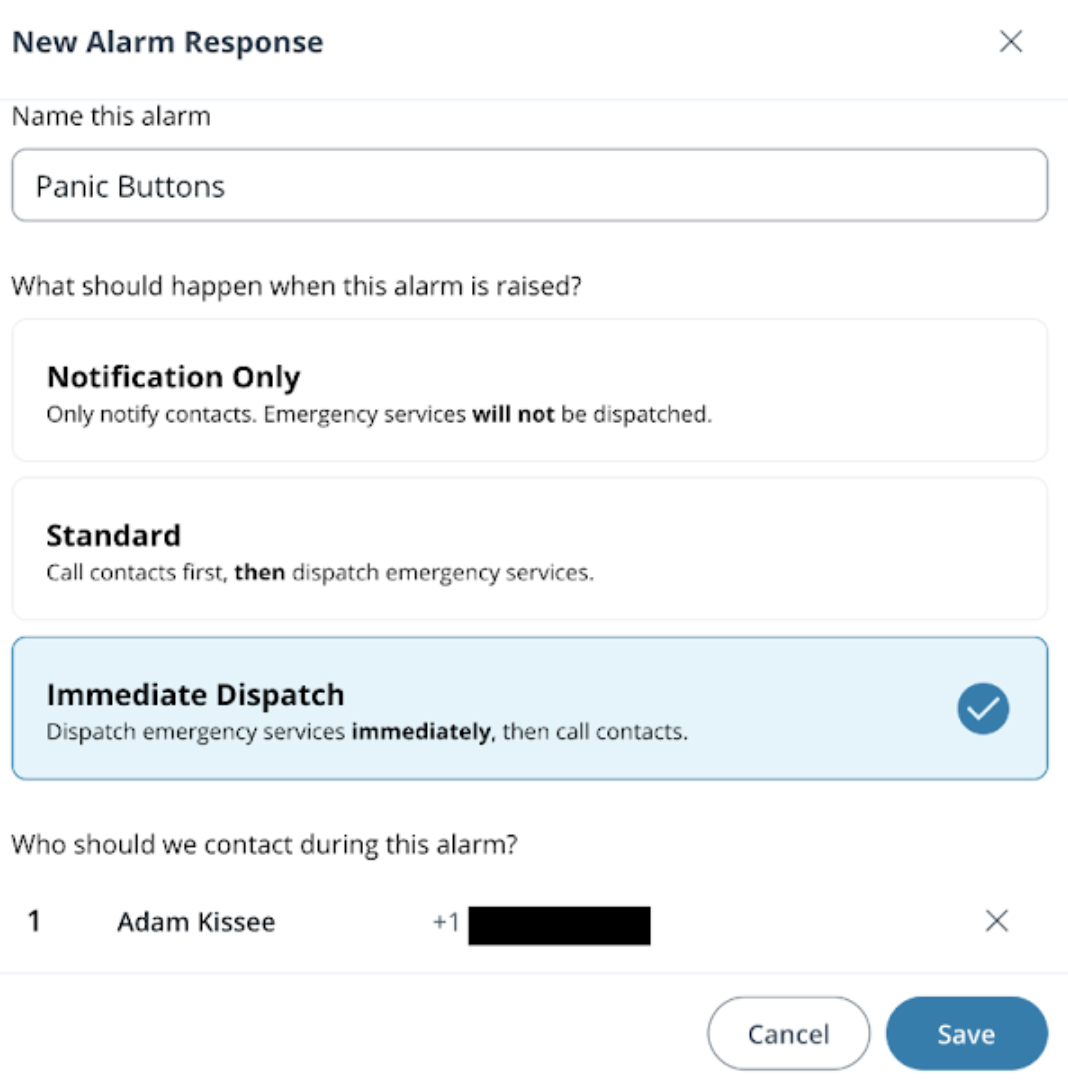
**Sélectionnez l’une des réponses suivantes :**
* Notification uniquement
* Standard
* Intervention immédiate
{% endstep %}
{% step %}
**Ajouter un contact**
{% endstep %}
{% step %}
**Cliquez sur Enregistrer.**
{% endstep %}
{% endstepper %}
### Configurer une partition toujours armée
{% stepper %}
{% step %}
[**Créez une nouvelle partition**](/new-alarms/fr/configuration/alarm-sites/configure-partitions.md) **et attribuez-lui une réponse d’alarme.**
{% endstep %}
{% step %}
**Ajoutez tous les boutons d’urgence à la partition.**
{% endstep %}
{% step %}
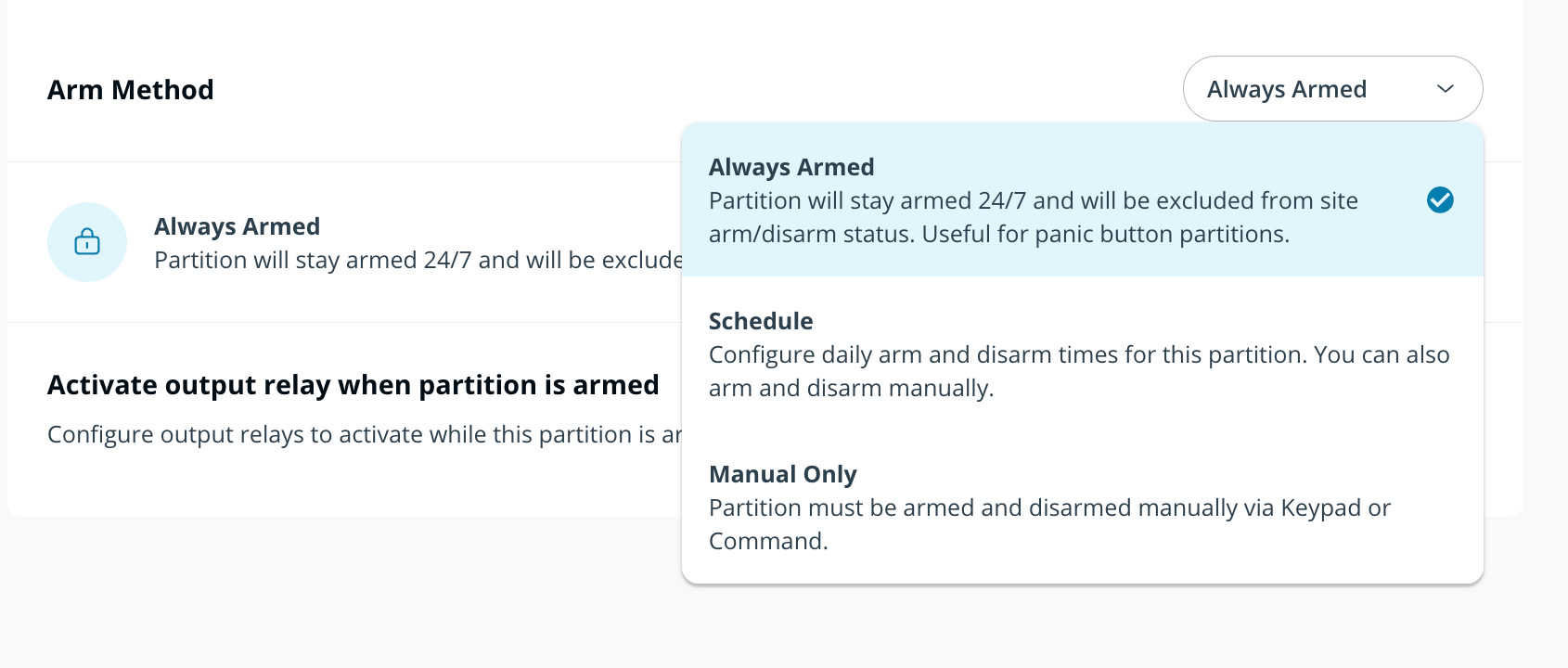
**Dans la liste déroulante Méthode pour armer, sélectionnez Toujours armé.**
{% endstep %}
{% endstepper %}
{% hint style="warning" %}
* Toujours armé est activé au niveau de la partition.
* Si une alarme est déclenchée depuis une partition Toujours armé, sa résolution ne désarmera pas cette partition.
{% endhint %}
---
# Agent Instructions
This documentation is published with GitBook. GitBook is the documentation platform designed so that both humans and AI agents can read, navigate, and reason over technical content effectively. Learn more at gitbook.com.
## Querying This Documentation
If you need additional information that is not directly available in this page, you can query the documentation by asking a question.
Perform an HTTP GET request on the following URL with the `ask` and `goal` query parameters:
```
GET https://help.verkada.com/new-alarms/fr/configuration/br33-panic-button-configuration.md?ask=&goal=
```
`ask` is the immediate question: it should be specific, self-contained, and written in natural language.
`goal` is what the user is ultimately trying to achieve, the reason they need the answer. Sharing it helps GitBook give you a better, more relevant answer. A goal is most helpful when it describes the outcome the user wants rather than restating the question. For example, with `ask=how do I create an API token`, a goal like `automate deployments from our CI pipeline` lets GitBook tailor the answer to that use case.
The response will contain a direct answer to the question and relevant excerpts and sources from the documentation.
Use this mechanism when the answer is not explicitly present in the current page, you need clarification or additional context, or you want to retrieve related documentation sections.