> For the complete documentation index, see [llms.txt](https://help.verkada.com/llms.txt). Markdown versions of documentation pages are available by appending `.md` to page URLs; this page is available as [Markdown](https://help.verkada.com/new-alarms/es/configuracion/configure-an-alarm-response/agent-talk-down.md).
# Intervención verbal del agente
Usa la intervención verbal del agente para disuadir a los intrusos cuando se active una alarma
{% hint style="success" %}
Este artículo es una guía para nuevas Alarmas. Consulte esto [artículo](/classic-alarms/es/configuracion/agent-talk-down-with-classic-alarms.md) si tiene alarmas clásicas. Vea [Nuevas alarmas frente a Alarmas clásicas](/new-alarms/es/primeros-pasos/new-alarms-vs-classic-alarms.md) si no está seguro de qué versión de alarmas tiene.
{% endhint %}
***
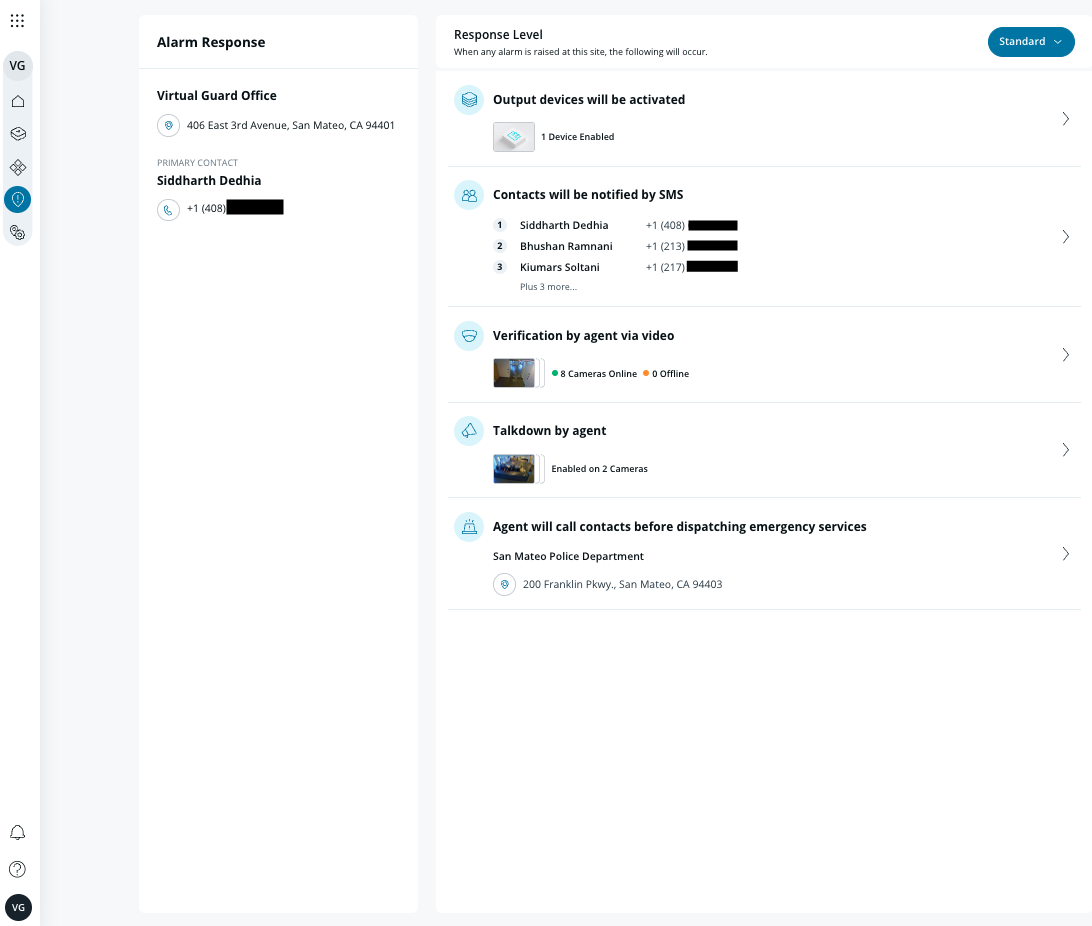
**Disuasión verbal por agente** permite a los agentes de monitoreo remoto usar el altavoz para una disuasión verbal en vivo cuando se activa una alarma para disuadir a los intrusos antes de enviar a las autoridades.
{% hint style="warning" %}
**Altavoces compatibles:** Altavoz de bocina BZ11, todos los modelos de intercomunicador Verkada.
{% endhint %}
### Requisitos
* Si se usa un altavoz de bocina BZ11:
* El BZ11 debe estar emparejado con las cámaras en el sitio de la alarma.
* Las cámaras emparejadas con el BZ11 deben configurarse como activadores en la partición de la cámara.
* Si se usa un intercomunicador:
* **Videoportero:** La cámara integrada debe configurarse como activador en la partición de la cámara.\
**Nota:** La disuasión verbal por agente solo funciona si la cámara integrada se agrega explícitamente como activador de alarma.
* **Intercomunicador de audio:** La cámara emparejada debe configurarse como activador en la partición de la cámara.
* El nivel de respuesta debe establecerse en **Estándar**.
{% hint style="danger" %}
Si no se cumple alguno de los requisitos anteriores, es posible que la disuasión verbal por agente no esté configurada correctamente para su sitio y puede que no funcione como se espera.
{% endhint %}
***
## Configurar disuasión verbal por agente
{% hint style="warning" %}
**Disuasión verbal por agente** está habilitado de forma predeterminada si el altavoz está emparejado con una cámara que se agrega como activador de cámara.
{% endhint %}
{% stepper %}
{% step %}
**En Verkada Command, vaya a Todos los productos > Alarmas.**
{% endstep %}
{% step %}
**Seleccione el sitio de Alarmas que desea configurar.**
{% endstep %}
{% step %}
**Crear una cámara** [**partición**](/new-alarms/es/configuracion/alarm-sites/configure-partitions.md#create-a-camera-partition) **y agregue las cámaras asociadas con los altavoces.**
{% endstep %}
{% step %}
**En la navegación de la izquierda, seleccione Respuesta > Disuasión verbal por agente en la cámara activadora.**
{% hint style="danger" %}
La disuasión verbal por agente solo está disponible para el **Estándar** nivel de respuesta.
{% endhint %}
{% endstep %}
{% step %}
**En la esquina superior derecha, active Disuasión verbal habilitada.**
{% endstep %}
{% endstepper %}
***
{% hint style="info" %}
**¿Prefiere verlo en acción?** Consulte el [tutorial en video](https://www.youtube.com/watch?v=ff_TxRmg__c).
{% endhint %}
---
# Agent Instructions
This documentation is published with GitBook. GitBook is the documentation platform designed so that both humans and AI agents can read, navigate, and reason over technical content effectively. Learn more at gitbook.com.
## Querying This Documentation
If you need additional information that is not directly available in this page, you can query the documentation by asking a question.
Perform an HTTP GET request on the following URL with the `ask` and `goal` query parameters:
```
GET https://help.verkada.com/new-alarms/es/configuracion/configure-an-alarm-response/agent-talk-down.md?ask=&goal=
```
`ask` is the immediate question: it should be specific, self-contained, and written in natural language.
`goal` is what the user is ultimately trying to achieve, the reason they need the answer. Sharing it helps GitBook give you a better, more relevant answer. A goal is most helpful when it describes the outcome the user wants rather than restating the question. For example, with `ask=how do I create an API token`, a goal like `automate deployments from our CI pipeline` lets GitBook tailor the answer to that use case.
The response will contain a direct answer to the question and relevant excerpts and sources from the documentation.
Use this mechanism when the answer is not explicitly present in the current page, you need clarification or additional context, or you want to retrieve related documentation sections.