> For the complete documentation index, see [llms.txt](https://help.verkada.com/llms.txt). Markdown versions of documentation pages are available by appending `.md` to page URLs; this page is available as [Markdown](https://help.verkada.com/new-alarms/es/configuracion/alarm-sites/configure-partitions/smart-schedule-in-new-alarms.md).
# Programación inteligente en Nuevas Alarmas
Aprende cómo funciona la programación inteligente y cómo configurarla en Nuevas Alarmas
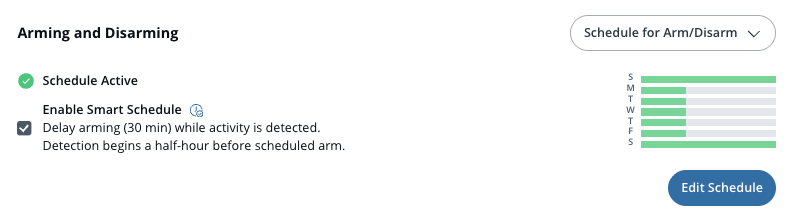
Las Programaciones inteligentes activan automáticamente su sitio en función de la actividad, en lugar de una hora fija. Esto ayuda a prevenir falsas alarmas y, al mismo tiempo, garantiza que el sitio quede asegurado una vez que la actividad se detenga.
A diferencia de los horarios normales que activan y desactivan a horas fijas, las Programaciones inteligentes comienzan a supervisar la actividad 30 minutos antes de la hora programada de activación. Si se detecta actividad, la activación se retrasa 30 minutos. Cada nuevo evento, como movimiento u otra actividad que normalmente activaría una alarma, reinicia el temporizador de 30 minutos. Una vez que el sitio ha estado inactivo durante 30 minutos completos, el sistema se activa automáticamente.
{% hint style="warning" %}
Las Programaciones inteligentes operan a nivel de partición y son compatibles con particiones de sensores y cámaras.
{% endhint %}
***
## Configuración
{% stepper %}
{% step %}
**En Verkada Command, vaya a Todos los productos > Alarmas.**
{% endstep %}
{% step %}
**Seleccione el sitio de alarma que desea configurar.**
{% endstep %}
{% step %}
**En la navegación izquierda, haga clic en Particiones.**
{% endstep %}
{% step %}
**Seleccione la partición.**
1. En **activar y desactivar,** seleccione **Horario para activar/desactivar** en el menú desplegable.
2. Haga clic en la **Activar Programación inteligente** casilla.
3. Haz clic en **Editar programación** para configurar la programación según sea necesario. Cuando termine, haga clic en **Listo**.
{% endstep %}
{% endstepper %}
***
### Ejemplo
* Si su programación está configurada para activar a las 6:00 p. m., las Programaciones inteligentes comienzan a supervisar a las 5:30 p. m.
* Si se detecta movimiento a las 5:45 p. m., la activación se retrasa hasta las 6:15 p. m.
* Si ocurre actividad adicional antes de las 6:15 p. m., el retraso continúa hasta que no haya habido actividad durante 30 minutos.
{% hint style="info" %}
Las Programaciones inteligentes son ideales para lugares con horarios de cierre variables. Puede establecer la hora de activación antes de lo habitual para maximizar la seguridad y, al mismo tiempo, minimizar las falsas alarmas.
{% endhint %}
---
# Agent Instructions
This documentation is published with GitBook. GitBook is the documentation platform designed so that both humans and AI agents can read, navigate, and reason over technical content effectively. Learn more at gitbook.com.
## Querying This Documentation
If you need additional information that is not directly available in this page, you can query the documentation by asking a question.
Perform an HTTP GET request on the following URL with the `ask` and `goal` query parameters:
```
GET https://help.verkada.com/new-alarms/es/configuracion/alarm-sites/configure-partitions/smart-schedule-in-new-alarms.md?ask=&goal=
```
`ask` is the immediate question: it should be specific, self-contained, and written in natural language.
`goal` is what the user is ultimately trying to achieve, the reason they need the answer. Sharing it helps GitBook give you a better, more relevant answer. A goal is most helpful when it describes the outcome the user wants rather than restating the question. For example, with `ask=how do I create an API token`, a goal like `automate deployments from our CI pipeline` lets GitBook tailor the answer to that use case.
The response will contain a direct answer to the question and relevant excerpts and sources from the documentation.
Use this mechanism when the answer is not explicitly present in the current page, you need clarification or additional context, or you want to retrieve related documentation sections.