> For the complete documentation index, see [llms.txt](https://help.verkada.com/llms.txt). Markdown versions of documentation pages are available by appending `.md` to page URLs; this page is available as [Markdown](https://help.verkada.com/new-alarms/de/konfiguration/wireless-alarms-devices/supervised-wiring.md).
# Überwachte Verdrahtung
Verwenden Sie die Überwachung mit Alarmen, um durchtrennte und kurzgeschlossene Leitungen zu erkennen
{% hint style="success" %}
Dieser Artikel ist ein Leitfaden für neue Alarms. Siehe hierzu [Artikel](/classic-alarms/de/installation/alarm-setup-and-install-best-practices/supervised-wiring-with-classic-alarms.md) wenn Sie klassische Alarme haben. Siehe [Neue Alarme vs. klassische Alarme](/new-alarms/de/erste-schritte/new-alarms-vs-classic-alarms.md) wenn Sie sich nicht sicher sind, welche Alarmversion Sie haben.
{% endhint %}
***
In einem nicht überwachten Stromkreis wird ein unterbrochenes Kabel an einem Sensor mit normalerweise offenem Anschluss oder ein kurzgeschlossenes Kabel an einem Sensor mit normalerweise geschlossenem Anschluss nicht als Alarmauslösung erkannt. Die Überwachung ermöglicht es der Verkada BP52-Alarmzentrale, diese Ereignisse zu erkennen und eine Benachrichtigung oder einen Alarm auszulösen.
***
## Überwachungsarten
Die BP52-Alarmzentrale unterstützt 2 Arten der Überwachung:
* Einzelner End-of-Line-Widerstand (EOLR) (1 Widerstand)
* Doppelter EOLR (2 Widerstände)
Diese beiden Überwachungsarten können auf Sensoren angewendet werden, die normalerweise offen (NO) oder normalerweise geschlossen (NC) verdrahtet sind. Referenz-Widerstandswerte für jeden Typ sind unten aufgeführt.
### Einzelne EOLR-Überwachung (1000 Ω-Widerstände)
| | | |
| ---------------------- | ----------------------------------------------------------- | ------------------------------------------------------------------------- |
| **Widerstand** | **Normalerweise geschlossen (NC)** | **Normalerweise offen (NO)** |
| 0 Ω | Kurzgeschlossener Stromkreis; Störungszustand | Kurzgeschlossener Stromkreis oder geschlossenes Ereignis; Alarm ausgelöst |
| 1000 Ω | Normalzustand | Normalzustand |
| Unendlicher Widerstand | Unterbrochenes Kabel oder offenes Ereignis; Alarm ausgelöst | Unterbrochenes Kabel; Störungszustand |
### Doppelte EOLR-Überwachung
| | | |
| ---------------------- | --------------------------------------------- | --------------------------------------------- |
| **Widerstand** | **Normalerweise geschlossen (NC)** | **Normalerweise offen (NO)** |
| 0 Ω | Kurzgeschlossener Stromkreis; Störungszustand | Kurzgeschlossener Stromkreis; Störungszustand |
| 1000 Ω | Normalzustand | Geschlossenes Ereignis; Alarm ausgelöst |
| 2000 Ω | Offenes Ereignis; Alarm ausgelöst | Normalzustand |
| Unendlicher Widerstand | Unterbrochenes Kabel; Störungszustand | Unterbrochenes Kabel; Störungszustand |
***
## Verdrahten Sie EOLR-Widerstände an Ihre BP52-Alarmzentrale
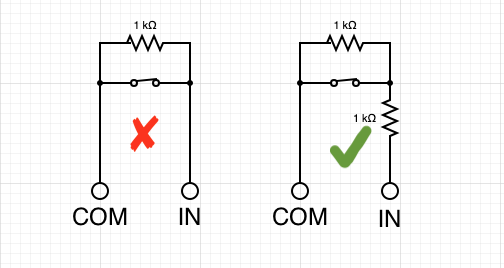
Widerstände werden am Ende des Stromkreises, so nah wie möglich am Sensor, sowohl für einzelne als auch für doppelte EOL-Widerstände installiert. Das Installieren von EOL-Widerständen an der Zentrale beeinträchtigt den Zweck der Überwachung.
| | |
| --------------------------------------------------------------------------------------------------------------------------------------------------------------------------------------------------------------------------------------------------------------- | --------------------------------------------------------------------------------------------------------------------------------------------------------------------------------------------------------------------------------------------------------------- |
| **Einzelner EOLR** | **Doppelter EOLR** |
|  |  |
{% hint style="danger" %}
Es ist nicht kompatibel, wenn Sie einen normalerweise geschlossenen Alarmsensor haben und der Widerstand parallel verdrahtet ist. Wenn Sie diese Konfiguration haben, fügen Sie einen einzelnen Widerstand in Reihe hinzu, um ihn in Doppel-EOLR umzuwandeln.
{% endhint %}
---
# Agent Instructions
This documentation is published with GitBook. GitBook is the documentation platform designed so that both humans and AI agents can read, navigate, and reason over technical content effectively. Learn more at gitbook.com.
## Querying This Documentation
If you need additional information that is not directly available in this page, you can query the documentation by asking a question.
Perform an HTTP GET request on the following URL with the `ask` and `goal` query parameters:
```
GET https://help.verkada.com/new-alarms/de/konfiguration/wireless-alarms-devices/supervised-wiring.md?ask=&goal=
```
`ask` is the immediate question: it should be specific, self-contained, and written in natural language.
`goal` is what the user is ultimately trying to achieve, the reason they need the answer. Sharing it helps GitBook give you a better, more relevant answer. A goal is most helpful when it describes the outcome the user wants rather than restating the question. For example, with `ask=how do I create an API token`, a goal like `automate deployments from our CI pipeline` lets GitBook tailor the answer to that use case.
The response will contain a direct answer to the question and relevant excerpts and sources from the documentation.
Use this mechanism when the answer is not explicitly present in the current page, you need clarification or additional context, or you want to retrieve related documentation sections.