> For the complete documentation index, see [llms.txt](https://help.verkada.com/llms.txt). Markdown versions of documentation pages are available by appending `.md` to page URLs; this page is available as [Markdown](https://help.verkada.com/new-alarms/de/konfiguration/br33-panic-button-configuration.md).
# BR33-Panikknopf-Konfiguration
Richten Sie Neue Alarme für Ihre BR33-Panikknöpfe korrekt ein
Panikknöpfe sind unauffällige Möglichkeiten, im Notfall einen Alarm auszulösen. Sie müssen eine Reaktionsstufe konfigurieren und die Partition, die die Panikknöpfe enthält, scharf schalten, bevor sie einen Alarm auslösen können.
***
## Konfiguration
{% hint style="danger" %}
Das Konfigurieren eines Panikknopfs besteht aus drei Schritten. Sie müssen alle drei Schritte konfigurieren, damit Ihre Panikknöpfe beim Drücken immer einen Alarm auslösen. Wenn nicht alle drei Schritte korrekt konfiguriert werden, können Panikknöpfe möglicherweise nicht wie erwartet Alarme auslösen.
{% endhint %}
{% stepper %}
{% step %}
**Gehen Sie in Verkada Command zu Alle Produkte > Alarme.**
{% endstep %}
{% step %}
**Wählen Sie Ihre Alarm-Site aus.**
{% endstep %}
{% step %}
**Klicken Sie in der linken Navigation auf Geräte.**
{% endstep %}
{% step %}
**Klicken Sie auf Ihren Sensor, um die Geräteeinstellungen anzuzeigen.**
{% endstep %}
{% step %}
**Hier können Sie die folgenden Einstellungen konfigurieren:**
* **Panikgesten:** Wählen Sie das Tastendruckmuster, das ein Paniksignal und einen Alarm auslöst. Zu den Optionen gehören Einzeldruck, Doppeldruck, Dreifachdruck oder Langdruck.
* **Gerät stummschalten:** Wenn aktiviert, löst das Gerät keine Alarme aus, zeichnet Signale jedoch weiterhin auf.
* **Nahegelegene Kamera:** Wählen Sie die Kamera aus, die mit dem Panikknopf gekoppelt werden soll, um visuellen Kontext bereitzustellen.
{% endstep %}
{% endstepper %}
{% hint style="danger" %}
Panikknöpfe werden nicht per Video verifiziert. Das Material der gekoppelten Kamera dient nur als Kontext.
{% endhint %}
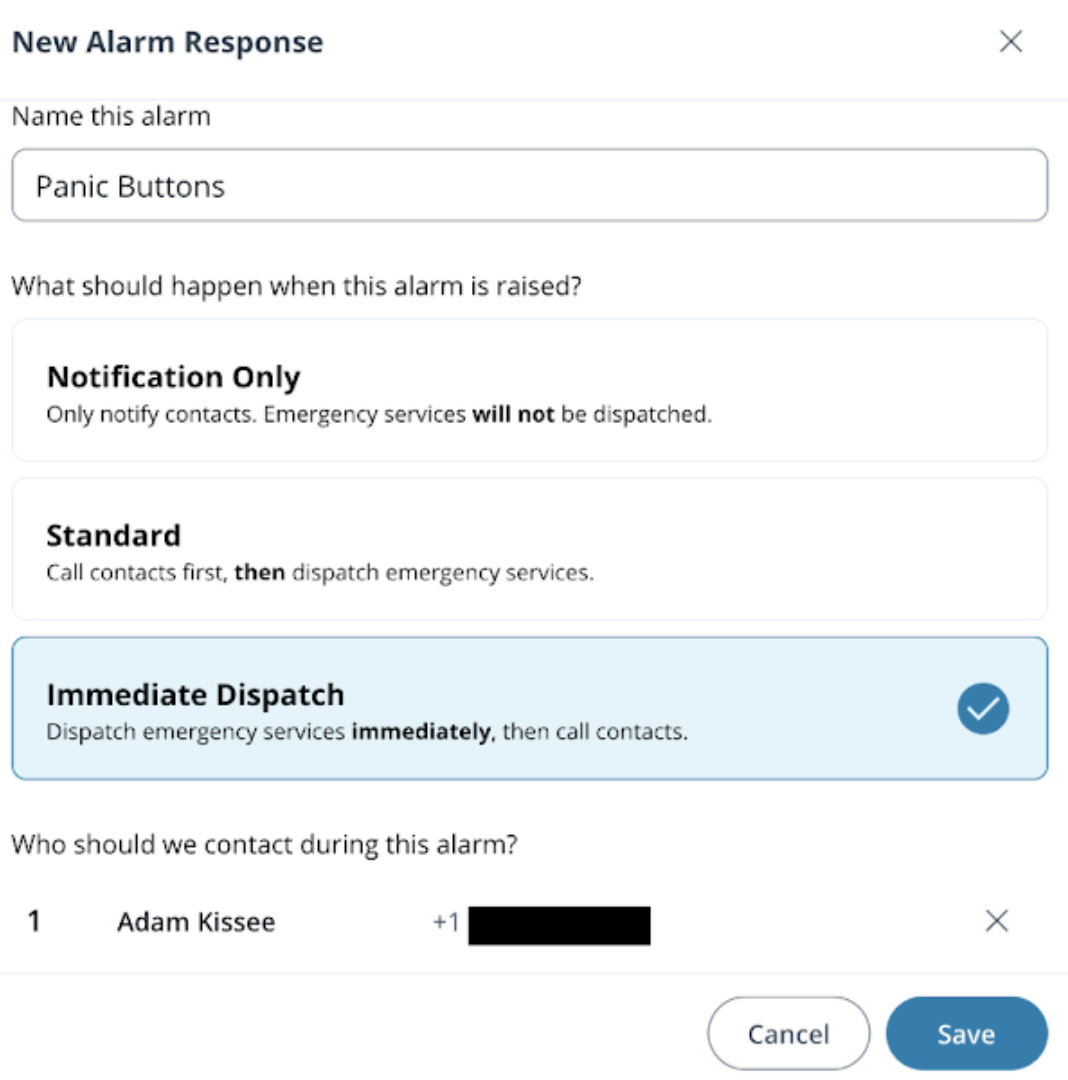
### Eine Reaktion konfigurieren
{% stepper %}
{% step %}
**Gehen Sie in Verkada Command zu Alle Produkte > Alarme.**
{% endstep %}
{% step %}
**Wählen Sie die Alarm-Site aus, die Sie konfigurieren möchten.**
{% endstep %}
{% step %}
**Wählen Sie in der linken Navigation Reaktion > aus.**
{% endstep %}
{% step %}
**Wählen Sie eine der folgenden Reaktionen aus:**
* Nur Benachrichtigung
* Standard
* Sofortige Alarmierung
{% endstep %}
{% step %}
**Einen Kontakt hinzufügen**
{% endstep %}
{% step %}
**Klicken Sie auf Speichern.**
{% endstep %}
{% endstepper %}
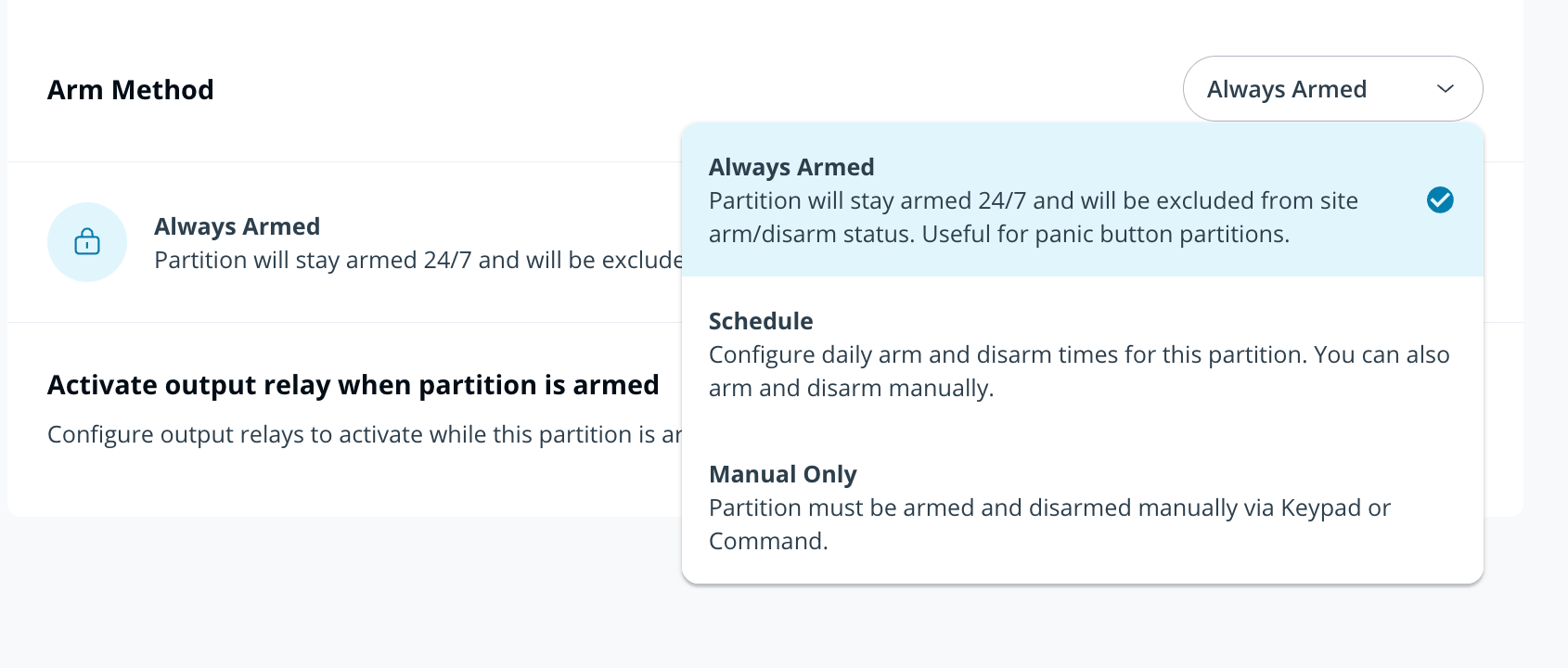
### Eine immer scharf geschaltete Partition konfigurieren
{% stepper %}
{% step %}
[**Erstellen Sie eine neue Partition**](/new-alarms/de/konfiguration/alarm-sites/configure-partitions.md) **und weisen Sie eine Alarmreaktion zu.**
{% endstep %}
{% step %}
**Fügen Sie alle Panikknöpfe der Partition hinzu.**
{% endstep %}
{% step %}
**Wählen Sie im Dropdown-Menü der Scharfschaltmethode die Option Immer scharf geschaltet aus.**
{% endstep %}
{% endstepper %}
{% hint style="warning" %}
* Immer scharf geschaltet wird auf Partitionsebene aktiviert.
* Wenn von einer immer scharf geschalteten Partition ein Alarm ausgelöst wird, wird die Partition durch das Beheben des Alarms nicht unscharf geschaltet.
{% endhint %}
---
# Agent Instructions
This documentation is published with GitBook. GitBook is the documentation platform designed so that both humans and AI agents can read, navigate, and reason over technical content effectively. Learn more at gitbook.com.
## Querying This Documentation
If you need additional information that is not directly available in this page, you can query the documentation by asking a question.
Perform an HTTP GET request on the following URL with the `ask` and `goal` query parameters:
```
GET https://help.verkada.com/new-alarms/de/konfiguration/br33-panic-button-configuration.md?ask=&goal=
```
`ask` is the immediate question: it should be specific, self-contained, and written in natural language.
`goal` is what the user is ultimately trying to achieve, the reason they need the answer. Sharing it helps GitBook give you a better, more relevant answer. A goal is most helpful when it describes the outcome the user wants rather than restating the question. For example, with `ask=how do I create an API token`, a goal like `automate deployments from our CI pipeline` lets GitBook tailor the answer to that use case.
The response will contain a direct answer to the question and relevant excerpts and sources from the documentation.
Use this mechanism when the answer is not explicitly present in the current page, you need clarification or additional context, or you want to retrieve related documentation sections.