> For the complete documentation index, see [llms.txt](https://help.verkada.com/llms.txt). Markdown versions of documentation pages are available by appending `.md` to page URLs; this page is available as [Markdown](https://help.verkada.com/new-alarms/de/konfiguration/bp32-alarm-panel-configurations-and-battery-backup-estimator.md).
# BP32 Alarmzentrale-Konfigurationen und Batterie-Backup-Rechner
Der BP32 verfügt über einen RS-485-Ausgang zum Anschluss von Tastaturen und Erweiterungsmodulen. Sie können unterstützte Geräte anschließen und die Dauer der Akkusicherung für verschiedene Konfigurationen berechnen.
***
## BK22-Tastatur anschließen
* **RS-485-Verbindung (empfohlen) -** Um Ihre BK22-Tastatur bei einem Stromausfall oder einer Verbindungsstörung vollständig mit Backup zu versorgen, verbinden Sie sie mit dem BP32 über den **RS-485 Out** -Anschluss. Diese Verbindung bietet bis zu 8 Stunden Akkubackup für sowohl die BK22 (bei 80 % Helligkeit) als auch den BP32.
* **LAN-Verbindung -** Für eine einfachere Installation verbinden Sie die BK22-Tastatur mit dem BP32 über **LAN**. Dies bietet dem BP32 bis zu 30 Stunden Akkubackup, die BK22 wird jedoch bei einem Stromausfall oder einer Verbindungsstörung nicht mit Backup versorgt.
### Zusätzliche Konfigurationsoptionen
* **LAN:** Sie können Geräte wie den WH52 Wireless Hub anschließen, um die Abdeckung zu erweitern.
* **RS-485-Anschluss:** Sie können zusätzliche Geräte über den RS-485-Out-Anschluss verbinden. Das Akkubackup variiert je nach Konfiguration:
* **Funk-Repeater:**
* BP32 mit 1x WH32 angeschlossen
* BP32 mit 4x WH32 in Reihe geschaltet
* **Kabelgebundene Erweiterungen:**
* BP32 mit BE32 + 8 Türkontaktsensoren
* BP32 mit BE32 + 8 Bewegungsmeldern
* **Sirene und Blitzlicht:**
* BP32 mit 1x BZ32
***
## Akkubackup-Stunden für den BP32 berechnen
Berechnen Sie die Laufzeit des Akkubackups Ihres BP32-Panels auf Grundlage der gesamten Leistungsaufnahme der angeschlossenen Geräte. So können Sie die gewünschte Betriebszeit während eines Stromausfalls planen.
Verwenden Sie die folgende Formel:
**Akkubackup (Stunden) = 42,9 Wh ÷ \[Gesamtleistungsaufnahme der angeschlossenen Geräte]**
{% hint style="warning" %}
Der BP32 hat eine effektive Akkukapazität von 42,9 Wh.
{% endhint %}
**Beispielkonfigurationen**
| | | |
| ---------------------------------------------------------------- | --------------------- | ------------------------------------ |
| **Konfiguration** | **Leistungsaufnahme** | **Verfügbares Akkubackup (Stunden)** |
| BP32 mit 1x WH32 | 2,2 W | Bis zu 19 Std. |
| BP32 mit 4x WH32 in Reihe geschaltet | 2,81 W | Bis zu 15 Std. |
| BP32 mit BK22 (Display dauerhaft eingeschaltet, 80 % Helligkeit) | 5,24 W | Bis zu 8 Std. |
| BP32 mit BK22 (Display dauerhaft eingeschaltet, 50 % Helligkeit) | 4,51 W | Bis zu 10 Std. |
| BP32 mit BK22 (Display dauerhaft eingeschaltet, 25 % Helligkeit) | 4,01 W | Bis zu 11 Std. |
| BP32 mit BK22 (Display dauerhaft eingeschaltet, 1 % Helligkeit) | 3,55 W | Bis zu 12 Std. |
| BP32 mit BE32 + 8 Türsensoren | 2,78 W | Bis zu 15 Std. |
| BP32 mit BE32 + 8 Bewegungsmeldern | 3,98 W | Bis zu 11 Std. |
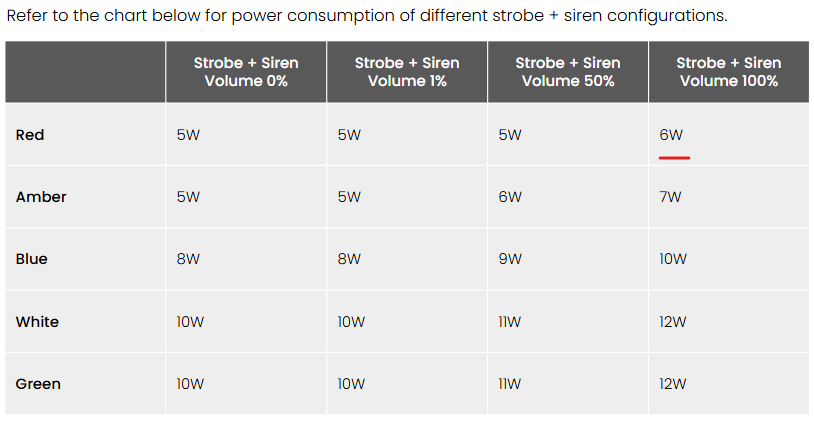
| BP32 mit BE32 + 8 Bewegungsmeldern + 15 Min. Sirene (1,7 A) \* | 4,81 W | Bis zu 9 Std. |
{% hint style="warning" %}
Die 15-minütige Sirenen-Backup-Zeit basiert auf roten LEDs bei 100 % Lautstärke. Der BP32 unterstützt eine maximale RS-485-Ausgangsleistung von 6 W.
{% endhint %}
### Ladezeit
Das System reserviert mindestens 5,35 W zum Laden des Akkus; zusätzliche Leistung steht zur Verfügung, wenn die Systemlast es zulässt. Bei dieser Rate lädt sich ein vollständig entladener BP32-Akku in etwa 11,5 Stunden wieder auf.
---
# Agent Instructions
This documentation is published with GitBook. GitBook is the documentation platform designed so that both humans and AI agents can read, navigate, and reason over technical content effectively. Learn more at gitbook.com.
## Querying This Documentation
If you need additional information that is not directly available in this page, you can query the documentation by asking a question.
Perform an HTTP GET request on the following URL with the `ask` and `goal` query parameters:
```
GET https://help.verkada.com/new-alarms/de/konfiguration/bp32-alarm-panel-configurations-and-battery-backup-estimator.md?ask=&goal=
```
`ask` is the immediate question: it should be specific, self-contained, and written in natural language.
`goal` is what the user is ultimately trying to achieve, the reason they need the answer. Sharing it helps GitBook give you a better, more relevant answer. A goal is most helpful when it describes the outcome the user wants rather than restating the question. For example, with `ask=how do I create an API token`, a goal like `automate deployments from our CI pipeline` lets GitBook tailor the answer to that use case.
The response will contain a direct answer to the question and relevant excerpts and sources from the documentation.
Use this mechanism when the answer is not explicitly present in the current page, you need clarification or additional context, or you want to retrieve related documentation sections.