> For the complete documentation index, see [llms.txt](https://help.verkada.com/llms.txt). Markdown versions of documentation pages are available by appending `.md` to page URLs; this page is available as [Markdown](https://help.verkada.com/intercom/ja/she-ding/intercom-reader-settings.md).
# Intercom リーダー設定
第2世代 Verkada インターコムのリーダーを設定する
{% stepper %}
{% step %}
**Verkada Commandで、[すべての製品]>[Intercom]に移動します。**
{% endstep %}
{% step %}
**構成するインターコムを選択します。**
{% endstep %}
{% step %}
**上部で、[設定]>[ドア]をクリックします。**
{% endstep %}
{% endstepper %}
## 認証情報タイプを管理
以下のトグルを使用して、許可または禁止する認証情報タイプを管理できます:
* **カードリーダー**: RFIDおよびNFC認証情報を有効または無効にします。
* **NFCアンロック**: NFC認証情報を許可または禁止します。
* **Bluetoothアンロック**: Bluetooth認証情報のアクセスを管理します。
## ジェスチャーアンロックの設定
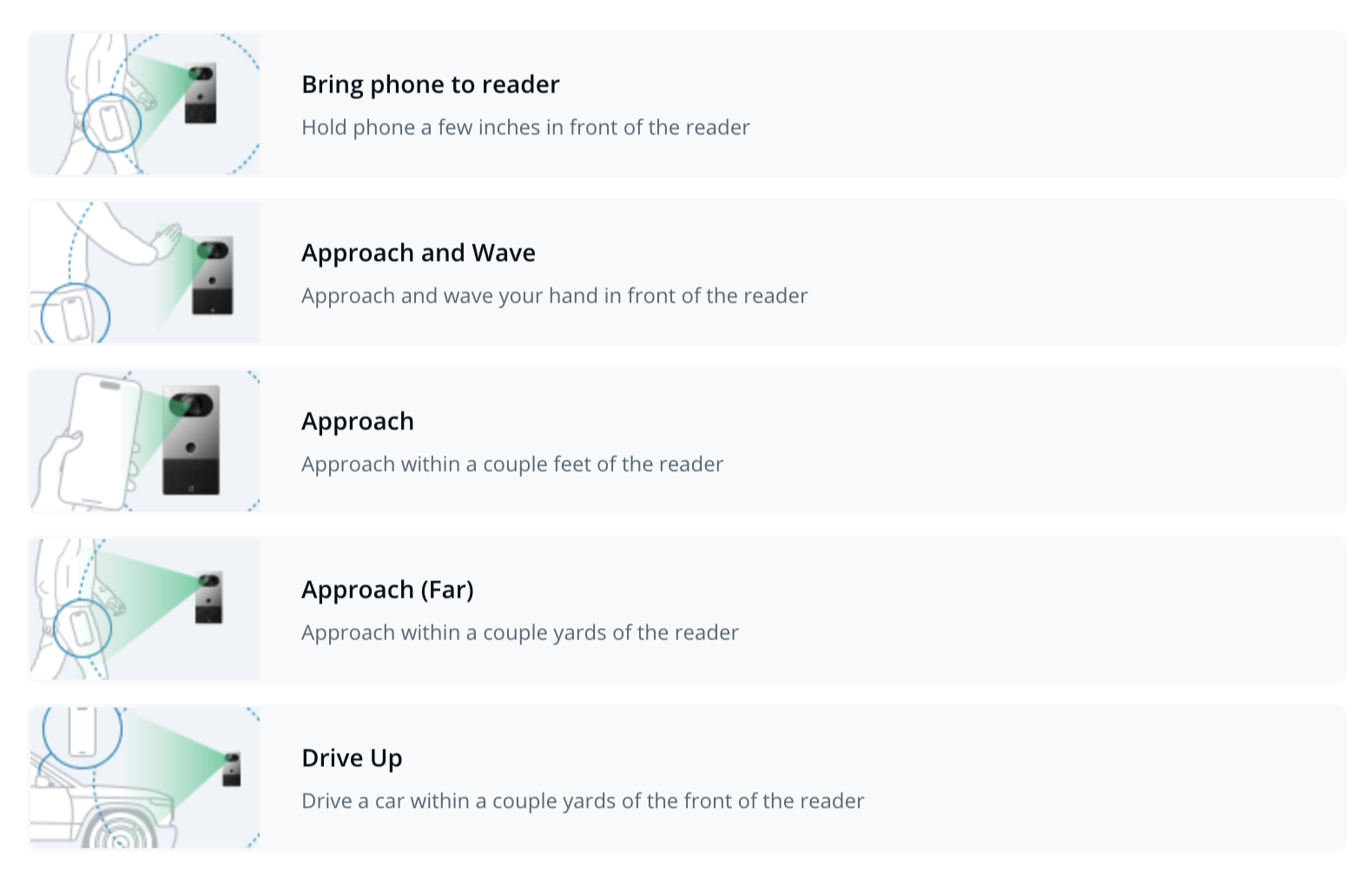
Verkadaインターホン(TD52 + AD34、TD33、TD53、TD63)は **ジェスチャーアンロック**をサポートしています。これは、誤ってBluetoothでアンロックされるのを防ぐための機能です。ジェスチャーアンロックでは、ドアのロックを解除するためにBluetooth認証情報に加えて特定のジェスチャーが必要です。
{% stepper %}
{% step %}
**Intercom Settings > Reader > Bluetooth Unlock Trigger > Custom Configuration に移動します。**
{% endstep %}
{% step %}
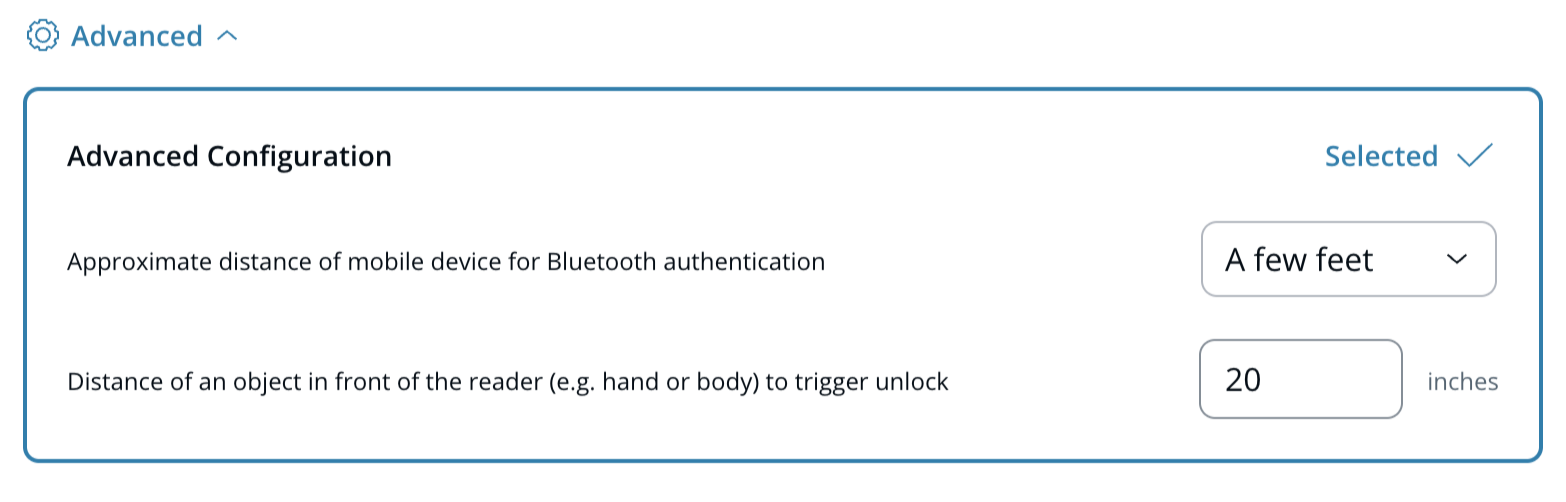
**プリセットオプションを選択するか、Advanced をクリックして独自のパラメータを定義します。**
{% endstep %}
{% endstepper %}
### リーダー互換性表
| | | |
| ----------------- | ---------------------- | -------------------------- |
| **モード** | **配線** | **リーダー互換性** |
| **シングルドアコントローラー** | インターホンに直接接続 | 統合リーダーを使用 |
| **ペア** | Verkadaアクセスコントローラーに接続 | リーダーはRS485経由で有線接続する必要があります |
| **サードパーティ製ACU** | サードパーティ製アクセスコントローラーに接続 | サポートされていません |
***
## その他のBluetooth設定
* **Bluetoothクールダウン**: Bluetoothアンロック試行の間に必要な最小時間を定義します。
* **Bluetoothアンロック時にビープ音を鳴らす**: Bluetooth認証情報がアクセスを許可したときの音声フィードバックを有効または無効にします。
***
{% hint style="info" %}
**実際に動作しているところを見たいですか?** こちらをチェックしてください [動画チュートリアル](https://www.youtube.com/watch?v=pWUVHl3gzKc).
{% endhint %}
---
# Agent Instructions
This documentation is published with GitBook. GitBook is the documentation platform designed so that both humans and AI agents can read, navigate, and reason over technical content effectively. Learn more at gitbook.com.
## Querying This Documentation
If you need additional information that is not directly available in this page, you can query the documentation by asking a question.
Perform an HTTP GET request on the following URL with the `ask` and `goal` query parameters:
```
GET https://help.verkada.com/intercom/ja/she-ding/intercom-reader-settings.md?ask=&goal=
```
`ask` is the immediate question: it should be specific, self-contained, and written in natural language.
`goal` is what the user is ultimately trying to achieve, the reason they need the answer. Sharing it helps GitBook give you a better, more relevant answer. A goal is most helpful when it describes the outcome the user wants rather than restating the question. For example, with `ask=how do I create an API token`, a goal like `automate deployments from our CI pipeline` lets GitBook tailor the answer to that use case.
The response will contain a direct answer to the question and relevant excerpts and sources from the documentation.
Use this mechanism when the answer is not explicitly present in the current page, you need clarification or additional context, or you want to retrieve related documentation sections.