> For the complete documentation index, see [llms.txt](https://help.verkada.com/llms.txt). Markdown versions of documentation pages are available by appending `.md` to page URLs; this page is available as [Markdown](https://help.verkada.com/intercom/ja/she-ding/configure-a-td52/td52-status-leds.md).
# TD52 のステータス LED
Verkada TD52 ビデオインターコムの LED ステータスの詳細
「The」 [Verkada TD52ビデオインターホン](https://www.verkada.com/intercom/td52/) 2組のLEDステータスライトを使用します:
* 青色LED 1つ(カメラの上に配置)—装置の現在の状態を示します。カメラは、Verkada Commandでの表示可否にかかわらず、録画を継続します。
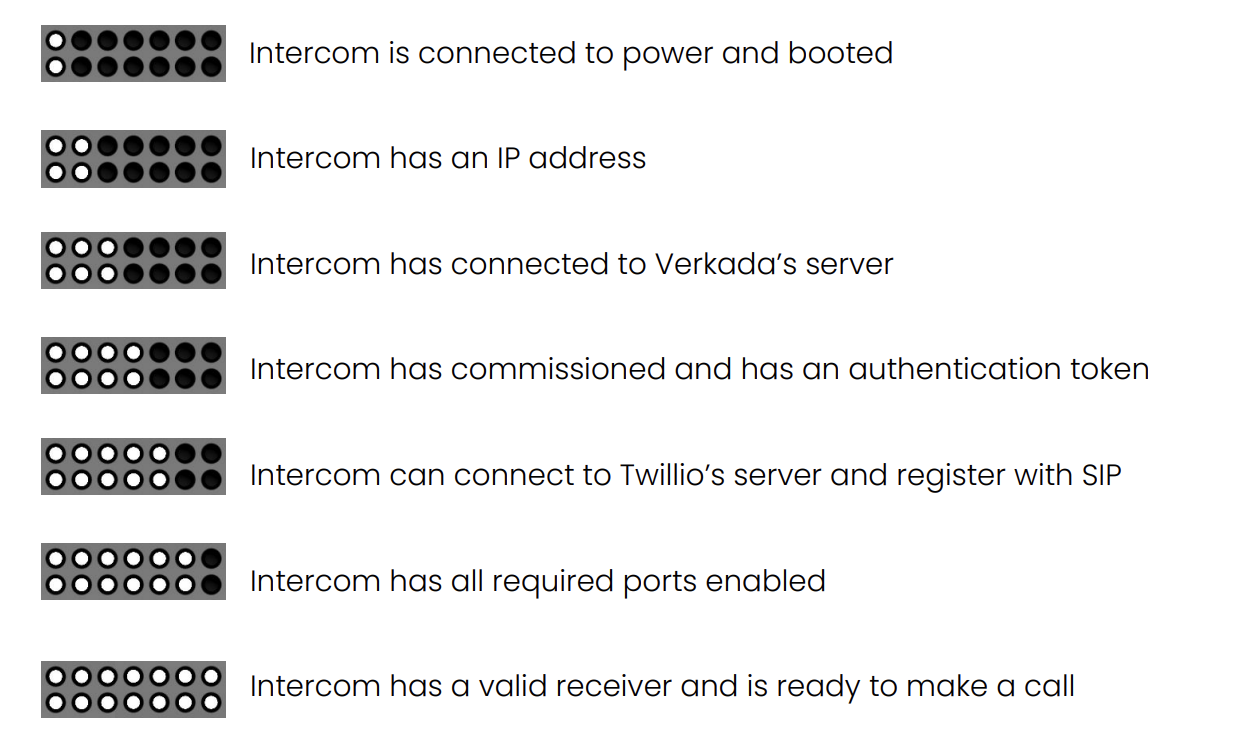
* 白色LED 6つ(通話ボタンの上に配置)—セットアッププロセスにおけるIntercomの段階を示します。
***
## ステータスLED
LEDステータスライトは次の状態で構成されます:
* 橙色点灯—起動中
* 橙色点滅—ファームウェアを更新中
* 青色点滅—ネットワーク接続を確立中
* 青色点灯—完全に正常
* ピンク色点滅—識別
**例**: 完全にオンラインで正常なIntercom
### ステータスLEDのセットアップの進行状況
Intercomの電源を初めて入れると、白色LEDが1つ点灯します。セットアップの進行に応じてLEDが増えていきます(最大5個の追加LEDが点灯)。これらのステータスLEDは、Intercomが初回オンラインになるまでの進行状況を示す進捗バーのようなものです。
{% hint style="warning" %}
Intercomの設定が完全に完了すると、ステータスバーは表示されなくなります。ステータスバーが再び表示されるのは、いったん廃止され、その後Commandに追加し直された場合のみです。
{% endhint %}
---
# Agent Instructions
This documentation is published with GitBook. GitBook is the documentation platform designed so that both humans and AI agents can read, navigate, and reason over technical content effectively. Learn more at gitbook.com.
## Querying This Documentation
If you need additional information that is not directly available in this page, you can query the documentation by asking a question.
Perform an HTTP GET request on the following URL with the `ask` and `goal` query parameters:
```
GET https://help.verkada.com/intercom/ja/she-ding/configure-a-td52/td52-status-leds.md?ask=&goal=
```
`ask` is the immediate question: it should be specific, self-contained, and written in natural language.
`goal` is what the user is ultimately trying to achieve, the reason they need the answer. Sharing it helps GitBook give you a better, more relevant answer. A goal is most helpful when it describes the outcome the user wants rather than restating the question. For example, with `ask=how do I create an API token`, a goal like `automate deployments from our CI pipeline` lets GitBook tailor the answer to that use case.
The response will contain a direct answer to the question and relevant excerpts and sources from the documentation.
Use this mechanism when the answer is not explicitly present in the current page, you need clarification or additional context, or you want to retrieve related documentation sections.