> For the complete documentation index, see [llms.txt](https://help.verkada.com/llms.txt). Markdown versions of documentation pages are available by appending `.md` to page URLs; this page is available as [Markdown](https://help.verkada.com/intercom/de/konfiguration/intercom-deployment-best-practices-guide/pair-intercoms-with-viewing-station.md).
# Intercoms mit Viewing Station koppeln
Intercom-Anrufvideo auf Ihrer Viewing Station anzeigen
Gegensprechanlagen können auf zwei Arten mit Viewing Stations gekoppelt werden:
{% stepper %}
{% step %}
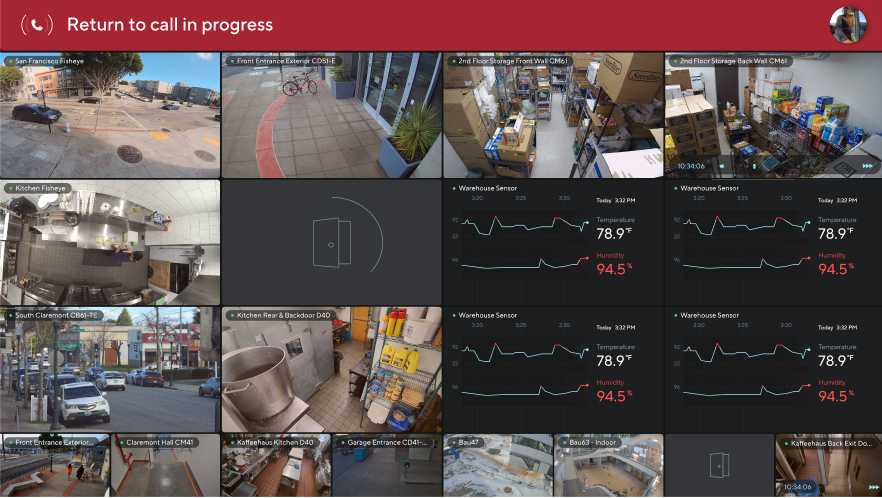
[**Als Sicherheitskamera**](/viewing-station/de/konfiguration/set-up-your-viewing-station.md) **– Fügt den Videostream der Gegensprechanlage als Kachel auf der Viewing Station hinzu.**
{% endstep %}
{% step %}
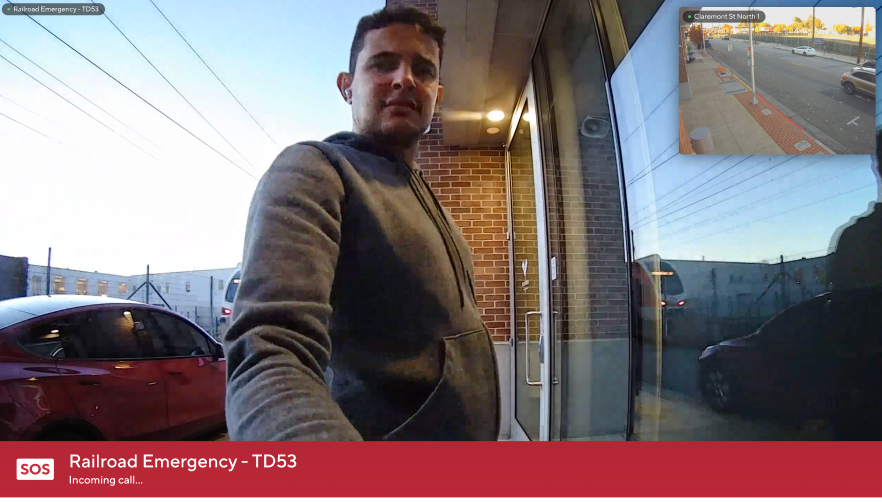
[**Anrufvideo**](#h_1a8194f198) **– Wenn ein Gegensprechanlagenanruf eingeht, wird das ausgewählte Video automatisch im Vollbildmodus auf der Viewing Station angezeigt und gibt den Disponenten sofortigen visuellen Kontext.**
{% endstep %}
{% endstepper %}
{% hint style="warning" %}
Der Anruf-Audio ist nicht enthalten. Anrufe müssen weiterhin auf einem anderen Empfänger angenommen werden.
{% endhint %}
***
## **Konfiguration**
{% stepper %}
{% step %}
**Gehen Sie in Verkada Command zu Alle Produkte > Geräte.**
{% endstep %}
{% step %}
**Wählen Sie Ihre Viewing Station aus.**
{% endstep %}
{% step %}
**Wählen Sie oben rechts** :gear:**.**
{% endstep %}
{% step %}
**Wählen Sie unter Gegensprechanlagen die Gegensprechanlagen aus, die Sie mit der Viewing Station koppeln möchten.**
Wenn von einer dieser Gegensprechanlagen ein Anruf gestartet wird, wird das Video automatisch im Vollbildmodus auf der Viewing Station geöffnet.
{% endstep %}
{% endstepper %}
***
## Mit Anrufen interagieren
### Notrufanrufe über die Gegensprechanlage
[Notfall-Gegensprechanlagen](/intercom/de/konfiguration/add-and-configure-receivers-in-intercom/configure-an-intercom-as-an-emergency-phone.md) erscheinen auf Viewing Stations anders als reguläre Gegensprechanlagen.
* Das Video des Notrufs ist zur besseren Sichtbarkeit rot umrandet.
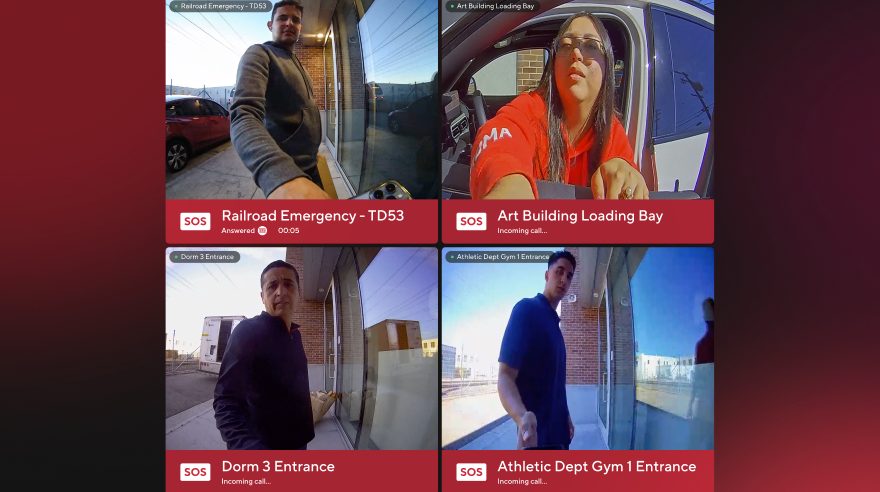
* Bei gleichzeitigen Anrufen wird das Video der Notfall-Gegensprechanlage priorisiert und auf der linken Seite des Bildschirms angezeigt.
### Handhabung gleichzeitiger Anrufe
Wenn mehrere Gegensprechanlagenanrufe gleichzeitig eingehen, werden sie als Kacheln auf dem Bildschirm angezeigt.
### Anrufvideo minimieren
Verwenden Sie die Apple TV-Fernbedienung, um das Anrufvideo zu verlassen. Um zurückzukehren, klicken Sie auf das Banner oben auf dem Bildschirm.
---
# Agent Instructions
This documentation is published with GitBook. GitBook is the documentation platform designed so that both humans and AI agents can read, navigate, and reason over technical content effectively. Learn more at gitbook.com.
## Querying This Documentation
If you need additional information that is not directly available in this page, you can query the documentation dynamically by asking a question.
Perform an HTTP GET request on the current page URL with the `ask` query parameter, and the optional `goal` query parameter:
```
GET https://help.verkada.com/intercom/de/konfiguration/intercom-deployment-best-practices-guide/pair-intercoms-with-viewing-station.md?ask=&goal=
```
`ask` is the immediate question: it should be specific, self-contained, and written in natural language.
`goal` is optional and describes the broader end goal you are ultimately trying to accomplish on behalf of the user. GitBook uses it to tailor the answer towards what is most useful for that goal.
The response will contain a direct answer to the question and relevant excerpts and sources from the documentation.
Use this mechanism when the answer is not explicitly present in the current page, you need clarification or additional context, or you want to retrieve related documentation sections.