> For the complete documentation index, see [llms.txt](https://help.verkada.com/llms.txt). Markdown versions of documentation pages are available by appending `.md` to page URLs; this page is available as [Markdown](https://help.verkada.com/incident-response/ko/getting-started/incident-response-portal.md).
# 사고 대응 포털
비상 상황 후 영향을 받은 사람들에 대한 집계를 간소화합니다
사건 대응 포털은 직원들이 진행 중인 대응 중에 대피자를 확인할 수 있는 웹 페이지입니다. 모든 Workplace 직원은 사건 대응 포털에 액세스하여 자신의 사이트에서 진행 중인 대응과 상호 작용할 수 있습니다.
***
## 사건 대응 포털
대응이 다음에서 시작되면 **사건** 또는 **훈련 모드** 직원 알림이 활성화된 상태에서, 해당 사이트의 모든 Workplace 직원은 사건 대응 포털에 액세스할 수 있도록 이메일 및/또는 SMS로 매직 링크를 받습니다. 직원은 또한 언제든지 다음에서 로그인할 수 있습니다. [unite.my.verkada.com](https://unite.my.verkada.com).
***
## 인원 상태 페이지
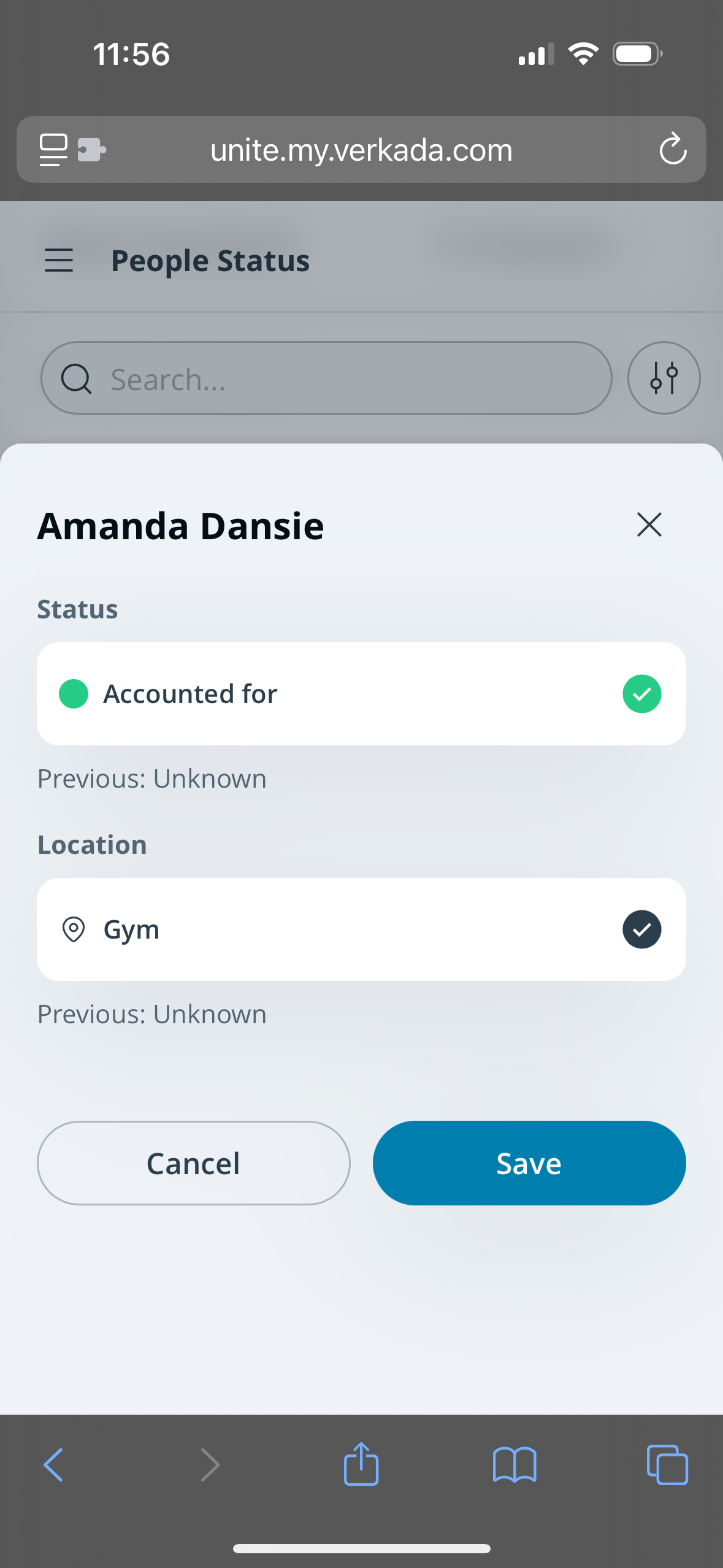
대피자를 이름으로 검색하고 상태와 위치를 확인하거나 업데이트할 수 있습니다. 대피자의 상태 또는 위치를 업데이트하려면:
{% stepper %}
{% step %}
**다음에 로그인하세요** [**unite.my.verkada.com**](https://unite.my.verkada.com)**.**
{% endstep %}
{% step %}
**(선택 사항) 적용** [**필터**](#h_457b70e469)**.**
{% endstep %}
{% step %}
**대피자를 선택하세요.**
a. 하나의 **상태**를 선택합니다.\
b. 하나의 **위치**를 선택합니다.\
c. 다음을 클릭합니다 **저장**.
{% endstep %}
{% endstepper %}
### 필터
Workplace 직원은 인원 상태 페이지의 검색창과 필터를 사용하여 특정 대피자를 찾을 수 있습니다. 필터에는 다음이 포함됩니다:
{% stepper %}
{% step %}
**대피자 상태**
{% endstep %}
{% step %}
**대피자 위치**
{% endstep %}
{% step %}
**교사 및 섹션(SIS 통합이 있는 K12 고객용)**
{% endstep %}
{% step %}
**내가 수정함**
{% endstep %}
{% endstepper %}
***
## 보호자 로그인 페이지
직원은 다음을 보게 됩니다 **보호자 로그인** 페이지를 응답 템플릿에서 [재결합 사용](/incident-response/ko/configuration/create-response-templates.md)으로 확인할 수 있습니다. 여기에서 직원은 보호자를 로그인하고 검토할 수 있습니다:
{% stepper %}
{% step %}
**다음에 로그인하세요** [**unite.my.verkada.com**](https://unite.my.verkada.com)**.**
{% endstep %}
{% step %}
**보호자 로그인 페이지를 선택합니다.**
{% endstep %}
{% step %}
**위치를 선택합니다.**
{% endstep %}
{% step %}
**하단에서 보호자 로그인하기를 선택합니다.**
{% endstep %}
{% step %}
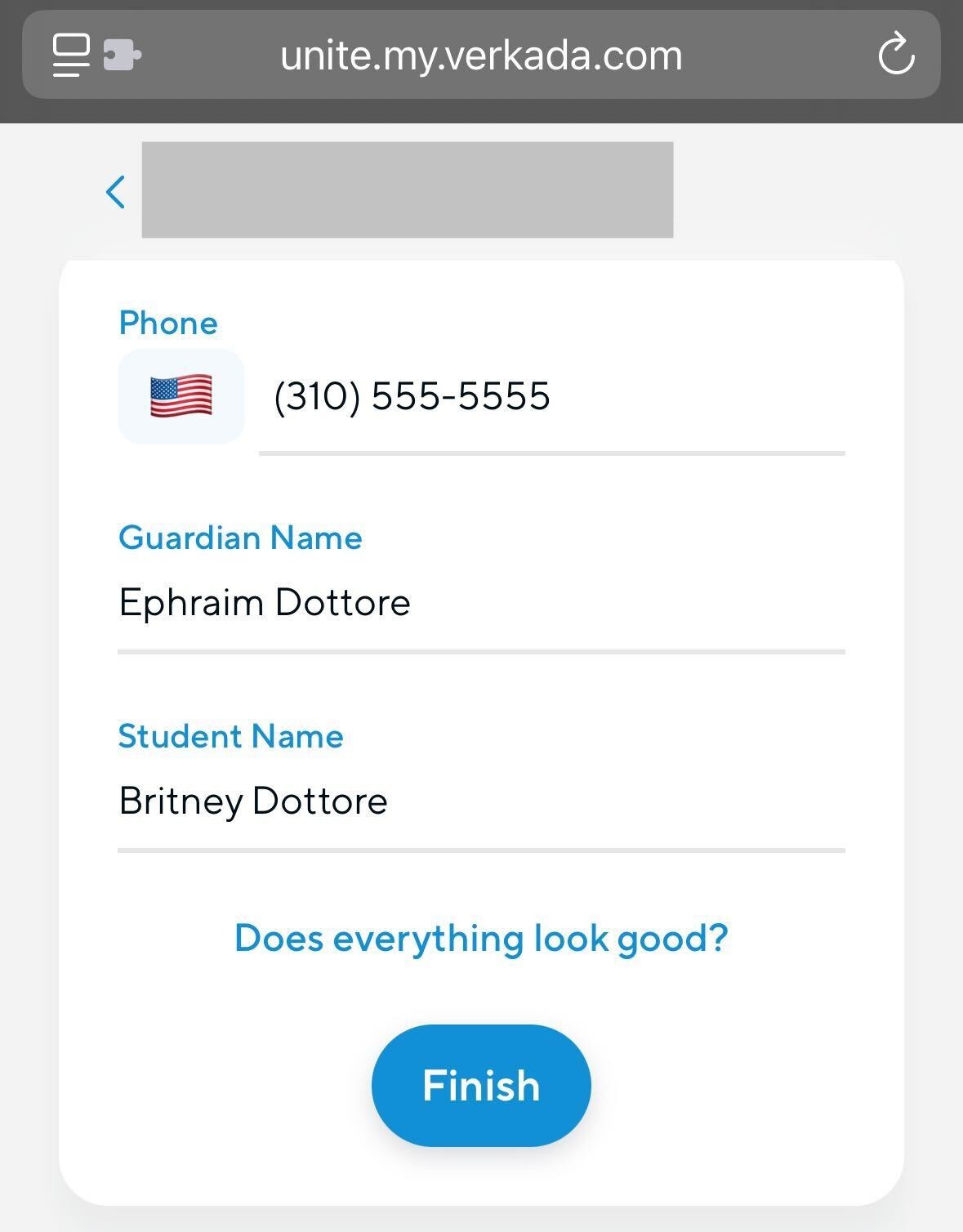
**다음** [**양식**](https://app.intercom.com/a/apps/q5re5q6g/knowledge-hub/all-content?activeContentId=13666171\&activeContentType=article\&editorMode=view\&search=guardian%20form) **을 보호자를 대신하여 작성합니다.**
{% endstep %}
{% endstepper %}
기본적으로 **보호자 로그인** 페이지에는 대기 중인 모든 보호자가 표시됩니다. 직원은 다음을 보도록 필터링할 수 있습니다:
* 대응 중 체크인한 모든 보호자
* 거부된 보호자
* 재결합된 보호자
보호자를 선택하면 직원은 해당 보호자가 인계받기를 요청한 학생과 그들을 체크인한 직원을 볼 수 있습니다.
***
## 학생과 보호자 재결합
직원은 다음을 보게 됩니다 **학생 + 보호자 재결합** 페이지를 응답 템플릿에서 [재결합 사용](/incident-response/ko/configuration/create-response-templates.md). 기본적으로 이 페이지에는 다음 조건을 충족하는 모든 학생/보호자 쌍이 표시됩니다:
{% stepper %}
{% step %}
**학생의 상태가 알 수 없음도 아니고 재결합됨도 아님.**
{% endstep %}
{% step %}
**보호자가 로그인되어 있고 완전히 승인됨(예: 보안 심사 통과 또는 임시 보호자 예외)**
{% endstep %}
{% endstepper %}
직원은 위치 및 상태 필터를 사용하여 표시되는 쌍을 더 구체적으로 좁힐 수 있습니다. 필터는 개별 사용자의 보기에는만 영향을 미치며 다른 직원이 보는 내용에는 영향을 주지 않습니다. 위치 필터는 보호자와 학생 모두에게 적용됩니다.
---
# Agent Instructions
This documentation is published with GitBook. GitBook is the documentation platform designed so that both humans and AI agents can read, navigate, and reason over technical content effectively. Learn more at gitbook.com.
## Querying This Documentation
If you need additional information that is not directly available in this page, you can query the documentation by asking a question.
Perform an HTTP GET request on the following URL with the `ask` and `goal` query parameters:
```
GET https://help.verkada.com/incident-response/ko/getting-started/incident-response-portal.md?ask=&goal=
```
`ask` is the immediate question: it should be specific, self-contained, and written in natural language.
`goal` is what the user is ultimately trying to achieve, the reason they need the answer. Sharing it helps GitBook give you a better, more relevant answer. A goal is most helpful when it describes the outcome the user wants rather than restating the question. For example, with `ask=how do I create an API token`, a goal like `automate deployments from our CI pipeline` lets GitBook tailor the answer to that use case.
The response will contain a direct answer to the question and relevant excerpts and sources from the documentation.
Use this mechanism when the answer is not explicitly present in the current page, you need clarification or additional context, or you want to retrieve related documentation sections.