> For the complete documentation index, see [llms.txt](https://help.verkada.com/llms.txt). Markdown versions of documentation pages are available by appending `.md` to page URLs; this page is available as [Markdown](https://help.verkada.com/incident-response/ja/she-ding/create-guardian-forms-for-reunification.md).
# 再統合のための Guardian フォームを作成する
再統合イベント中に保護者から重要な情報を収集します。
Verkada Incident Response は、学校が再会イベントのあらゆる手順を管理するのを支援します。保護者フォームにより、学校は生徒を引き渡す前に保護者から必要な情報を収集できます。
***
## 保護者フォームを作成
管理者は、サイト固有の保護者フォームまたは複数のサイトで使用できるグローバルフォームを作成できます。
### グローバル
{% hint style="danger" %}
少なくとも **組織管理者** グローバル保護者フォームを作成する権限が必要です。
{% endhint %}
{% stepper %}
{% step %}
**Verkada Command で、[すべての製品]>[Workplace Incident Response]に移動します。**
{% endstep %}
{% step %}
**左側のナビゲーションで、[Incident Response Settings]をクリックします。**
{% endstep %}
{% step %}
**[Guardian Experience]>[Guardian Sign-In]で、[Manage Guardian Forms]を選択します。**
a. 右上で、次を選択します **保護者フォームを追加**。\
b. 一意の名前を入力します。\
c. クリック **保存。**
{% endstep %}
{% endstepper %}
### サイト固有
{% hint style="danger" %}
少なくとも **Workplace サイト管理者** サイト固有の保護者フォームを作成する権限が必要です。
{% endhint %}
{% stepper %}
{% step %}
**Verkada Command で、[すべての製品]>[Workplace Incident Response]に移動します。**
{% endstep %}
{% step %}
**左側のナビゲーションで、[Incident Response Settings]>[あなたのサイト]をクリックします。**
{% endstep %}
{% step %}
**[Guardian Experience]>[Guardian Sign-In]で、[Manage Guardian Forms]を選択します。**
a. 右上で、次を選択します **保護者フォームを追加**。\
b. 一意の名前を入力します。\
c. クリック **保存。**
{% endstep %}
{% endstepper %}
***
## 設定
すべての保護者フォームでは、保護者の氏名と、引き渡しを希望する生徒の氏名を収集する必要があります。組織は、次の任意の手順も含めることができます:
* 連絡先情報(メールアドレスおよび/または電話番号)
* [セキュリティ確認](https://help.verkada.com/guest/ja/she-ding/guest-security-screening.md)
* 保護者の写真
* 自由回答形式の質問
* 選択式の質問
* 質問票
* 動画
* PDF
* ドキュメント
{% hint style="warning" %}
セキュリティ確認の手順では、チェックイン時に保護者の ID の画像を取得する必要があります。この機能は、検証のために ID から法定氏名と生年月日を抽出します。
{% endhint %}
***
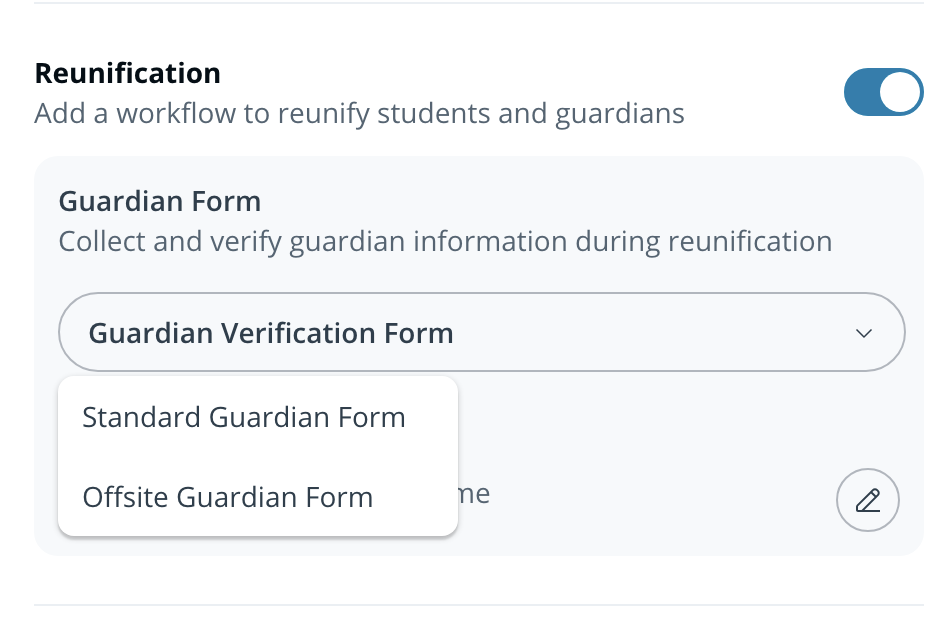
## Response テンプレートに保護者フォームを追加
Reunification が有効な Response テンプレートには、保護者フォームを割り当てる必要があります。Response テンプレートを設定する際に、必要なフォームを選択できます。参照 [Response テンプレートを作成](https://help.verkada.com/incident-response/ja/she-ding/create-response-templates.md) 詳細については。
---
# Agent Instructions
This documentation is published with GitBook. GitBook is the documentation platform designed so that both humans and AI agents can read, navigate, and reason over technical content effectively. Learn more at gitbook.com.
## Querying This Documentation
If you need additional information that is not directly available in this page, you can query the documentation by asking a question.
Perform an HTTP GET request on the following URL with the `ask` and `goal` query parameters:
```
GET https://help.verkada.com/incident-response/ja/she-ding/create-guardian-forms-for-reunification.md?ask=&goal=
```
`ask` is the immediate question: it should be specific, self-contained, and written in natural language.
`goal` is what the user is ultimately trying to achieve, the reason they need the answer. Sharing it helps GitBook give you a better, more relevant answer. A goal is most helpful when it describes the outcome the user wants rather than restating the question. For example, with `ask=how do I create an API token`, a goal like `automate deployments from our CI pipeline` lets GitBook tailor the answer to that use case.
The response will contain a direct answer to the question and relevant excerpts and sources from the documentation.
Use this mechanism when the answer is not explicitly present in the current page, you need clarification or additional context, or you want to retrieve related documentation sections.