> For the complete documentation index, see [llms.txt](https://help.verkada.com/llms.txt). Markdown versions of documentation pages are available by appending `.md` to page URLs; this page is available as [Markdown](https://help.verkada.com/incident-response/ja/fen-xi/review-responses-from-command.md).
# Command からの応答を確認
進行中のインシデント対応の進捗をリアルタイムで監視します。
Commandでは、進行中および過去のResponseを管理し、主要な指標を確認し、避難者と保護者を追跡し、実行された操作の完全なログにアクセスできます。これらのツールにより、Workplaceサイト管理者はインシデント対応プロセスの各段階をモニターし、管理するための一元的なビューを得られます。
{% hint style="danger" %}
〜が必要です **Workplaceサイト管理者** の役割、または[ 明示的な権限](/command/ja/yzto/roles-and-permissions-for-command/custom-roles.md#workplace) Responseの分析を表示するには**.**
{% endhint %}
***
## 分析
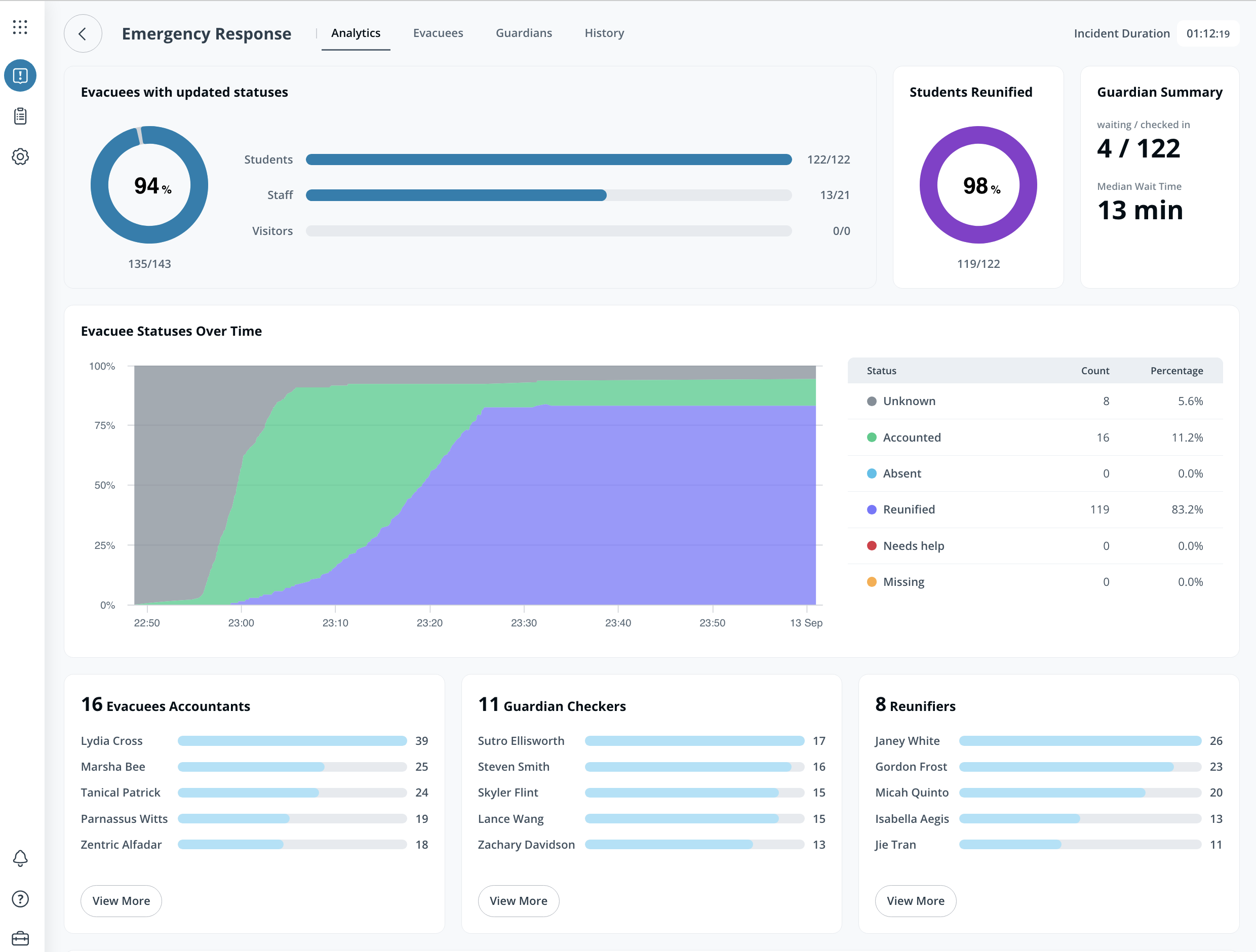
この **分析** ページには、各Responseの主要指標が表示されます。内容は次のとおりです:
* 避難者は人物タイプ(学生、スタッフ、または訪問者)ごとに更新されます
* ステータス別の避難者総数
* 各スタッフが更新した一意の避難者総数
***
## 避難者
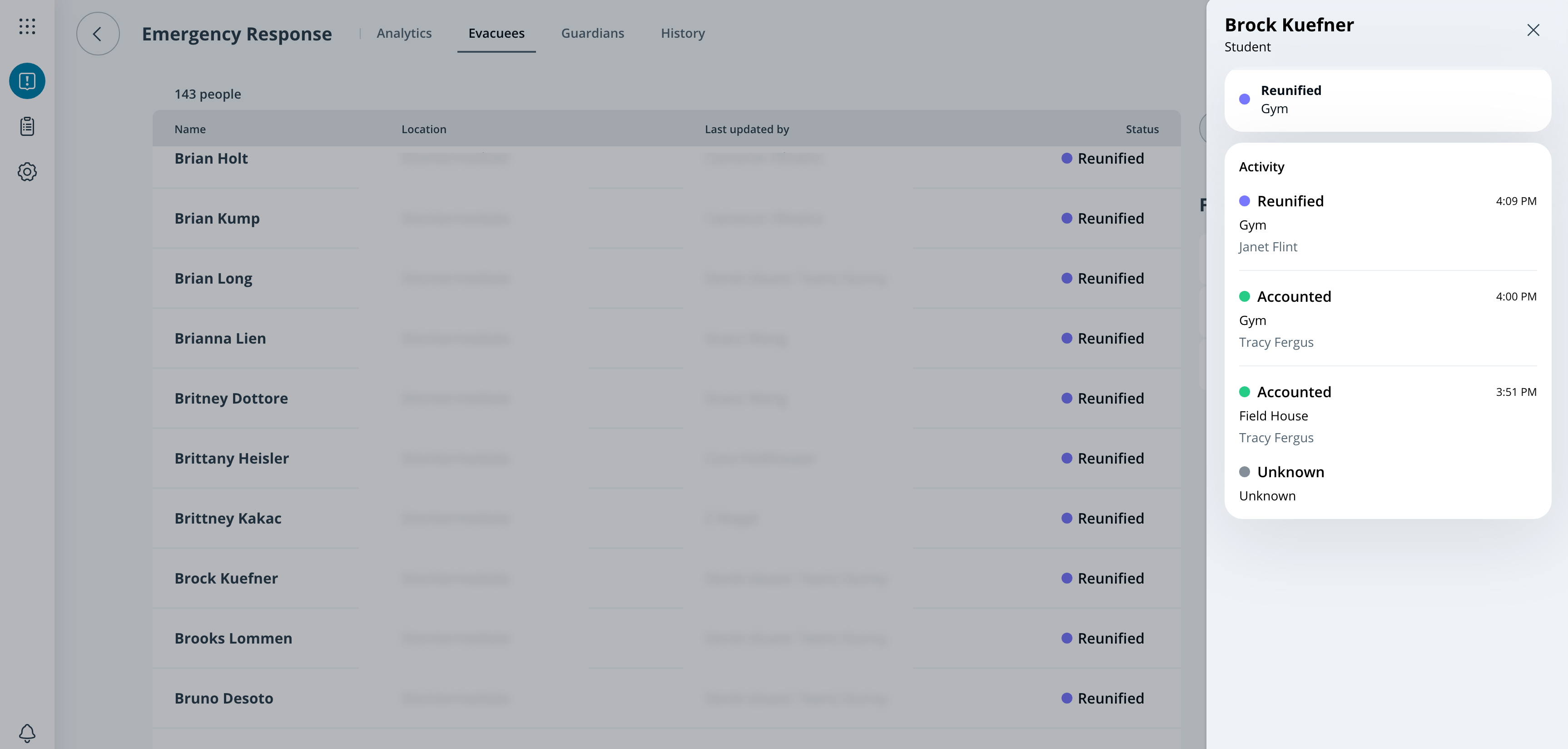
Workplaceサイト管理者は、すべての避難者のステータスと更新を次の **避難者** ページで確認できます。管理者は、ステータス、場所、クラス区分で避難者一覧をフィルタリングできます。
***
### 保護者
従業員には次のページが表示されます **保護者** 再会機能が有効になっているResponseテンプレートのページです。これにより、Workplaceサイト管理者はサインイン済みの保護者すべてとその詳細を確認できます。
***
## 履歴
この **履歴** ページには、1つのResponseに対してIncident Response Portalで実行されたすべての操作が表示されます。ログはこのページから.jsonファイルとしてエクスポートできます。
{% stepper %}
{% step %}
**Verkada Commandで、[すべての製品]>[Workplaceインシデント対応]に移動します。**
{% endstep %}
{% step %}
**Responseを選択します。**
{% endstep %}
{% step %}
**上部で[履歴]を選択します。**
{% endstep %}
{% step %}
**右上で[ログをエクスポート]を選択します。**
{% endstep %}
{% endstepper %}
---
# Agent Instructions
This documentation is published with GitBook. GitBook is the documentation platform designed so that both humans and AI agents can read, navigate, and reason over technical content effectively. Learn more at gitbook.com.
## Querying This Documentation
If you need additional information that is not directly available in this page, you can query the documentation by asking a question.
Perform an HTTP GET request on the following URL with the `ask` and `goal` query parameters:
```
GET https://help.verkada.com/incident-response/ja/fen-xi/review-responses-from-command.md?ask=&goal=
```
`ask` is the immediate question: it should be specific, self-contained, and written in natural language.
`goal` is what the user is ultimately trying to achieve, the reason they need the answer. Sharing it helps GitBook give you a better, more relevant answer. A goal is most helpful when it describes the outcome the user wants rather than restating the question. For example, with `ask=how do I create an API token`, a goal like `automate deployments from our CI pipeline` lets GitBook tailor the answer to that use case.
The response will contain a direct answer to the question and relevant excerpts and sources from the documentation.
Use this mechanism when the answer is not explicitly present in the current page, you need clarification or additional context, or you want to retrieve related documentation sections.