> For the complete documentation index, see [llms.txt](https://help.verkada.com/llms.txt). Markdown versions of documentation pages are available by appending `.md` to page URLs; this page is available as [Markdown](https://help.verkada.com/guest/notifications/send-custom-messages-to-guests.md).
# Send Bulk Messages to Guests
Send a personalized message to visitors at any time
Bulk messaging in Verkada Guest allows Workplace users to send on-demand updates to visitors via email or SMS. Users can message visitors signed in on the current calendar day or send messages to attendees for upcoming events.
***
## Enable Bulk Messaging to Guests
{% hint style="danger" %}
You need **Org Admin** permissions to enable this feature.
{% endhint %}
{% stepper %}
{% step %}
**In Verkada Command, go to All Products > Workplace >**  **Guest.**
{% endstep %}
{% step %}
**On the left navigation, click Guest Settings.**
{% endstep %}
{% step %}
**At the top, under Organization, select Messaging.**
{% endstep %}
{% step %}
**Toggle on Enable sending bulk messages to guests.**
{% endstep %}
{% endstepper %}
***
## Create bulk messages
{% hint style="danger" %}
You need at least **Workplace Site Viewer** permissions to send bulk messages in Guest.
{% endhint %}
### Send a message to visitors (current day)
{% stepper %}
{% step %}
**In Verkada Command, go to All Products > Workplace >** **Guest.**
{% endstep %}
{% step %}
**On Guest Home, select Message Guests.**
{% endstep %}
{% step %}
**Choose which visitors to send the message to. Users can choose by Guest Type and filter by the statuses of all, signed in, and signed out.**
a. Title the message. The title will be used as the subject line for emails to guests.\
b. Write the message body.\
c. Select **Send.**
{% endstep %}
{% endstepper %}
{% hint style="danger" %}
Bulk messages are not supported for [School Guest Types](/guest/schools/school-guest-types.md).
{% endhint %}
### Send a message to a specific visitor
{% stepper %}
{% step %}
**In Verkada Command, go to All Products > Workplace >** **Guest.**
{% endstep %}
{% step %}
**On Guest Home, make sure the current day is selected.**
{% endstep %}
{% step %}
**Select the desired visitor.**
{% endstep %}
{% step %}
**Under Actions, select Send message.**
a. Title the message.\
b. Write the message body.\
c. Select **Send.**
{% endstep %}
{% endstepper %}
### Send a message for a Guest Event
{% stepper %}
{% step %}
**In Verkada Command, go to All Products > Workplace >** **Guest.**
{% endstep %}
{% step %}
**On the left navigation, select Events .**
{% endstep %}
{% step %}
**Select the desired event.**
{% endstep %}
{% step %}
**In the top right, click > Send message.**
a. Title the message.\
b. Write the message body.\
c. Select **Send.**
{% endstep %}
{% endstepper %}
### Compose message content
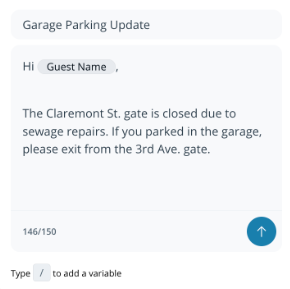
Bulk messages include a **Title** and **Message Body**.
* The **Title** appears as the subject line in emails (not included in SMS).
* All SMS messages begin with: `Message from {Site Name}`
You can include the following variables in messages:
* **Guest Name:** Full name entered at sign-in
* **Site Name:** Name of the Guest site in Command
* **Purpose of Visit:** Guest Type name
* **Guest Portal Link:** Unique link for each visitor (available only in the message body).
{% hint style="warning" %}
Messages can include any Unicode character except emojis. The message body supports up to **150 characters**. Special characters and glyphs may count as multiple characters.
{% endhint %}
***
## Review bulk message history
The **Message History** panel shows all messages sent within that site and identifies any failed SMS deliveries.
* Users can retry failed SMS messages once.
* Email deliverability is not tracked.
{% stepper %}
{% step %}
**In Verkada Command, go to All Products > Workplace >** **Guest.**
{% endstep %}
{% step %}
**On Guest Home, in the top right, select Messages.**
{% endstep %}
{% endstepper %}
***
## FAQ
**Guest.**
{% endstep %}
{% step %}
**On the left navigation, click Guest Settings.**
{% endstep %}
{% step %}
**At the top, under Organization, select Messaging.**
{% endstep %}
{% step %}
**Toggle on Enable sending bulk messages to guests.**
{% endstep %}
{% endstepper %}
***
## Create bulk messages
{% hint style="danger" %}
You need at least **Workplace Site Viewer** permissions to send bulk messages in Guest.
{% endhint %}
### Send a message to visitors (current day)
{% stepper %}
{% step %}
**In Verkada Command, go to All Products > Workplace >** **Guest.**
{% endstep %}
{% step %}
**On Guest Home, select Message Guests.**
{% endstep %}
{% step %}
**Choose which visitors to send the message to. Users can choose by Guest Type and filter by the statuses of all, signed in, and signed out.**
a. Title the message. The title will be used as the subject line for emails to guests.\
b. Write the message body.\
c. Select **Send.**
{% endstep %}
{% endstepper %}
{% hint style="danger" %}
Bulk messages are not supported for [School Guest Types](/guest/schools/school-guest-types.md).
{% endhint %}
### Send a message to a specific visitor
{% stepper %}
{% step %}
**In Verkada Command, go to All Products > Workplace >** **Guest.**
{% endstep %}
{% step %}
**On Guest Home, make sure the current day is selected.**
{% endstep %}
{% step %}
**Select the desired visitor.**
{% endstep %}
{% step %}
**Under Actions, select Send message.**
a. Title the message.\
b. Write the message body.\
c. Select **Send.**
{% endstep %}
{% endstepper %}
### Send a message for a Guest Event
{% stepper %}
{% step %}
**In Verkada Command, go to All Products > Workplace >** **Guest.**
{% endstep %}
{% step %}
**On the left navigation, select Events .**
{% endstep %}
{% step %}
**Select the desired event.**
{% endstep %}
{% step %}
**In the top right, click > Send message.**
a. Title the message.\
b. Write the message body.\
c. Select **Send.**
{% endstep %}
{% endstepper %}
### Compose message content
Bulk messages include a **Title** and **Message Body**.
* The **Title** appears as the subject line in emails (not included in SMS).
* All SMS messages begin with: `Message from {Site Name}`
You can include the following variables in messages:
* **Guest Name:** Full name entered at sign-in
* **Site Name:** Name of the Guest site in Command
* **Purpose of Visit:** Guest Type name
* **Guest Portal Link:** Unique link for each visitor (available only in the message body).
{% hint style="warning" %}
Messages can include any Unicode character except emojis. The message body supports up to **150 characters**. Special characters and glyphs may count as multiple characters.
{% endhint %}
***
## Review bulk message history
The **Message History** panel shows all messages sent within that site and identifies any failed SMS deliveries.
* Users can retry failed SMS messages once.
* Email deliverability is not tracked.
{% stepper %}
{% step %}
**In Verkada Command, go to All Products > Workplace >** **Guest.**
{% endstep %}
{% step %}
**On Guest Home, in the top right, select Messages.**
{% endstep %}
{% endstepper %}
***
## FAQ
Is there a daily message limit?
Yes. Each Guest site can send up to 100 messages per calendar day with the bulk messaging feature. This restriction does not apply to automatic messages sent to visitors, like sign-in notifications and sign-out reminders.
If a message is sent by both email and SMS, does it count as one or two messages?
When the same message is sent to a visitor via both email and SMS, this counts as one message towards the message limit.
Can I send messages to invited visitors who haven’t registered?
No. Bulk messages can only be sent to **registered**, **signed-in**, or **signed-out** event attendees.
---
# Agent Instructions
This documentation is published with GitBook. GitBook is the documentation platform designed so that both humans and AI agents can read, navigate, and reason over technical content effectively. Learn more at gitbook.com.
## Querying This Documentation
If you need additional information that is not directly available in this page, you can query the documentation by asking a question.
Perform an HTTP GET request on the following URL with the `ask` and `goal` query parameters:
```
GET https://help.verkada.com/guest/notifications/send-custom-messages-to-guests.md?ask=&goal=
```
`ask` is the immediate question: it should be specific, self-contained, and written in natural language.
`goal` is what the user is ultimately trying to achieve, the reason they need the answer. Sharing it helps GitBook give you a better, more relevant answer. A goal is most helpful when it describes the outcome the user wants rather than restating the question. For example, with `ask=how do I create an API token`, a goal like `automate deployments from our CI pipeline` lets GitBook tailor the answer to that use case.
The response will contain a direct answer to the question and relevant excerpts and sources from the documentation.
Use this mechanism when the answer is not explicitly present in the current page, you need clarification or additional context, or you want to retrieve related documentation sections.