> For the complete documentation index, see [llms.txt](https://help.verkada.com/llms.txt). Markdown versions of documentation pages are available by appending `.md` to page URLs; this page is available as [Markdown](https://help.verkada.com/guest/ko/configuration/door-access-for-guests/assigning-a-keycard-in-guest.md).
# Guest에서 키카드 할당
임시 키카드는 방문자가 공간을 이동할 수 있는 간단하고 안전한 방법을 제공합니다.
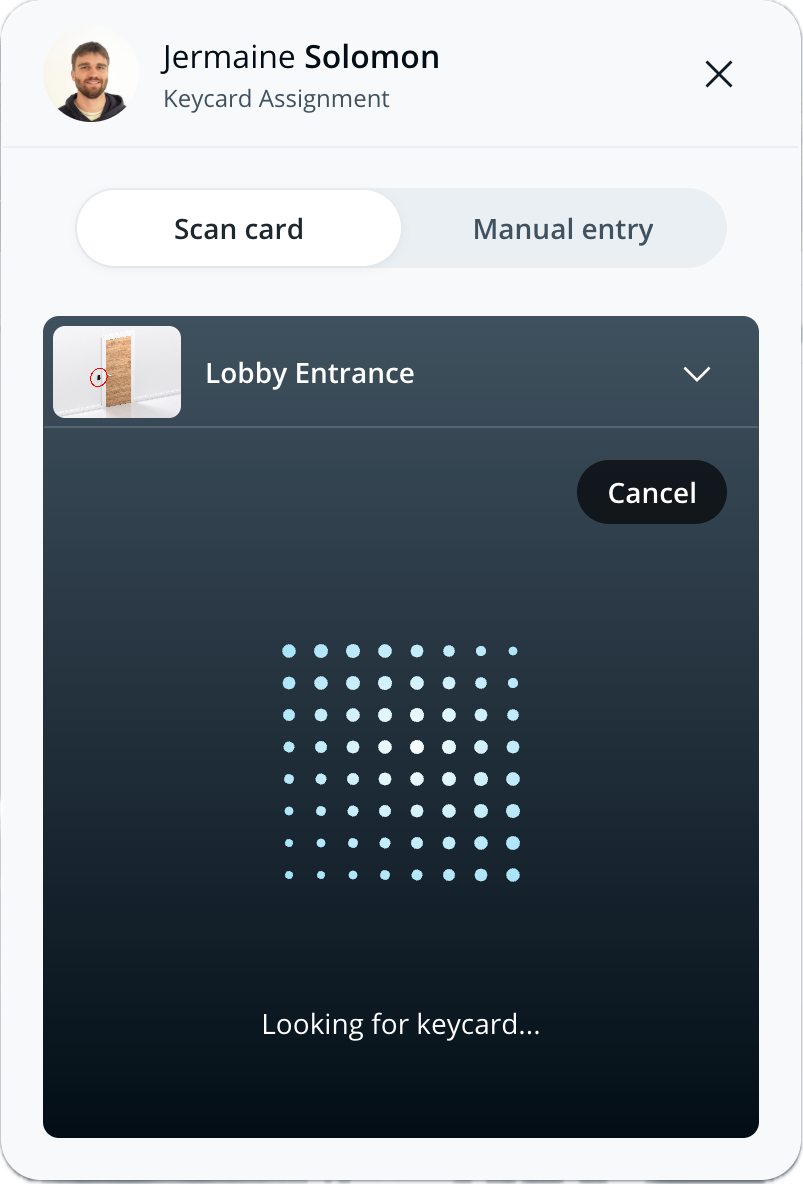
직원은 게스트에서 재량에 따라 방문자에게 키카드를 발급할 수 있습니다. 키카드는 카드 번호를 입력하거나 가까운 리더기에 키카드를 스캔하여 방문자에게 활성화할 수 있습니다.
***
## 게스트에서 방문자에게 키카드 할당하기
방문자가 키카드 액세스가 활성화된 게스트 유형으로 체크인하면, 게스트 홈 페이지의 방문 기록에 카드를 할당하는 옵션이 표시됩니다.
{% stepper %}
{% step %}
**Verkada Command에서 All Products > Workplace >** **Guest.**
{% endstep %}
{% step %}
**게스트 홈에서 방문자 기록 옆의 키카드 할당을 클릭합니다.**
{% endstep %}
{% step %}
**액세스 자격 증명을 할당합니다:**
a. 다음에서 **카드 스캔,** 사이트에서 카드를 스캔할 문을 선택합니다. 클릭하여 스캔을 시작합니다. 선택한 문의 리더기에 카드를 스캔하여 Command에 카드 번호를 등록합니다.\
b. 다음에서 **수동 입력,** 카드 형식이 올바른지 확인한 다음 카드 번호를 입력합니다. 클릭하여 저장합니다.
{% hint style="danger" %}
* 둘 다 필요합니다 **Workplace Site Viewer** 및 **액세스 제어 사이트 뷰어** 역할이 있어야 리더기에 카드를 스캔하여 키카드를 할당할 수 있습니다.
* 최소한 **Workplace Site Viewer** 역할이 있어야 카드 번호를 수동으로 입력하여 게스트에게 키카드를 할당할 수 있습니다.
{% endhint %}
{% endstep %}
{% step %}
**닫기를 클릭합니다.**
{% endstep %}
{% step %}
**방문자가 방문 중에 사용할 수 있도록 키카드를 전달합니다.**
{% endstep %}
{% endstepper %}
### 초대된 게스트에게 키카드 할당하기
키카드는 다음 대상에게만 할당할 수 있습니다 [초대된 방문자](/guest/ko/configuration/guest-events.md) 체크인한 후에만 가능합니다.
***
## FAQ
다음을 사용하려면 어떤 권한이 필요합니까? 카드 스캔 기능?
게스트 사용자도 또한 **액세스 제어 사이트 뷰어** 역할이 있어야 리더기에 스캔하여 키카드를 활성화할 수 있습니다.
게스트 사용자는 어떤 문에서 키카드를 스캔할 수 있습니까?
게스트 사용자는 키카드를 스캔할 때 사이트 내의 모든 문을 선택할 수 있습니다.
기존 액세스 제어 사용자와 일치하는 방문자에게 새 키카드를 할당할 수 있습니까?
아니요. 게스트 사용자는 연락처 정보가 기존 액세스 사용자와 일치하는 방문자에게 새 키카드를 할당할 수 없습니다. 이 경우 방문자는 자신의 기존 키카드를 사용하여 방문의 일환으로 일시적으로 문에 액세스할 수 있습니다.
방문자 키카드를 다시 할당할 수 있나요?
예. 방문자가 체크아웃하거나 출입 권한이 취소되면 해당 키카드는 다른 방문자에게 다시 할당할 수 있습니다. 키카드는 한 번에 한 방문자에게만 활성화될 수 있습니다.
---
# Agent Instructions
This documentation is published with GitBook. GitBook is the documentation platform designed so that both humans and AI agents can read, navigate, and reason over technical content effectively. Learn more at gitbook.com.
## Querying This Documentation
If you need additional information that is not directly available in this page, you can query the documentation by asking a question.
Perform an HTTP GET request on the following URL with the `ask` and `goal` query parameters:
```
GET https://help.verkada.com/guest/ko/configuration/door-access-for-guests/assigning-a-keycard-in-guest.md?ask=&goal=
```
`ask` is the immediate question: it should be specific, self-contained, and written in natural language.
`goal` is what the user is ultimately trying to achieve, the reason they need the answer. Sharing it helps GitBook give you a better, more relevant answer. A goal is most helpful when it describes the outcome the user wants rather than restating the question. For example, with `ask=how do I create an API token`, a goal like `automate deployments from our CI pipeline` lets GitBook tailor the answer to that use case.
The response will contain a direct answer to the question and relevant excerpts and sources from the documentation.
Use this mechanism when the answer is not explicitly present in the current page, you need clarification or additional context, or you want to retrieve related documentation sections.

 **Guest.**
{% endstep %}
{% step %}
**게스트 홈에서 방문자 기록 옆의 키카드 할당을 클릭합니다.**
**Guest.**
{% endstep %}
{% step %}
**게스트 홈에서 방문자 기록 옆의 키카드 할당을 클릭합니다.**