> For the complete documentation index, see [llms.txt](https://help.verkada.com/llms.txt). Markdown versions of documentation pages are available by appending `.md` to page URLs; this page is available as [Markdown](https://help.verkada.com/guest/ja/yi-liao-ji-guan/use-the-guest-healthcare-portal.md).
# Guest 医療ポータルを使用
Guest のヘルスケアポータルは、患者および部署の来訪者の管理を支援します。このページでは、Guest ユーザーは各サイトの来訪者と患者を確認できます。
{% hint style="warning" %}
少なくとも **Workplace サイト閲覧者** 〜を備えた Guest サイト向けに [部署](/guest/ja/yi-liao-ji-guan/manage-departments-and-checkpoints.md) ヘルスケアポータルを閲覧するには。
{% endhint %}
***
## ヘルスケアポータルへ移動する
{% hint style="danger" %}
Command にログインする必要があります **前に** Guest のヘルスケアポータルにアクセスできます。
{% endhint %}
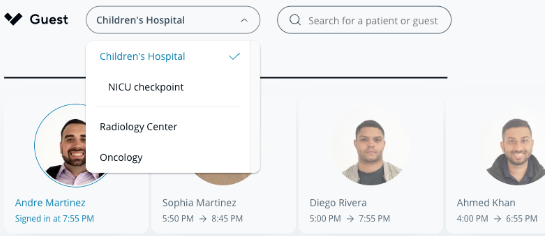
〜から [ヘルスケアポータルから、](https://command.verkada.com/healthcare) Guest ユーザーは、サインインし、患者および部署の来訪者の詳細なログを確認し、患者を閲覧できます。Guest ユーザーは、ロケーションメニューからサイトとチェックポイントを切り替えられます:
### タブレットを接続する
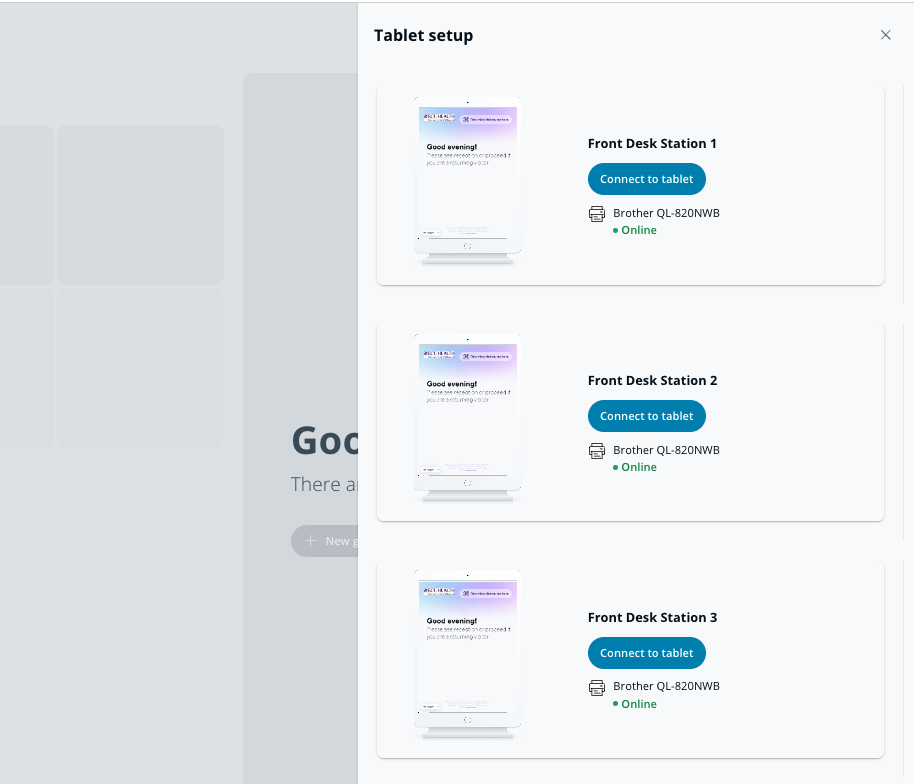
来訪者をサインインさせるには、Guest ユーザーはヘルスケアポータルからタブレットに接続する必要があります。
{% hint style="danger" %}
ヘルスケアポータルに接続する前に、タブレットをサイトに追加する必要があります。
{% endhint %}
{% stepper %}
{% step %}
**〜へ移動** [**医療ポータル**](https://command.verkada.com/healthcare)**.**
{% endstep %}
{% step %}
**右上のタブレットボタンをクリックします**
{% endstep %}
{% step %}
**目的のタブレットを選択します。**
{% endstep %}
{% endstepper %}
{% hint style="warning" %}
一度にタブレットに接続できる Guest ユーザーは 1 人だけです。
{% endhint %}
***
### 来訪者のサインイン
* Guest ユーザーは、次をクリックしてサインイン手続きを開始できます。 **新しいゲスト** 右上の
* Guest ユーザーは、ID をスキャンしたり連絡先情報を入力したりせずに未成年者をサインインできます。未成年者をサインインするには、右上のドロップダウンをクリックして次を選択します。 **未成年者をサインイン**.
参照 [入院患者の来訪者サインイン](/guest/ja/yi-liao-ji-guan/inpatient-visitor-sign-in.md) 詳細については。
### 検索
Guest ユーザーは検索バーを使って、1 つのサイト内で次の種類の人物を検索できます:
* 現在の来訪者
* 以前の来訪者
* 現在の患者
来訪者は名前で検索できます。患者は名前または部屋番号で検索できます。機密患者は名前または部屋番号で検索でき、プライバシー保護のため検索結果では名前がぼかされます。
### 患者プロフィールを確認する
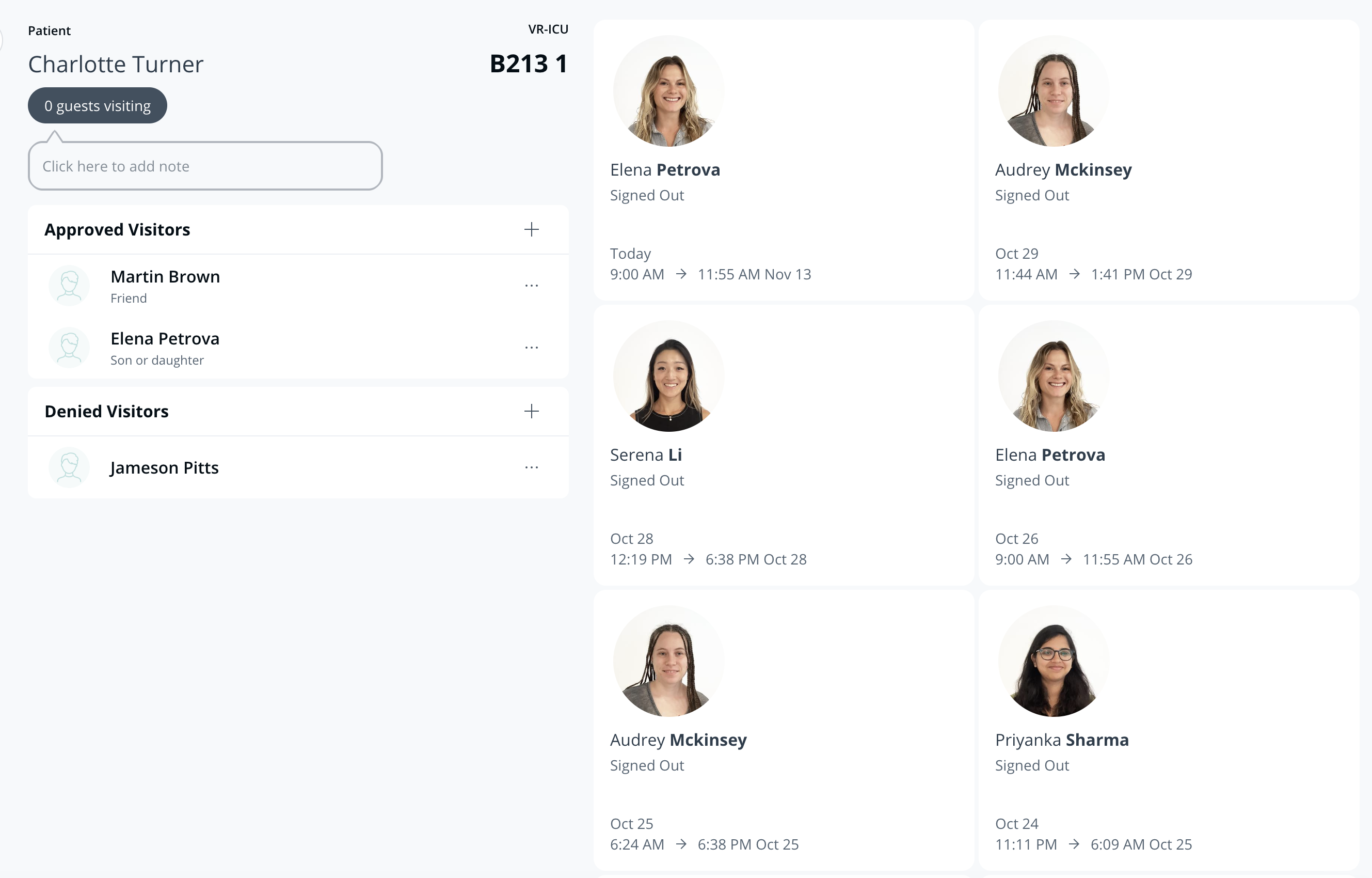
現在の患者には、位置、現在の来訪者数、すべての来訪者の一覧を表示するヘルスケアポータル内のプロフィールがあります。
患者ごとの許可済みおよび拒否済みの来訪者リストは、患者プロフィールで管理できます。機密プロフィールでは、プライバシー保護のため患者名がぼかされます。
***
{% hint style="info" %}
**実際の動きを見ますか?** こちらをチェック [ビデオチュートリアル](https://www.youtube.com/watch?v=0D4soV-y7VE).
{% endhint %}
---
# Agent Instructions
This documentation is published with GitBook. GitBook is the documentation platform designed so that both humans and AI agents can read, navigate, and reason over technical content effectively. Learn more at gitbook.com.
## Querying This Documentation
If you need additional information that is not directly available in this page, you can query the documentation by asking a question.
Perform an HTTP GET request on the following URL with the `ask` and `goal` query parameters:
```
GET https://help.verkada.com/guest/ja/yi-liao-ji-guan/use-the-guest-healthcare-portal.md?ask=&goal=
```
`ask` is the immediate question: it should be specific, self-contained, and written in natural language.
`goal` is what the user is ultimately trying to achieve, the reason they need the answer. Sharing it helps GitBook give you a better, more relevant answer. A goal is most helpful when it describes the outcome the user wants rather than restating the question. For example, with `ask=how do I create an API token`, a goal like `automate deployments from our CI pipeline` lets GitBook tailor the answer to that use case.
The response will contain a direct answer to the question and relevant excerpts and sources from the documentation.
Use this mechanism when the answer is not explicitly present in the current page, you need clarification or additional context, or you want to retrieve related documentation sections.